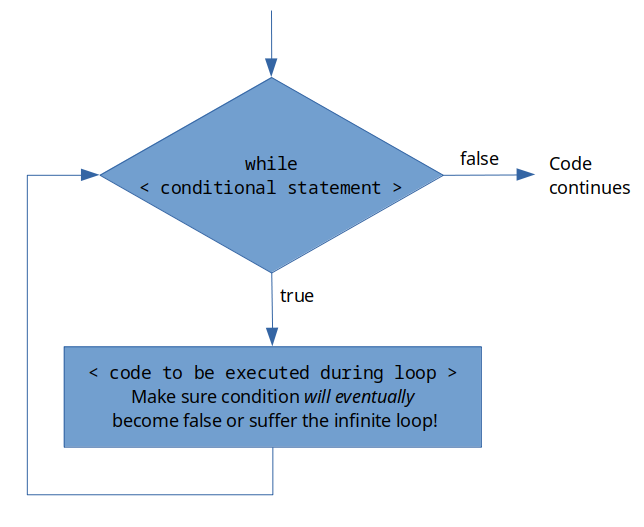
It is vitally important that your while loop conditional expression is made false at some point during the execution of the loop. If it is not made false, you get an infinite loop.
You can think of while loops as over-eager dogs. They will run themselves to death unless you tell them to stop. The way that you tell a while loop to stop is to make sure that at some point in the loop, the initial conditional expression becomes false.
The beauty of while loops is that you can ensure that your code repeats itself until a specific condition is met. However, while loops should only be used in instances where you do not already know how many times the loop needs to be run.
To see an instance where a while loop is necessary, let’s consider the case of the Maclaurin series expansion of \(sin(x)\) one last time. In this case, let’s flip the question a little bit. Let’s say that the new question is, you want to know how many terms of the Maclaurin series are necessary to get an estimation of \(sin(x)\) that is 99% accurate.
We know from the Maclaurin series that if we keep adding terms, the estimation will get more and more accurate. We also know that we need an infinite number of terms to make the answer infinitely accurate. But how many terms are necessary to get our estimation of \(sin(x)\) to be 99% accurate? It will depend on the \(x\) that the user specifies but it actually might not take as many terms as you might think it does.
It is actually easier to use the error rather than accuracy. The formula for percent error is \(\frac{(true-approximate)}{true}*100\text{.}\) So 99% accurate would be less than 1% error.
Use the built-in MATLAB function sin() to get a “true” value for \(sin(x)\text{.}\) Even though it isn’t 100% accurate, it is close enough for our purposes.
I am not going to lie, I think that this is a pretty difficult problem. But we are here to work out our brains and difficult problems are our opportunity to show off our strength!
Test- Compare your MATLAB solution to your solution by hand (it won’t take as many terms as you think!). Try with different x values and make sure that it is robust and it works.
The code solution to the problem is shown below in example 15.5.4 Make sure that you give it an honest try before looking at the solution though! Do not skip your brain workouts, you will only cheat yourself.
Using your script (or the solution shown in Figure 14.13), how many terms are necessary to achieve better than 99% accuracy when using the Maclaurin series expansion for \(\sin(x)\) when estimating \(x=1.874\) radians?