Section 14.3 MATLAB if-else-end Statements
There are instances when writing computer programs where it is beneficial to make decisions that will run one set of instructions if the conditional statement is true, and it will run a different set of instructions if the conditional statement is false. This is called an
if-else-end statement.
Generically, an
if-else-end statement looks like this:
if < conditional expression is true >
< do this stuff >
else
< do other stuff >
end
Breaking this down:
-
Notice that it is almost identical to the
if-endstatement with the exception that there is an else keyword. -
In this case, we have created two different branches. The
< do this stuff >runs only if the conditional statement is true. Conversely, the< do other stuff >will only run if the conditional statement is false. In this case, it is not possible to run both< do this stuff >and< do other stuff >.
The generic flowchart for an if-else-end statement can be seen in figure 14.3.1 below.
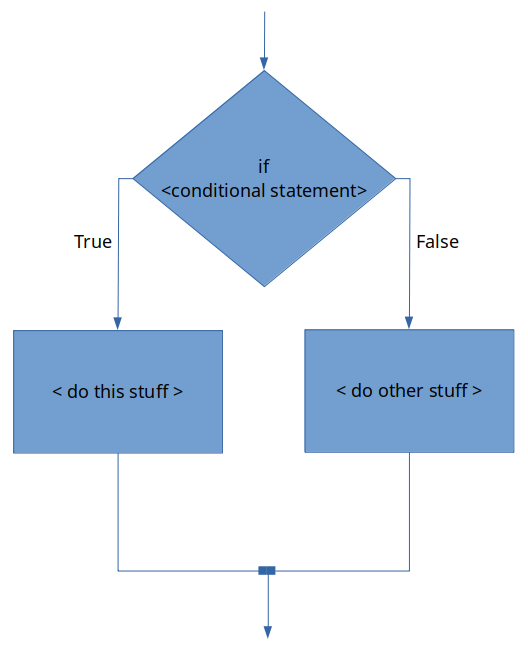
if-else-end statement.You can see that the flowchart for an if-else-end statement is almost identical to an if-end statement, with the exception that an if-else-end statement can have two independent code blocks. Only one of the code blocks will be run depending on if the conditional statement evaluates as true or false.
Another thing to remember is that although our conditional statement was fairly simple in our wage example, conditional statements can be complex! For example, try this problem.

