As mentioned above, a MATLAB function is very similar to a mathematical function. You have already been using MATLAB functions throughout this book! I have been careful to distinguish functions from other bits of code by appending a set of parenthesis on the end whenever we are discussing functions (i.e. sin()). Let’s investigate a few MATLAB built-in functions to understand how functions work:
It is worth taking a moment and reading the help text for the 3 functions listed above. To do so, open MATLAB and type in help function_name into the command window. You should replace function_name with the function of interest (e.g. help max). You do not need to memorize anything but go ahead and read through the help texts to get an idea of how they work.
The sin() function is perhaps the easiest to understand because you are likely already familiar with trigonometric functions. The sin() function takes an input, angle in radians, and returns an output, the ratio of the length of the side of a right triangle that is opposite that angle to the length of the longest side of the triangle.
Now the real question is, how does MATLAB calculate that ratio? Well, MATLAB engineers have created thousands of numerical algorithms stored in functions that they supply with the product. This brings us to the central idea behind functions: functions exist to make it easy to run snippets of code with different inputs.
An example would be the sine trigonometric function. Most engineers and scientists do not want to have to program the algorithm that calculates the sine of an angle every time they need to calculate sine. That is too much work! So you can create a function that calculates the sine of an angle, name it something that makes sense (in this case sin()), and allow it to work for any input!
When you try this example, you should notice that the value stored in the variable average is 4.8, the mean of the array! Keep in mind that you could have used a few different functions to calculate the exact same value. Recall: (\(average=\frac{sum}/{count}\)). Therefore:
Again give it a shot. You will notice that the value in avg is the same as avg_long_way which is unsurprising. However, you can imagine that if you had to constantly type out the long way, it would get tedious. The other thing to consider is that sum() and length() are functions themselves! Take those away and this problem of calculating a mean gets really complicated.
The key concept here is that functions make your code easier to read and easier to type. So when you have an algorithm that is likely to get run over and over again, it is a good idea to make a function for it!
Next up, lets consider the built-in function max(). This particular function is interesting because of its flexibility. The function accepts an array as an input and returns the maximum value in that array as its output. That in itself is cool, but not that exciting (hopefully you read the help text for max() and know where this is going). The exciting part is that max() can optionally return the index where the maximum value is located within the array!
Look at your workspace now. Notice that it created two new variables, one called maximum that has the number 9 stored in. The execution of that code also created a new variable, index with the number 1 stored in it. The 9 is the biggest number in the array, and the 1 is the index of where the number is located.
You can require any number of inputs. For example, you can require your user to specify at least one array, or you can say that a minimum of two arrays is required, etc.
The only output that is not optional is the first output. All other outputs from a function are optional. That means that you can not force your user to accept two outputs from your function. This is an important thing to consider when designing your own functions.
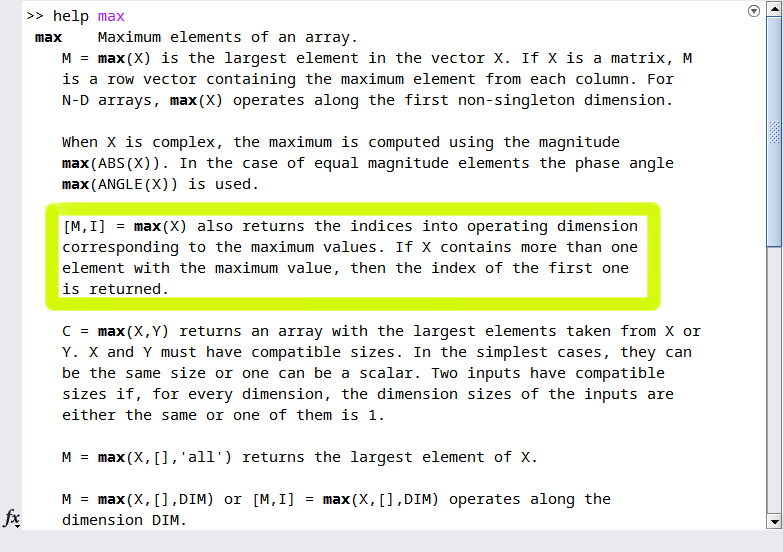
Let’s continue with the max() function to investigate our next key concept. If you have been doing your brain workouts, you read through the max() help text. See figure 16.1.5 below, specifically the highlighted region.
Notice how well this function is described! It shows an example of how to use the function ([M,I] = max(X)) and gives a nice description of how it works.
The second key concept is that well-written help text is critical to writing a good function. If the documentation for this function was poorly written or confusing, no one would use it!
A good function is one that is well documented, not only for your users but for yourself! Variable names and algorithms always make sense when you are working on them, but when you put them down for a while, you need good documentation to ensure that your code is still usable.