This is the first chapter in this book where we will learn how to use a computer software package (in subsequent chapters we will learn about MATLAB and other tools). It is assumed that you have access to Microsoft Excel. Luckily for you, most Universities give the entire Microsoft Office suite free to their students. If you do not have Microsoft Excel, you can use a free alternative such as LibreOffice. Most everything will be the same as Microsoft Excel.
Before we dive into Excel, I think it is necessary to remind you of how I expect you to approach learning this material. The key to learning how to use software is to roll up your sleeves and get your hands dirty (proverbially). What I am trying to say is that just reading about Excel (or any software package really) is insufficient for learning Excel. What you really need to do is open up Microsoft Excel, and follow along with the material as you are reading about it. Reading alone will not be enough to help you learn how to use it. For example, if you are reading about how to enter data into cells in Excel, you need to take a minute to practice that and actually enter data into cells in Excel.
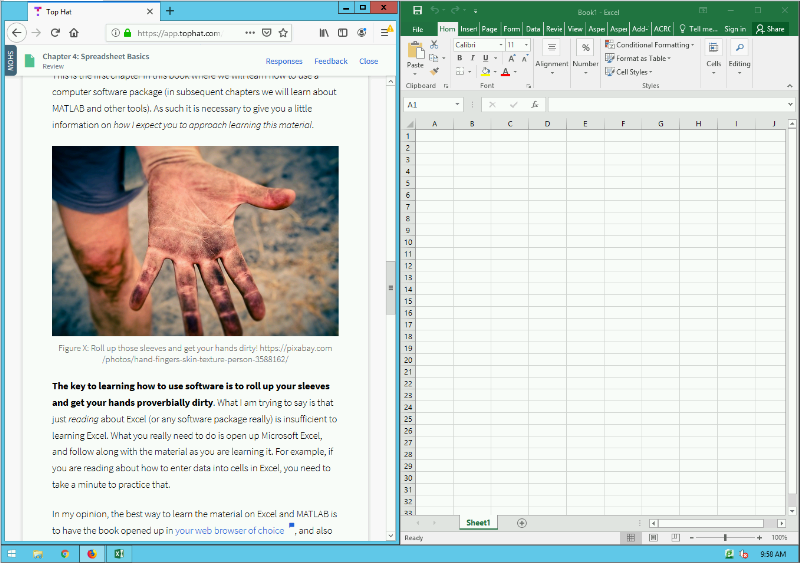
In my opinion, the best way to learn the material on Excel and MATLAB is to have the book opened up in your web browser of choice, and also have the software package of interest opened up beside it (Figure 5.1.3 below). That way you can read and practice simultaneously.
Remember, learning is working out your brain muscles. Some of you are stronger than others in certain areas. For example, maybe your Excel brain muscle is very strong because you have worked it out a lot in High School. Then you don’t need to put as much time into the mental gym (i.e. practicing Excel) because you are already strong! Others of you have never used Excel and will need to put a LOT of time in the mental gym to get up to speed. That is okay too! The point is, that you need to figure out how much you need to practice so that you are successful. See how all the “you” are bolded in that previous statement? That is because learning is an individual effort and you should never compare yourself to others, just worry about your own learning. Do not skip your brain workouts if you want to build brain muscle!
The last thing I want to mention about learning is that you also need to go beyond this textbook. Spend time playing around with the software package on your own. Find ways to use it for other classes or projects even if it is a little contrived. You can use it to help keep track of your monthly budget or weekly schedule. You can even use it for something fun you do personally like keeping track of football scores, hikes you’ve completed, or surprise songs at a concert. Watch YouTube videos on Microsoft Excel if you need to. There is even a world of competition! Maybe you could join or start your own university Excel e-sportsteam. Do whatever it takes so that you learn the material. With all that said, let’s jump in…