Section 13.1 Relational Operators
Before we can start creating programs that can make decisions we have to learn the framework to have our programs start comparing entities. That is where the relational operators come in. The relational operators look the same as math inequalities and they work in a similar fashion. The difference is, with math you are typically looking to “solve” the inequality, when we use the relational operators, we are simply interested if the operation is True or False.
For example, consider the following:
\(7+2>8\)
Does it evaluate to True or False? Well since \(7+2=9\) and \(9>8\) this particular statement evaluated to True! We will learn how this helps our programs make decisions in the sections below. For now, the important thing is to understand what the relational operators are (figure 13.1.1 below) and how they are used in MATLAB.
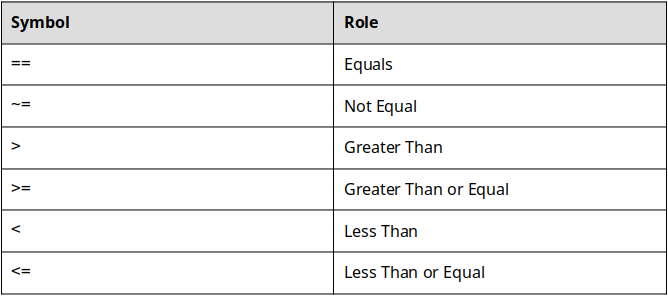
The relational operators can be used to compare variables, combinations of variables and numbers, or even mathematical operations. The important thing to remember is that when the operation is completed, either True or False comes out.
The only ones that might not seem intuitive are
== and ~= but again, they are very similar. For example, consider the following:
4==4
Since 4 does in fact equal 4, the preceding statement equals True. Nothing groundbreaking here. Let’s consider one more:
4~=4
In figure 13.1.1 above you can see that the ~= operator is the not equal operator. In this case, 4 does equal 4 so the statement 4 is not equal to 4 is False.

