Section15.1Maclaurin Expansion of \(sin(x)\) - A Tedious Example
Let’s start this discussion by looking at a real-world example (this one comes from the world of numerical methods, a crucial mechanical engineering course you will soon take!). We will be using this one particular example for a considerable percentage of this chapter.
Recall, this is saying that we can represent \(sin(x)\) as an infinite polynomial and it will equal \(sin(x)\) exactly as long as we have an \(\infty\) number of terms.
Let’s consider the case where we need to approximate \(sin(x)\) with MATLAB and we decide to use the Maclaurin expansion to do so. Clearly, we can’t do an \(\infty\) number of terms, that would take an \(\infty\) amount of time! Instead, let’s truncate the expansion to 3 terms and see if it is good enough.
Well, we can be sure that it will be more accurate but it is clear that the more terms that we add, the more tedious this process becomes. Imagine increasing our estimate to 20 terms! Whenever a process is tedious and repetitive, it is a perfect candidate to have a computer do it. In order for a computer to do it though, we need to transfer this process into an algorithm that can solve this problem for an arbitrary (n) number of terms.
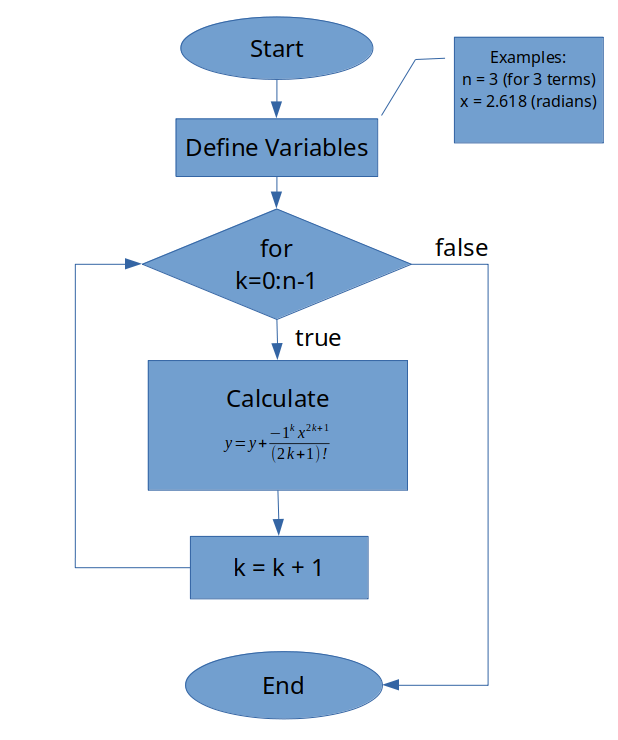
SKETCH - I will trust that you spent a minute thinking about the problem and making sure that you understand all the moving pieces. You wouldn’t skip a brain workout, would you? The next step is to sketch.
Before you move on and look at my flowchart, can you create pseudocode or draw a flowchart that can algorithmically solve this problem for an arbitrary (n) number of terms? It might be good to review what we learned in the thinking algorithmically chapter if you have not done so already.
We have now successfully completed the think and sketch stages of our process. In order to continue with the next step, code, we need to learn how to program these types of structures into MATLAB. Let’s take a break from this particular problem and investigate how to program the necessary functionality into MATLAB.