Previously, we just saw how we can use an if-else-end statement to essentially create two blocks of code that can be run independently depending on the outcome of the conditional statement. There is another MATLAB conditional structure that is even more flexible and actually allows you to have however many independent code blocks you would like. The if-elseif-else-end statement allows this.
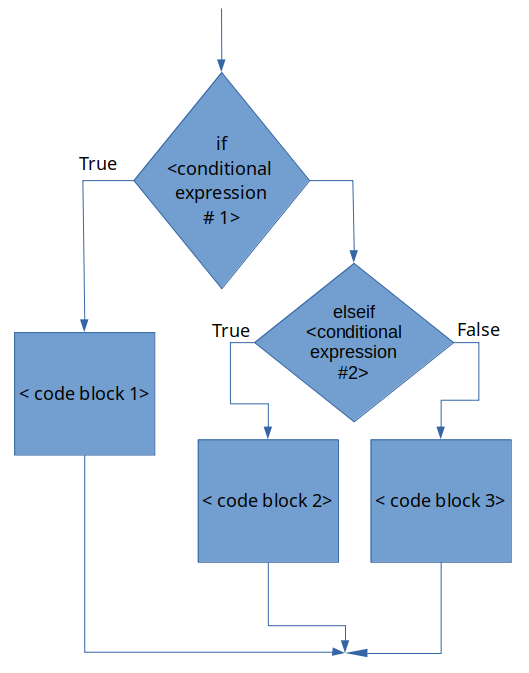
Technically, the else is optional in an if-elseif-else-end statement. If you look at the flowchart in figure 14.4.1 below, omitting the final else would be equivalent to chopping off the < code block 3 > chunk of code.
In this generic example there is only one elseif statement with a corresponding conditional expression. However, MATLAB lets you have however many elseif statements that you need.
Note that because of the logic of the statement, you only need 2 conditions to run 3 separate blocks of code. In general, when designing an if-elseif-else-end statement that has ( n ) different conditions, you need ( n−1 ) conditional statements.
The generic if-elseif-else-end flowchart is shown below in figure 14.4.1. Again, keep in mind it can have any number of elseif < conditional expression > lines!
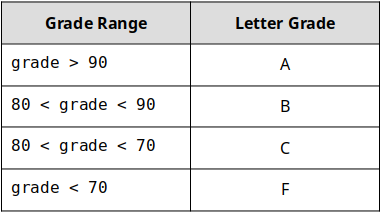
I think that it is important to clarify the statement “when you have ( n ) different conditions, you need ( n−1 ) conditional statements”. To do so, let’s consider an example. Let’s say that we have a variable grade that contains the final numeric grade for a person in a class. Furthermore, let’s say that this hypothetical class does not have + or - grades, instead, the final letter grade is calculated as follows:
The problem is to create a MATLAB script that can take the numeric grade as a variable grade, determine the letter grade associated with it, and store that in a variable called letter_grade.
This may seem contrived because, in this particular example, we will only have 1 grade but in the next chapter, we will learn techniques that will allow us to analyze any number of grades in the same fashion. What we are working on now will be the bones of that future algorithm!
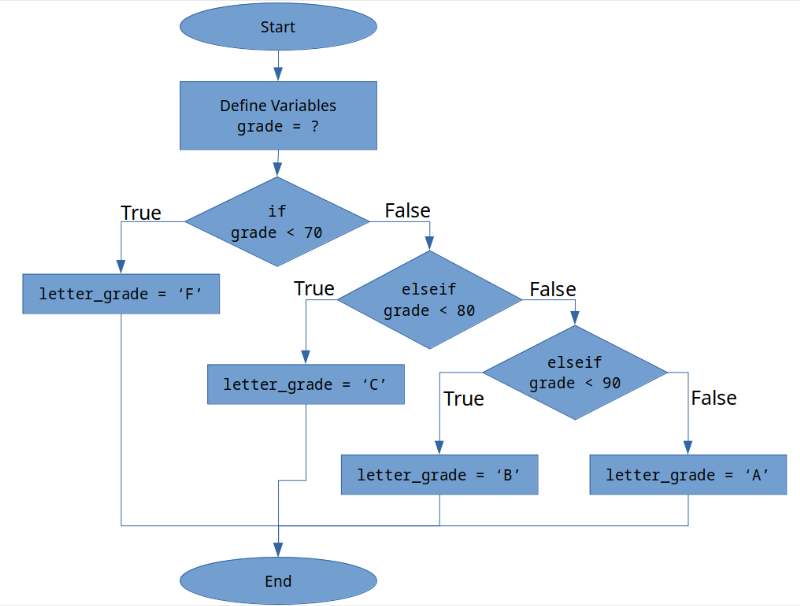
Think and Sketch - we can see that we have 4 different categories of grades. That means that ( n=4 ) (the grade can be an A, B, C, or F). Before you continue, can you create the flowchart necessary to complete this script? Take your time. I am hoping that by thinking and sketching it will be obvious why you only need ( n–1 = 3 ) conditional statements.
If you are feeling like a tough workout today, go ahead and try to program this script on your own. Go you! If your brain is too tired from that it is OK, but don’t skip the flowchart part.
Do you notice how my flow chart only has three conditional statements? THAT is what I meant by ( n ) conditions requires ( n–1 ) conditional statements. Here is the logic:
Now is your chance to try and do the code, test, and repeat part of our process on your own to finish the problem! Even if you can’t get it working perfectly, take some time and give it your best shot! Make sure you have a pen and paper handy and jot down notes, ideas, and snippets of code as you are working. You got this!