Section 9.2 Nodes, Topics, and Messages (.msg)

Now that you understand why ROS 2 uses middleware to connect separate processes, let’s look at the three building blocks that make up the ROS 2 Computation Graph in practice: nodes, topics, and messages.

Subsection 9.2.1 Nodes: Single-Purpose Workers

A Node is a modular process designed to perform a single computational task. Keeping nodes focused makes system design modular and reusable. For instance, a self-driving car might have:
  • A lidar_driver_node responsible solely for receiving raw laser data.
  • A planner_node responsible for mapping a path.
  • A motor_driver_node responsible for pushing PWM signals to physical motors.
Figure 9.2.1. A camera driver node publishes images on a topic that a pedestrian detector node receives.

Subsection 9.2.2 Topics: The Publish-Subscribe Pattern

Nodes exchange data using a Publish-Subscribe (Pub/Sub) model:
  • A Publisher node produces data and broadcasts it over a specific Topic.
  • A Subscriber node listens to a Topic and receives data whenever a new message is published.
  • Communication is anonymous: publishers don’t know who is listening, and subscribers don’t know who generated the data.
Real-World Example: Consider a warehouse mobile robot (like an AMR in a fulfillment center).
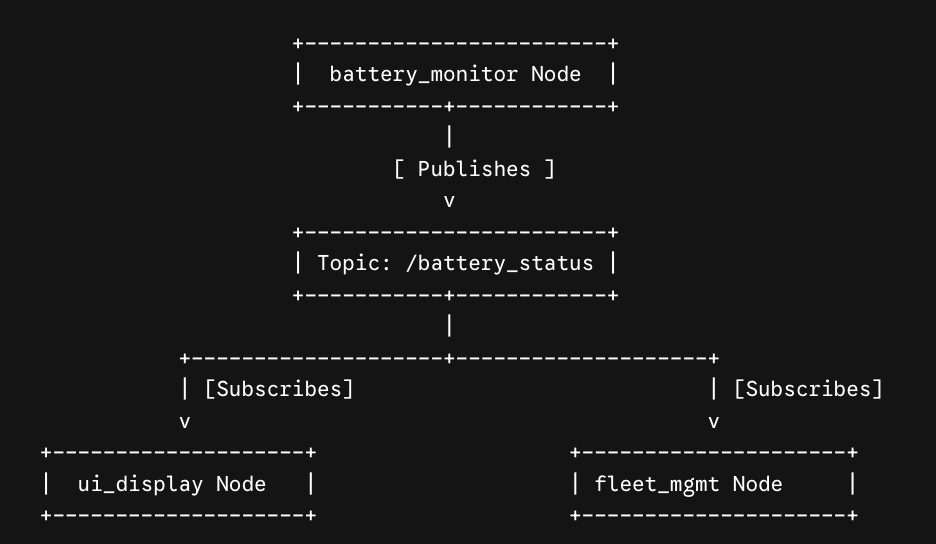
  • The battery_monitor node continuously publishes state-of-charge data to the /battery_status topic.
  • Both the ui_display node on the robot’s screen and the fleet_management node on a cloud server subscribe to /battery_status. The battery monitor node doesn’t care who is listening; it just publishes the data!
The battery_monitor node publishes onto the /battery_status topic, and both the ui_display node and the fleet_mgmt node subscribe independently to that same topicβ€”neither subscriber needs to know the other exists.
Figure 9.2.2. Multiple subscriber nodes can independently receive data published to the same ROS 2 topic.

Subsection 9.2.3 Messages (.msg files)

Data sent over topics must follow a structured contract known as a ROS 2 Message (.msg). A message definition lists field types and field names.
For example, a custom sensor payload message (SensorPayload.msg) might look like this:
int32 sensor_id
float64 temperature
float64 humidity
string status
ROS 2 provides built-in primitive types (int32, float64, string, bool) as well as complex multi-field messages (such as geometry_msgs/msg/Twist, used to command linear and angular velocity for mobile robots).

Subsection 9.2.4 Section 9.2 Interactive Exercises

Subsubsection 9.2.4.1 Exercise 9.2.1: ActiveCode Exercise β€” Python Parsing

Because Runestone CodeLens runs standard Python without third-party ROS libraries installed, let’s practice how ROS message deserialization works under the hood!
Write a Python script that parses incoming raw text payload strings (simulating a stream of message packets over a ROS topic) and extracts key sensor fields.
Task: Parse the incoming string format "ID:<id_num>;TEMP:<temp_val>;STATUS:<status_str>" and print the extracted values.

Subsubsection 9.2.4.2 Exercise 9.2.2: Parsons Problem β€” Python ROS 2 Node Creation Sequence

Put the standard lines of a minimal rclpy subscriber node setup in the correct order.

Checkpoint 9.2.3.

Arrange the blocks to form a minimal rclpy subscriber node: initialize the client library, create the node, create the subscription, spin, then shut down.

You have attempted of activities on this page.