Arrange the steps in the order a VEX AI vision system performs them, from capturing the raw frame to computing a target’s center location.
Section 6.2 Introduction to Image Processing
Before feeding camera feeds into complex AI models or path planners, a robot must clean, isolate, and interpret raw visual data. Raw camera frames contain millions of numbers—most of which represent background noise like shadows, sunlight glares, or arena floor tiles. Image processing provides the fundamental tools to isolate the exact visual features a robot needs to act.
Subsection 6.2.1 Images as Pixel Grids & Color Spaces
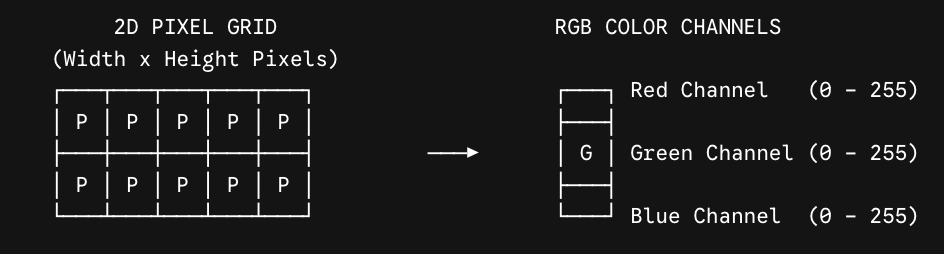
To a human, a camera photo shows an arena, a game piece, or a warehouse aisle. To a robot’s onboard processor, an image is simply a giant 2D grid (matrix) of numerical values called pixels.
Picture that grid running from the top-left corner \((0, 0)\) down to the bottom-right corner \((\text{Width}, \text{Height})\text{.}\) Each cell in the grid holds a triplet of numbers—for example, a pixel with values \([200, 45, 30]\) has a notably high red channel value (200), marking it as a strongly red pixel compared to its neighbors.
Subsubsection 6.2.1.1 Understanding Color Spaces: RGB vs. HSV
Robots interpret color using different mathematical representations, known as color spaces:
-
RGB (Red, Green, Blue):Digital camera sensors capture light using three overlapping color channels: Red, Green, and Blue. Each pixel contains three numbers representing channel intensities (typically ranging from 0 to 255).The Problem in Robotics: RGB is very sensitive to environmental lighting changes. If a spotlight turns on or a shadow falls across a red game ring, its raw RGB values change dramatically, causing the robot to "lose sight" of the object.
-
HSV (Hue, Saturation, Value):To solve the lighting issue, robotics vision systems often convert RGB images into HSV:
-
Hue (\(H\)): Represents the pure color type (e.g., Red, Green, Yellow) regardless of brightness.
-
Saturation (\(S\)): Represents how vivid or washed-out the color is.
-
Value (\(V\)): Represents how bright or dark the pixel is.
Why Robots Prefer HSV: Because Hue isolates the actual color from the brightness (\(V\)), a robot using HSV can track a red game piece under harsh venue spotlights, dim stadium shadows, or natural window light without needing code changes! -
The two models split from a common root, Color Representation. The RGB Model (Red, Green, Blue) is sensitive to shadows and lighting—a pixel like \([200, 30, 20]\) can shift dramatically as light changes. The HSV Model (Hue, Saturation, Value) instead isolates color (Hue) from brightness (Value), which is why it is the ideal choice for robotics.
Use the simulator below to compare how fixed RGB thresholds and HSV thresholds respond as environmental lighting changes.
How to test the failure mode:
-
Open the file in your browser.
-
Under default lighting (100%), both RGB and HSV successfully detect the red ring.
-
Increase the Environmental Lighting slider to 180% (simulating bright stadium lights or direct sunlight).
-
Observe: The RGB mask loses detection because the green and blue channels rise above
gMaxandbMax. Meanwhile, the HSV mask continues to detect the target reliably because Hue remains stable regardless of brightness.
Subsection 6.2.2 Color Thresholding & Binary Segmentation
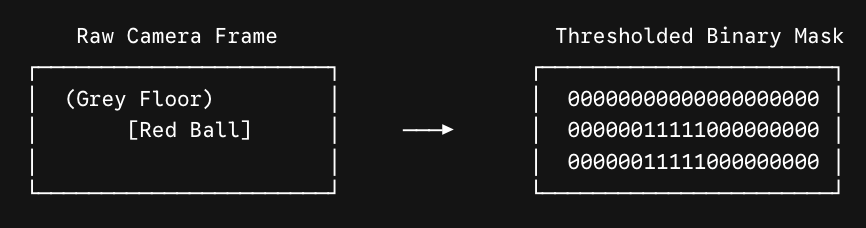
Color Thresholding (or Segmentation) is the process of converting a full-color camera frame into a simplified binary image (a grid composed only of 0s and 1s):
-
1 (Binary White): Target pixels that fall within specified color boundaries (the object of interest).
-
0 (Binary Black): Background pixels that fall outside the bounds (ignored environment).
Picture a raw color image containing a light red ring sitting on a dark shadowed floor. Passing each pixel through the question "Is pixel Hue within Red Range?" keeps the ring’s pixels as 1s and turns every floor pixel into a 0, producing a binary mask that marks exactly where the ring is and nothing else.
By filtering out non-essential background data, the robot reduces the amount of information it needs to process from millions of color values down to a simple target shape mask.
Subsection 6.2.3 Real-World Robotics Examples
Subsubsection 6.2.3.1 Industrial Inspection & Autonomous Agricultural Pickers
In automated recycling facilities or agricultural harvesting (like robotic apple or tomato pickers):
-
Color Segmentation: Cameras capture crop rows in real time. Thresholding filters out green leaves, brown stems, and dirt soil by isolating specific red/orange color hues.
-
Lighting Resilience: Using HSV color space ensures the agricultural arm can differentiate between a ripe red apple and surrounding foliage whether operating at sunrise or under direct noon sunlight.
Subsubsection 6.2.3.2 Warehouse Line-Following AMRs
Automated Guided Vehicles (AGVs) transporting pallets across factory floors often follow color-coded floor tape (e.g., bright yellow or reflective tape).
Thresholding Pipeline: The AGV’s downward-facing camera converts incoming video to a binary mask. By tracking the horizontal center of the white pixels (1s) representing the yellow tape, the robot continuously adjusts motor speeds to stay centered over the path.
Subsection 6.2.4 Competition Robotics Examples: VEX V5 & VEX AI
In high-stakes robotics competitions like the VEX Robotics Competition (VRC) and VEX AI Competition (VAIC), vision processing speed and reliability directly dictate match success.
-
Color Signatures (VEX V5 Vision Sensor):The standard V5 Vision Sensor allows students to configure custom "Color Signatures" (stored HSV color thresholds). During autonomous mode, the sensor scans the field for predefined signatures—such as Triballs, Red Rings, or Blue Rings.
-
Alliance Sorting (VEX AI / V5 Optical Sensor):Many competition robots build sorting mechanisms into their intake systems. As game pieces enter the robot’s conveyor, an optical/vision sensor checks the pixel color:
-
If the robot is on the Red Alliance and the sensor detects a Blue Ring (using Hue matching), the intake automatically activates a mechanical ejector flap to reject the opponent’s scoring element.
-
If it detects a Red Ring, the conveyor continues feeding the ring directly into the scoring mobile goal.
In this pipeline, an incoming ring passes under the Vision/Optical Sensor, which reads its color hue: if Blue (the opponent’s color), the eject flap trips; if Red (the robot’s own alliance), the ring feeds straight into the scorer. -
-
Rejecting Outdoor Arena Glare:Teams competing in venues with large windows often struggle when using standard RGB color matching because sunlight washes out game element colors. Switching to HSV thresholding allows VEX AI vision models to detect game pieces consistently regardless of shifting sunlight conditions across the field.
Subsection 6.2.5 Section 6.2 Interactive Exercises
Subsubsection 6.2.5.1 Exercise 6.2.2: ActiveCode Exercise — Pure Python Color Threshold Simulator
In this exercise, write a function that performs color thresholding on a row of pixel Hue values (\(0^\circ \ldots 360^\circ\)). The goal is to isolate a Red Ring in a VEX arena, where red hues fall within the range of \(340^\circ\) to \(360^\circ\) OR \(0^\circ\) to \(20^\circ\text{.}\)
Subsubsection 6.2.5.2 Exercise 6.2.3: Parsons Problem — Image Thresholding Pipeline Order
Reorder the steps below to represent the correct sequence of operations a VEX AI vision system takes to segment an image and isolate target game elements.
Checkpoint 6.2.3.
Reading Questions 6.2.6 Reading Questions
Check your understanding
1. Exercise 6.2.1: HSV vs. RGB Conceptual Check.
Why do competition robotics teams (like VEX AI teams) prefer configuring vision sensors using the HSV color space instead of the RGB color space?
-
HSV requires double the memory capacity, which makes the robot drive faster.
-
Incorrect. Memory capacity is unrelated to driving speed, and HSV is not chosen for memory reasons.
-
HSV separates color type (Hue) from lighting brightness (Value), allowing reliable object tracking under changing venue lights.
-
Correct! Because Hue isolates the actual color from brightness, a robot using HSV can keep tracking a target color even as lighting conditions change.
-
RGB cannot represent basic primary colors like red, blue, or green.
-
Incorrect. RGB represents primary colors directly through its Red, Green, and Blue channels.
-
RGB only works on black-and-white images, whereas HSV works on color images.
-
Incorrect. RGB is itself a color representation; both RGB and HSV describe color images.
You have attempted of activities on this page.

