The Internet has had a huge impact on society, enabling people to communicate, share information, and access services, while transforming businesses through e-commerce in ways that were not possible before the 1990s. But what is the Internet? Many people don’t know what the Internet is or how it works! In this topic, you will learn how the Internet works, how network devices communicate, and how the internet is designed to be fault-tolerant so that it can continue to function even when some devices or connections fail.
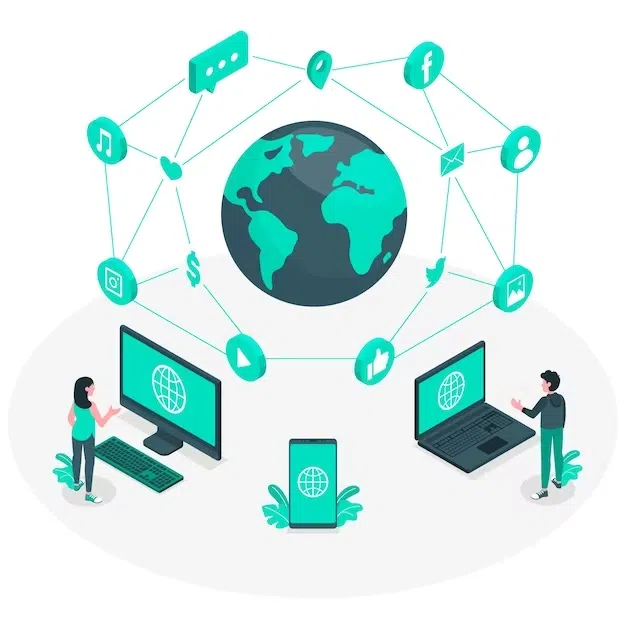
The Internet is a global network of networks that connects millions of devices worldwide, enabling them to communicate and share information through standardized communication protocols.
What do we mean by a network of networks? There are a lot of smaller networks that are connected together to make up the Internet. For example, your home Wi-Fi network is a small network that connects your devices like phones, tablets, computers, and printers to each other and to the Internet using an Internet Service Provider (ISP) like Comcast or Verizon. Your school or workplace has a larger network that connects many devices together and to the Internet. A computer network is a group of interconnected computing devices that communicate by sending and receiving data and form a computing system that works together to accomplish a shared purpose.
Devices access the Internet by connecting to a local network (like home or school Wi-Fi) or directly to a cellular provider’s network. In both cases, the connection is carried by an Internet service provider (ISP) to the broader Internet.
A networked computing device, such as a computer, tablet, server, router, or smart sensor, is a physical artifact that can run programs and can send and/or receive data over a network.
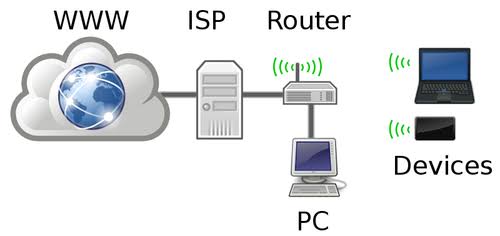
Take a look at the network diagram below of a simple home network. Does your house have a black box with an antenna that provides Wi-Fi access in your home? This is a router which is a device that connects your home network to the Internet through your ISP. It can use radio waves for wifi (wireless) access or cables to connect devices together. Through the Internet, you can connect to web servers that host websites and other devices around the world.
A computer network is a group of interconnected computing devices that communicate by sending and receiving data. It is a type of computing system because multiple devices coordinate to exchange data and provide services.
A computing system is a group of computing devices and programs that work together to accomplish a shared purpose. A messaging service may rely on an app on a phone, a Wi-Fi router, and cloud servers working together to send and receive messages.
The ISP provides a connection between the school’s network and other networks on the Internet.
Correct! An Internet Service Provider (ISP) provides the connection that allows the school’s network to communicate with other networks on the Internet.
The ISP becomes the owner of the school’s computers.
No, the school owns and manages its computers. The ISP provides Internet connectivity.
The ISP stores all the information that students access.
No, information is stored on servers distributed across the Internet. The ISP provides the connection that allows students to access that information.
The ISP replaces the need for routers.
No, routers are still needed to direct data between the school’s local network and other networks.
The Internet was designed to be scalable, meaning it can expand over time to meet demand. Scalability is a system’s ability to grow or change to meet new demands, such as more users, more devices, or higher traffic, while continuing to function efficiently and reliably.
A company adds 500 computers to its existing network. Which characteristic of the Internet’s design makes it possible for networks to grow and connect additional devices?
No, the Internet is decentralized. Its design does not depend on a single central system controlling all connected devices and networks.
Scalability
Correct! Scalability allows networks to grow by adding more devices and connecting additional networks without requiring the entire Internet to be redesigned.
Encryption
No, encryption protects information by making it unreadable to unauthorized users. It does not describe the ability of a network to grow.
Compression
No, compression reduces the size of data to make it more efficient to store or transmit. It does not describe network growth.
Create a network diagram like the one above showing at least 4 devices and connections in your home or school network. Make sure to include all the devices that connect to the Internet, such as computers, tablets, phones, smart TVs, and gaming consoles, as well as the router and the connection to your ISP. You can draw this on paper and take a picture or use a diagramming tool like app.diagrams.net (Click on More Shapes at the bottom left, scroll down to Networking, and choose Network 2025) or SmartDraw or Packet School Sandbox to create your diagram online and save a screenshot. Put your image or screenshot in google doc and share the link here.
The Internet uses a set of standardized protocols, or rules that devices follow to exchange data. For example, HTTP (Hypertext Transfer Protocol) is used to retrieve web pages formatted using HTML (HyperText Markup Language). IP (Internet Protocol) provides an addressing system of unique IP addresses for devices on the Internet. These protocols are nonproprietary, which means they are not owned or controlled by a single company, so that anyone can connect to the internet.
A protocol is an agreed-upon set of rules for communication, such as how data is formatted, sent, received, or acknowledged so different devices and networks can work together reliably.
Because Internet protocols are open and nonproprietary (not owned or controlled by a single company), devices and networks from different companies can communicate and exchange data. This makes widespread connectivity possible and allows new devices and networks to join the Internet without relying on proprietary systems (owned or controlled by one company).
Design a Protocol: In groups or individually, design a protocol for passing notes in class. The note can have 4 fields and separators: the date, the receiver’s name, the message, the sender’s name. Each group or person should choose a different order for these fields in their protocol and a way to separate the fields, such as a comma, a semicolon, or a space. Do not label the fields, just put the information in the order you choose, for example: "Apr 1, Jo, I like your shirt, Ava" or "Ava I like your shirt Jo Apr 1".
Using your protocol: Try sending a note to another person in your group using your protocol passing the note through at least two other people. Then, try sending a note to another group using your protocol passing the note through at least two other groups, but do not tell them your protocol. If you are working individually, imagine what would happen in these two scenarios.
If your school purchases computers from several different companies where each company uses its own proprietary communication protocols, what problems might occur when the computers try to communicate with one another on a network?
Why is it important for devices made by different companies to follow the same Internet protocols? How do nonproprietary protocols help make the Internet accessible and scalable?
Watch the following video to learn how data travels across the internet using electricity, light, and radio waves (wifi) and about bandwidth and latency which are measurements of internet performance.
Data sent across a network typically travels through multiple intermediate devices, such as switches and routers, before reaching its destination. A path from sender to receiver is the sequence of directly connected devices that the data follows from start to finish.
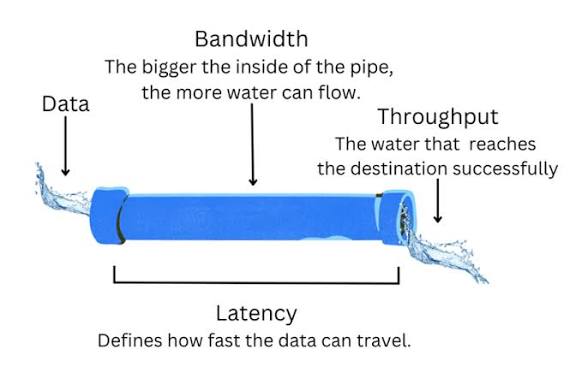
Bandwidth is the maximum amount of data that can be transmitted over a network connection in a given time period. It’s measured in bits per second (bps). You can imagine bandwidth as the width of a water pipe or the number of lanes on a highway. The more bandwidth you have, the more data can flow at the same time. This might be really important when you’re trying to stream a video or download a large file or play an online game.
Bandwidth commonly refers to the maximum rate at which data can be transmitted over a connection, usually measured in bits per second. More available bandwidth generally allows higher data rates. Higher data-rate bandwidth can support faster downloads and higher-quality streaming.
Latency is the time it takes for data to travel from one device to another across a network and is measured in milliseconds (ms). You can imagine latency as how long a single drop of water takes to travel from one end of a pipe to the other, or how long it takes a single car to drive down the highway. While we typically want high bandwidth, we want low latency, since less time means that it is faster. Low latency is important for real-time applications like video calls or online games.
Latency is the time it takes for data to travel from one device to another across a network. Latency is typically measured in milliseconds. High latency creates noticeable delays, like slow page loads, lag in video calls, or delayed responses in online games, even if bandwidth is high.
What are the download and upload speeds for your Internet connection? Note that these bandwidth measurements are in megabits per second (Mbps). If possible, measure the bandwidth at school and at home or on your phone. Are they different?
This speed test also provides a latency test using a utility called ping, which measures the round-trip time for a small packet to travel from your computer to a test server and for the response to return. The time is usually measured in milliseconds. What is the latency for your connection?
How does your download speed of your Internet connection compare to Global Speed Statistics? Is it faster or slower than the average download speed in your country? How does it compare to the top 3 countries with the highest speeds?
Have you ever tried loading a webpage or playing an online game and it was too slow? That can be frustrating. When designing an app that runs online, it’s important to consider the impact of network conditions on the user experience. If users have limited bandwidth or high latency because of congested networks or weak connections, the app might not run well. Some ways to design for these situations include reducing file sizes of images and videos and loading content in chunks.
Network conditions shape user experience. When bandwidth is limited, latency is high, or networks are congested, apps may lag, buffer, or fail to load. Developers design for these situations by reducing file sizes, loading content in chunks, saving progress, and showing clear status messages like "Loading..." or "Try again."
Understanding bandwidth, latency, and routing helps programmers design apps that stay usable under common situations such as crowded public Wi-Fi, weak cellular signals, or unreliable connections, so users can complete tasks reliably or receive clear feedback when connectivity prevents it.
How fast your computer can connect to the Internet.
No, bandwidth measures the capacity of a network connection, not simply how quickly a computer connects.
The average length of emails that you can send on a daily basis.
No, bandwidth is related to the amount of data that can be transmitted, not the length or number of emails.
The amount of time it takes to send data over the Internet.
No, this describes latency, which measures the time it takes for data to travel from one point to another.
The amount of data that can be sent in a fixed amount of time.
Correct! Bandwidth measures the maximum amount of data that can be transmitted over a network connection in a given amount of time, typically measured in bits per second (bps).
When you click on a link for a song or a video on the Internet, how does that song or video travel to your computer or phone? It’s too big to be sent all at once, so it is broken into smaller pieces called packets or data packets that travel across the Internet and are reassembled at the destination.
Data sent over the Internet is broken into smaller pieces called packets. Sending data as packets lets routers send each packet along available paths, and the receiving device reassembles the data at the destination, which improves efficiency.
Watch the following video to learn how the Internet uses packet routing to be fault-tolerant, meaning it can continue to function even when some devices or connections fail. Another fun but longer video is Warriors of the Net that animates a packet’s journey through the Internet or see this short 2-minute video about packets.
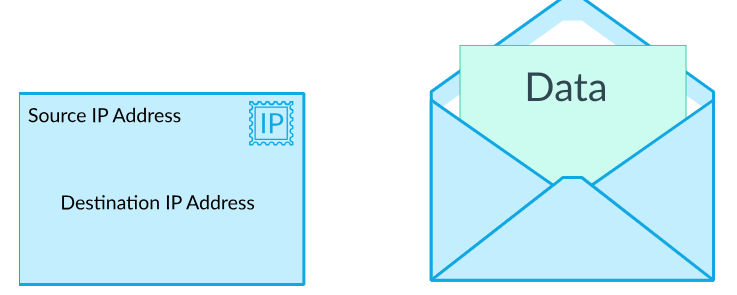
Packets contain data as well as metadata that provides information such as the packet’s origin and destination. The source and destination IP addresses are like mailing addresses on an envelope. Some protocols also include sequence information that lets the receiving device put data back in order and detect missing data. When needed, the protocol can request that missing data be sent again.
A packet contains a chunk of data (part of a message) and metadata (information such as where it came from and where it is going). This metadata helps networks route packets to the correct destination and may help the receiving device reassemble the original data.
Packets may arrive out of order, be delayed, or fail to arrive. Certain Internet protocols help handle these situations by organizing packets correctly and requesting missing data when needed.
Each packet contains data to be transmitted, along with metadata containing information used for routing the data.
Correct! Packets contain a portion of the original data along with metadata, such as addressing information, that helps routers forward the packet toward its destination.
Each packet contains an encrypted version of the data to be transmitted, along with metadata containing the key needed to decrypt the data.
No, packets do not necessarily contain encrypted data, and encryption keys are not generally included in packet metadata. Packets contain data and control information used for communication and routing.
Each packet contains only the metadata used to establish a direct connection so that the data can be transmitted.
No, packets contain actual data as well as metadata. The metadata helps direct the packet through the network.
Each packet contains multiple data files bundled together, along with metadata describing how to categorize each data file.
No, packets typically contain portions of a larger message or data transmission, not multiple complete files bundled together for categorization.
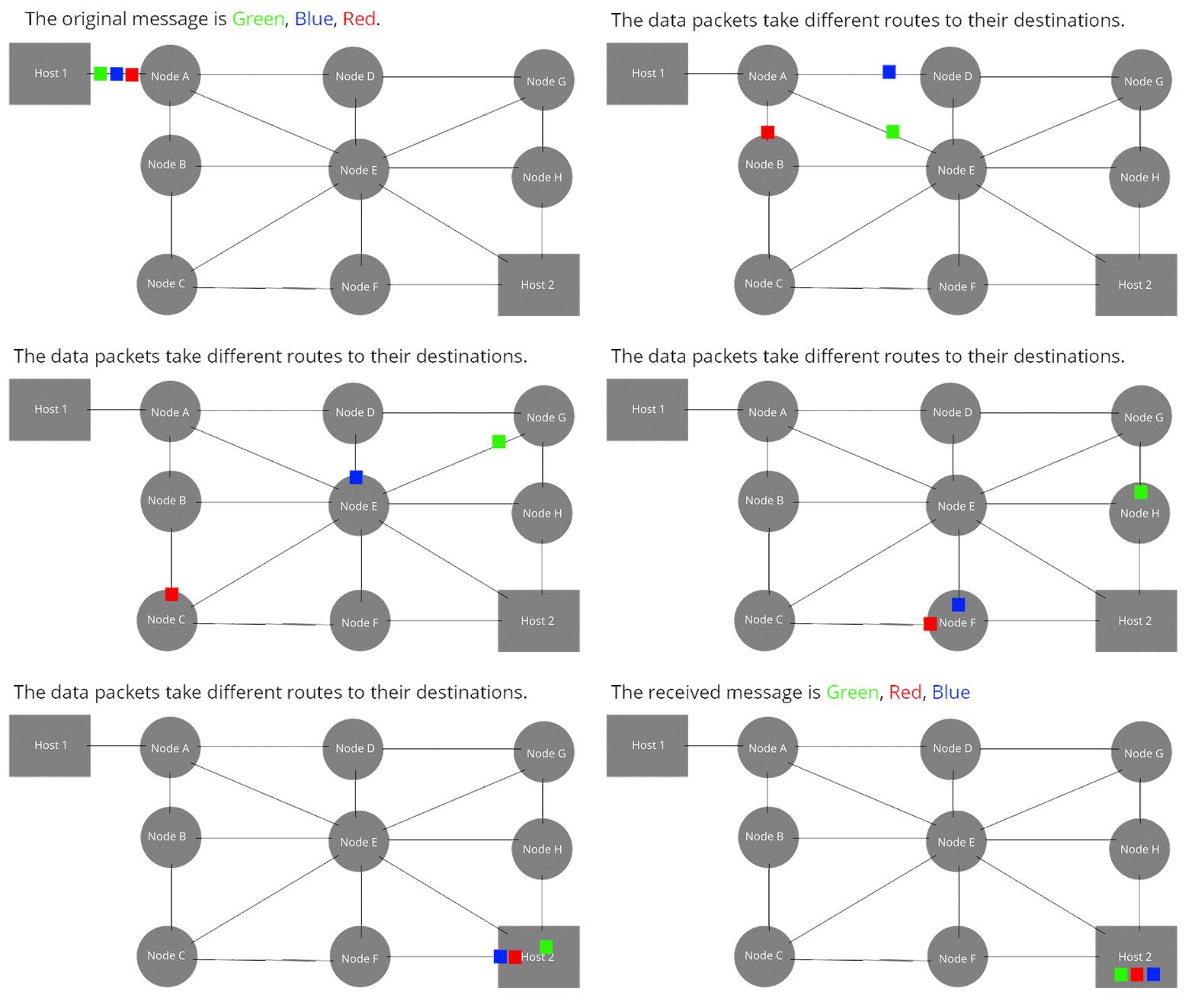
As seen in the animation below, packets can be routed through different paths to reach their destination. Selecting the paths is called packet routing. Using dynamic routing, the paths are chosen based on current network conditions at each moment.
Routing is the process of selecting a path for data to travel from a sender to a receiver. Routing on the Internet is usually dynamic, meaning data can take different paths when network conditions change, especially when links or devices fail or become unavailable.
Dynamic routing is the process of selecting a path for data to travel from a sender to a receiver based on current network conditions. Because data is sent as packets and routing is dynamic, packets can be redirected when a path fails. Redundant routes can allow the network to continue delivering data even if some devices or connections stop working.
True or False: All routes on the Internet are specified in advance and cannot change dynamically. Every packet of data sent over the Internet has only one possible route to reach its destination.
No, packets do not have to follow a single predetermined route. Routers can dynamically select different routes based on network conditions and available connections.
False
Correct! The Internet has multiple possible routes between devices. Routers can dynamically determine where to send packets, and different packets from the same message may travel along different routes.
The message is divided into packets that are routed individually over the Internet to the recipient’s email server.
Correct! Data sent over the Internet is divided into smaller packets. These packets are routed independently and may take different paths to reach their destination, where they are reassembled.
The message is placed into a single packet that is routed through the Internet to the recipient’s email server.
No, messages are typically divided into multiple packets rather than transmitted as one large packet.
The message is placed into a single packet that is routed through a dedicated communication channel to the recipient’s email server.
No, Internet communication generally uses packet routing rather than a dedicated communication channel reserved for the entire message.
The message is divided into packets that are routed through a dedicated communication channel to the recipient’s email server.
No, although messages are divided into packets, the Internet does not generally reserve a dedicated communication channel for each message. Packets are routed independently across shared network connections.
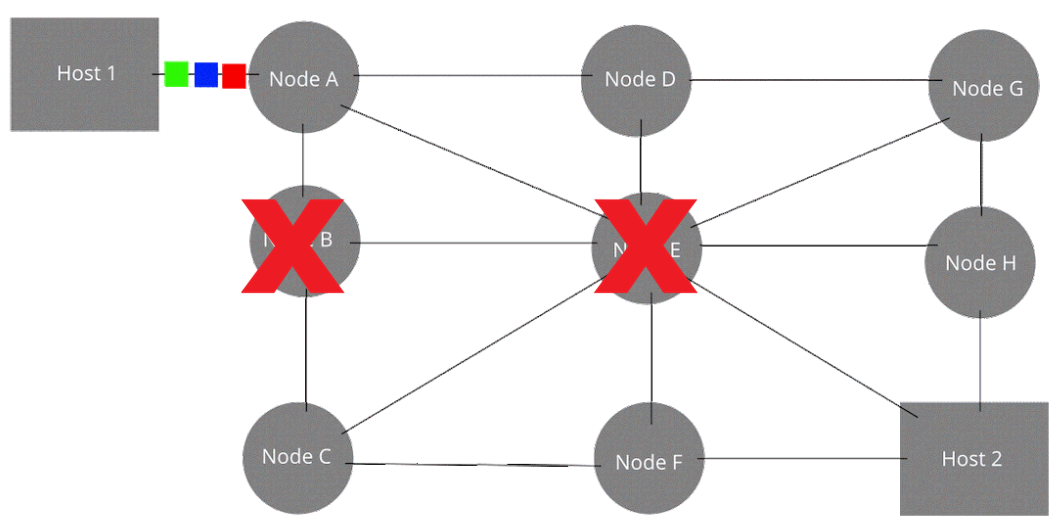
If a connection fails along one path, packets can be rerouted along a different path to reach the destination. These redundant or alternative paths make the Internet fault-tolerant, so that it can continue to function even when some devices or connections fail. For example, if device B and E below are both down, there is still another path that can be taken in the redundant network below.
The Internet is designed to be fault-tolerant, meaning it can continue to function even when some devices or connections fail. This matters because failures happen regularly, and fault tolerance helps users continue to access information.
Redundancy is the inclusion of extra components or alternate paths that can reduce the impact of failure when part of a system stops working. Redundancy often requires additional resources, but it increases reliability.
To predict the impact of a failure, identify the intermediate devices and connections used along a path. If removing one device or connection leaves no remaining path between the sender and receiver, that failure can stop communication. Redundancy reduces this risk by providing alternate paths.
In the network diagram below where the devices at node B and E are down, which of the following paths can still be used to send packets from Host 1 to Host 2?
Which of the following are benefits of redundancy in Internet routing, where multiple routes are available for packets to travel between devices? Select all that apply.
No, redundancy does not guarantee that packets will never be lost.
Increasing the ease with which the Internet can scale or grow because additional routes can be added.
Correct! The Internet’s distributed routing structure allows new networks and connections to be added without requiring a single central route for all communication.
Allowing many different communication protocols.
No, supporting different communication protocols is not a direct benefit of having redundant routes. Redundancy provides alternative paths for data to travel.
Increasing the fault tolerance of the Internet so that packets can still reach their destination even if some connections have failed.
Correct! Redundant routes increase fault tolerance by providing alternative paths when network connections or routers become unavailable.
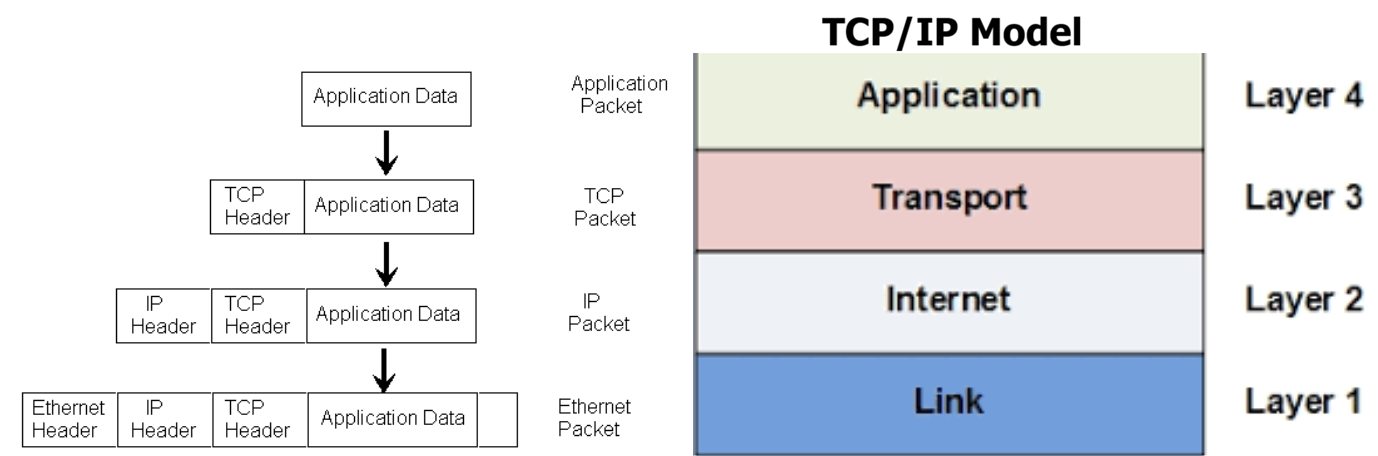
Our final activity will be simulating packet routing. We will act out the TCP/IP Model which describes how data is packaged through four layers: Application, Transport, Network, and Link, as shown below. In each level, we add more metadata to the packet on the left to prepare it for the journey. You do not need to learn the details of the TCP/IP model, but the activity below will help you understand how packets are created to travel across the Internet and how they are assembled at the destination.
In POGIL groups, do the Packet Routing Activity. Each group is a computer acting out 4 layers of the TCP/IP model to send packets across a network to another group. Each person will represent one layer of the TCP/IP model and have a role to play in sending packets across the network. If you are working individually, do all 4 layers yourself.
What should happen if a packet goes missing? Who (which layer) would handle this? What action would they have to take? And what additional information would be needed in the packet in order to handle it?
Suppose there is some kind of hardware glitch that corrupts one or more bits in a packet. Can this be detected? What action should be taken in this case? What additional information would be needed to handle this issue?
Complex systems, like networks, fail at unexpected times. Often multiple devices fail at the same time. Explain how the TCP/IP model continues to function even when parts of the system fail.
As the packets are being transmitted through the network, can people other than the sender and receiver read the messages? What methods can we use to protect the message?
Review the vocabulary in this lesson. Drag the vocabulary term from the left and drop it on its correct definition on the right. Click the "Check Me" button to see if you are correct.
Review the vocabulary in this lesson. Drag the vocabulary term from the left and drop it on its correct definition on the right. Click the "Check Me" button to see if you are correct.