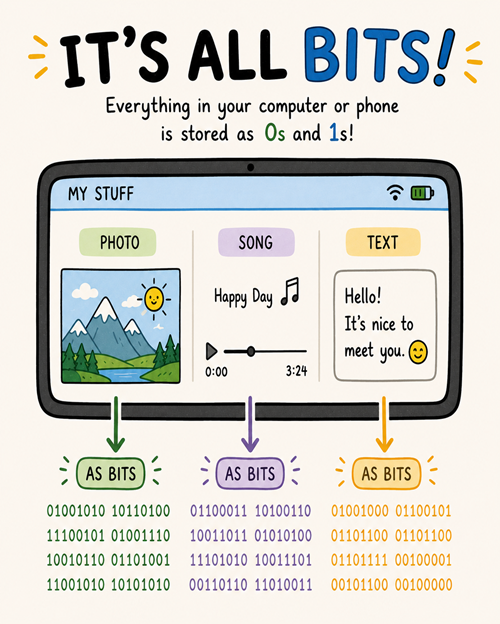
Think about all the types of files and data that you store in your computer or phone. Whether you look at a photo or listen to a song or write a paper or play a game, all of that data is stored as bits, which are just 0’s and 1’s. It’s all bits! In this topic, you’ll learn how computers use bits to represent and process data.
Binary is a base-2 number system that uses only two digits, 0 and 1, to represent all numbers. Humans use the decimal number system, counting in base 10, probably because we have 10 fingers, but computers use the binary (base 2) number system to represent and process data because computer circuits only have 2 states, on and off, where 1 is on and 0 is off.
Unplugged Activity: You and your friends can act out the video above by printing and using the following Binary Dot Cards. Five students can hold the 5 binary dot cards and see if they can count up from 0 to 11111. Or you can flip the cards randomly and see if the class can figure out the binary and the corresponding decimal number they make by counting the dots.
AP 2021 Sample Question: Each student that enrolls at a school is assigned a unique ID number, which is stored as a binary number. The ID numbers increase sequentially by 1 with each newly enrolled student. If the ID number assigned to the last student who enrolled was the binary number 1001 0011, what binary number will be assigned to the next student who enrolls?
Correct! Adding 1 to 1001 0011 causes the rightmost bits to carry over: 0011 + 1 becomes 0100, making the final value 1001 0100.
1001 0111
Try again. Remember that adding 1 to a binary number will trigger carries wherever there is a 1, changing those 1s to 0s and carrying a 1 to the next left column.
1101 0100
Try again. This changes bits in the first 4-bit group, which isn’t affected by adding 1 to this specific number.
1101 0111
Try again. This changes bits that should remain unaffected and misses the proper carry operations on the rightmost bits.
Try the following Binary Converter. In pairs, have one partner click on the binary digits below to create a binary number, and have the other partner figure out the number as a decimal number (click on the ? button to check your the answer).
The number 8 in binary is represented as 1000. Additional numbers can be represented by turning some of the 0s into 1s. For example, the number 9 would be represented as 1001.
12
The number 12 in binary is represented as 1100. Additional numbers can be represented by turning some of the 0s into 1s. For example, the number 13 would be represented as 1101.
15
Yes. The largest number that can be represented in 4 bits would be 1111, which is 1 + 2 + 4 + 8, which equals 15.
16
To represent 16 in binary, you would need 5 bits. It’s representation is 10000.
We use symbols like + and - in math or on a calculator to indicate arithmetic operations. This is another form of abstraction. For example, go to Google calculator and name the functions that are represented by the symbols on the buttons. For example, the symbol + represents the addition function, which takes two numbers as input and produces their sum as output.
Drag the abstract math symbol from the left and drop it on its corresponding arithmetic function or meaning on the right. Click the "Check Me" button to see if you are correct.
Yes. An abstraction is a general representation of something. Usually some of the specific details are omitted.
specific
Try again. A specific representation focuses on individual details, whereas an abstraction hides those details to look at the broader concept.
fixed
Try again. Abstractions can vary in their levels of detail and are not necessarily rigid or fixed.
artistic
Try again. While abstraction is a term used in art, in computer science and data context, it refers to a conceptual model rather than an artistic style.
For example, the binary code 01000001 can represent the decimal number 65 or the letter "A" in the ASCII encoding, or it could represent a pixel color in an image file, or a sound sample in an audio file, etc. The context of whether it is in a text file, image file, or audio file will determine what it means.
The binary code 01000001 is just a sequence of 1s and 0s. Depending on the context of the file or the software interpreting it, which of the following could this sequence represent? (Choose all that apply.)
Subsection1.4.5Limitations of Binary Representation
When we try to store large numbers in a fixed number of bits, we may encounter roundoff errors. For example, the fraction 1/3 is a repeating decimal number 0.3333333333333333333333 with infinite 3’s after the decimal point. It cannot be represented exactly in binary with a finite number of bits. The computer will round the value to fit within the available bits as an approximation. A standard 32-bit floating-point number can only store seven 3’s after the decimal point safely (0.3333333). If this approximate number is used in further calculations, we can get results that are slightly off because of this roundoff error. For example, if we multiply 1/3 by 3, we would expect to get exactly 1, but due to the roundoff error in representing 1/3, we might get a result like 0.9999999 instead of 1. This illustrates how roundoff errors can lead to results that are close but not exactly correct.
An overflow error occurs when there aren’t enough bits to represent a given number, so some of them overflow. The number of bits is similar to how a glass can overflow if it’s filled with too much water.
True or False. Using a fixed number of bits to represent numbers limits the range of values and hence limits the range of problems that can be solved with that representation.
Yes, to think of a simple example, if you were using 4 bits to represent numbers you wouldn’t be able to represent the number 17, so you wouldn’t be able to add 17 + 8. Modern computers use 32 or 64 bits to represent whole numbers, which are called integers. With 32 bits, you can represent \(2^{32}\) different values. That’s 4,294,967,296, more than 4 billion values. But, of course, there are still numbers that would cause overflow errors -- e.g., 4,300,000,000 could not be represented using 32 bits. This potential for overflow error is a necessary implication of using a finite representation to model the infinite concept of number.
False.
No. Using a fixed number of bits to represent numbers does limit the range of problems you can solve. For example, if you were using 4 bits to represent numbers you wouldn’t be able to represent the number 17, so you wouldn’t be able to add 17 + 8. Modern computers use 32 or 64 bits to represent whole numbers, which are called integers. With 32 bits, you can represent \(2^{32}\) different values. That’s 4,294,967,296, more than 4 billion values. But, of course, there are still numbers that would cause overflow errors -- e.g., 4,300,000,000 could not be represented using 32 bits. This potential for overflow error is a necessary implication of using a finite representation to model the infinite concept of number.
Review the vocabulary in this lesson. Drag the vocabulary term from the left and drop it on its correct definition on the right. Click the "Check Me" button to see if you are correct.