Almost all software is developed collaboratively in teams. Working with others can help programmers design better apps. In this topic, you will learn about the benefits of collaboration and user testing and how it can reduce bias in app development.
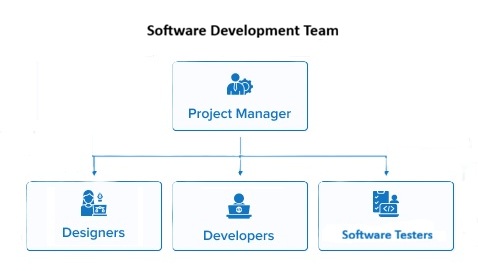
The following chart shows various roles on a software development team. There are many roles that don’t require coding even on a software development team.
Match the software development team roles to their responsibilities. Which roles seem the most interesting to you? Do internet research to find out more about the roles that interest you.
During pair programming, the driver accidentally forgets an important step. The navigator notices the mistake immediately. What does this example demonstrate about pair programming?
Not quite. Pair programming can help find mistakes earlier, but it cannot guarantee that every error will be caught.
It helps catch mistakes earlier through collaboration.
Correct! The navigator reviews the code as it is written, making it more likely that mistakes will be noticed and corrected before they become larger problems.
It means the partners should switch roles.
While pair programming involves switching roles, the main benefit is the collaborative review of code.
It slows down development.
While pair programming may initially seem slower, it often leads to higher quality code and faster debugging in the long run.
Let’s do a pair programming simulation! Work with a partner to write an algorithm for brushing your teeth. It must be precise enough for a robot to follow. One partner will be the driver and the other will be the navigator. The driver will write the steps while the navigator will check for mistakes and ask questions. After 2–3 minutes, switch roles. Write your algorithm below. Put *’s next to steps that were rewritten because the navigator made suggestions. Did having a partner help you write a better algorithm?
Watch the following video about user testing and how it can help find bugs, give feedback, and improve apps. Try it out with your friends the next time you code!
Imagine that you are a user-tester for Runestone, which is the platform this ebook is on. What are some things you would test to make sure the platform is easy to use? Did you find any tasks that were confusing or difficult to complete?
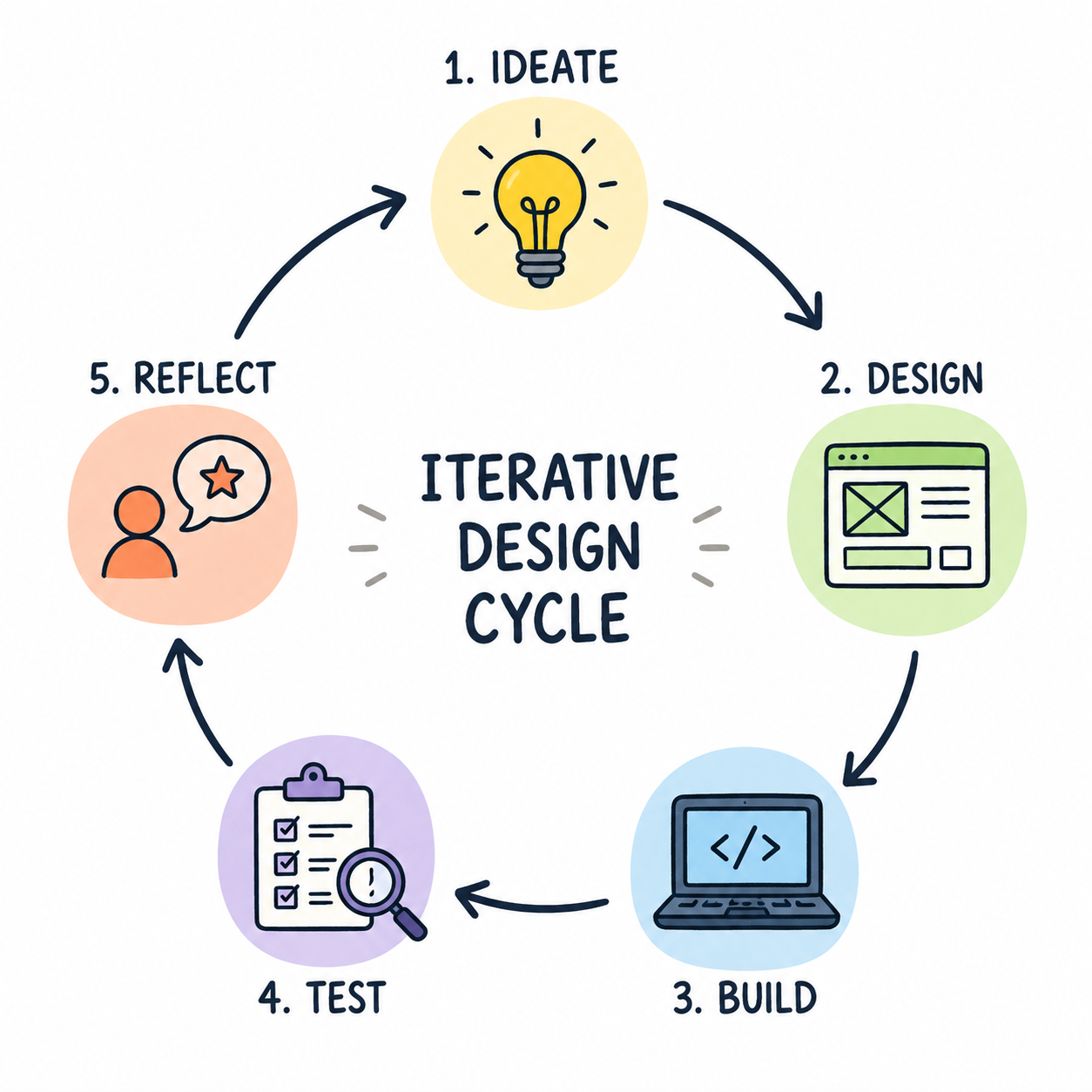
Software development teams use an iterative design process where they design, test, and revise their apps multiple times to improve the app’s functionality and usability. The following diagram is an example of an iterative design process:
A company creates a face recognition app. The developers assume the app will mostly be used in bright lighting, so they design and test it that way. They also train the app using a dataset that contains mostly images of adults with lighter skin tones. Which statement best explains the biases in this app? This is an actual historical example pointed out by Joy Buolamwini from MIT in her Gender Shades project.
The app only shows human bias because the programmers made assumptions about lighting.
Not quite. The programmers’ assumptions are an example of human bias, but the training data is also incomplete and unrepresentative, which is data bias.
The app only shows data bias because the training data is not representative.
Not quite. The dataset shows data bias, but the programmers’ assumption about lighting is also an example of human bias.
The app shows both human bias and data bias because the programmers’ assumptions influenced the design, and the training data is incomplete and unrepresentative.
Correct! The design choices reflect human bias, while the unrepresentative training data reflects data bias. These two types of bias often interact to affect how an app behaves for different users.
The app shows no bias because it was trained using real photos.
No. Even real-world data can be biased if it does not represent the people and situations the app is intended to work well for.
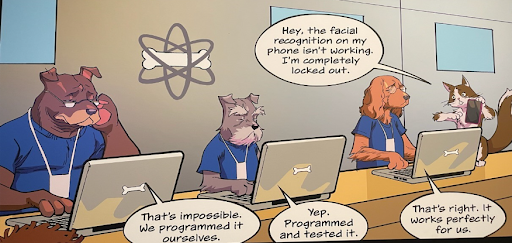
Take a look at the following comic strip where a cat who is a user of an app is letting the dog developers know that the app doesn’t work well for it, but the developers don’t listen.
What is the bias in the comic strip above? Why do you think the app works for dogs but not cats? How could the developers have reduced bias in their app?
Review the vocabulary in this lesson. Drag the vocabulary term from the left and drop it on its correct definition on the right. Click the "Check Me" button to see if you are correct.