
Section 1.7 Mathematical Expressions
90 minutes
Computers are very good at math! In this lesson, we’ll learn how to do math in Python using mathematical expressions which are mathematical formulas that combine numbers, variables, and operators to calculate a value like 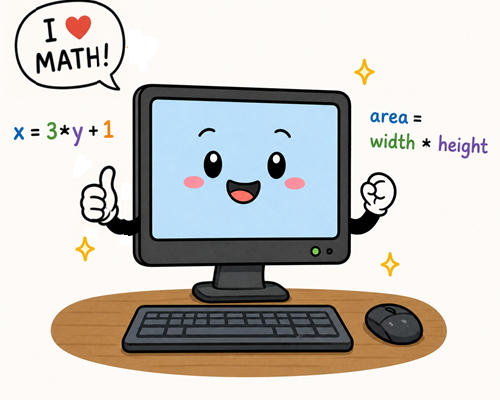
width*height below. Subsection 1.7.1 Mathematical Expressions
In the last lesson, we assigned values to variables like
score = 0, but the right side of an assignment statement can be more than just a simple value like 0. We can use expressions which combine numbers, variables, and operators to calculate a value and assign it to the variable in an assignment statement like below.
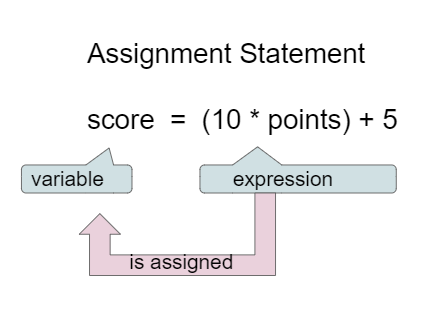
This looks like a mathematical formula, but in coding, an assignment statement always has a single variable on the left side and an expression on the right side. The expression is evaluated and then assigned to the variable.
Subsection 1.7.2 Updating State with Expressions
If you use a variable to keep score, you would probably increment the score (add one to the current value) as the game progresses. You can do this by setting the variable to the current value of the variable plus one (
score = score + 1) as shown below. The formula would look strange in math class, but it makes sense in coding because it is assigning a new value to the variable on the left that comes from evaluating the arithmetic expression on the right. So, the score variable is set to the previous value of score plus 1.
Activity 1.7.2.
Try the code below to see how score is incremented by 1. Try substituting 2 instead of 1 to increment by 2.
In Python, you do not need to indicate the data type of a variable, but variable that are assigned whole number values like
score = 5 are automatically type int for integer.
Subsection 1.7.3 Arithmetic Operators
Python uses the following basic arithmetic operators:
| Operator | Meaning |
|---|---|
| + | Addition |
| - | Subtraction |
| * | Multiplication |
| / | Division |
Activity 1.7.3.
Try the code below to see how the basic arithmetic operators work in Python. Add two more lines to the code as described.
Python also has the following non-standard operators:
| Operator | Meaning |
|---|---|
| // | Integer Division (everything after the decimal point is removed) |
| % | Modulo (integer remainder after integer division) |
| ** | Exponent (raises a number to a power) |
The modulo (mod) or remainder operator is very useful in coding. For example, it can be used to check if a number is even (divisible by 2) if it has no remainders when divided by 2. The expression
5 % 2 is equal to 1, because 5 divided by 2 is equal to 2 with a remainder of 1 (since 2 * 2 = 4).
Activity 1.7.4.
Try the code below to see how the special arithmetic operators work in Python. Compare the result of 5/2 and 5//2 and the remainder 5%2. Add 1 more line to the code as described.
Activity 1.7.5.
What is the result of
2 % 6?
-
0
-
This would be correct if it was
6 % 2. -
1
-
This would be correct if it was some odd number divided by 2, but it is not.
-
2
-
6 goes into 2 zero times with 2 left over. If you have a smaller number divided by a larger number the remainder is always the smaller number.
-
6
-
If you have a smaller number divided by a larger number the remainder is always the smaller number.
If you have a smaller number divided by a larger number the remainder is always the smaller number.
If there is more than one math operator in an expression, operator precedence rules are used, just like in math, so that multiplication *, division /, and remainder % are done before addition + and subtraction -. Anything in parentheses is done first. The PEMDAS acronym can help you remember the order of operations: Parentheses, Exponents, Multiplication and Division, Addition and Subtraction (from left to right). It doesn’t hurt to put in extra parentheses if you are unsure as to what will be done first or just to make it more clear.
Activity 1.7.6.
What is the result of
1 + 3 * (2 + 1)?
-
12
-
Remember PEMDAS! Don’t do the addition first.
-
9
-
Remember to do the parentheses first.
-
15
-
Remember PEMDAS
-
10
-
Yes, 1 + 3 * (2 + 1) = 1 + 3 * 3 = 1 + 9 = 10
Compound assignment operators
+=, -=, *=, /=, and %= are shortcuts that do a math operation and assignment in one step. For example, x += 1 adds 1 to the current value of x and assigns the result back to x. It is the same as x = x + 1. This pattern is possible with any operator put in front of the = sign.
| Operator | Example | Equivalent to |
|---|---|---|
| += | x += 1 | x = x + 1 |
| -= | x -= 1 | x = x - 1 |
| *= | x *= 2 | x = x * 2 |
| /= | x /= 2 | x = x / 2 |
| %= | x %= 2 | x = x % 2 |
When tracing through code with expressions, always remember to evaluate the right-hand side of the assignment first, then assign the result to the variable on the left-hand side. You can practice and check your answers by adding
print statements to show the variables or click on the "Show CodeLens" button on any Active Code exercise to turn on the interactive tracing tool called CodeLens as seen below. This is a tool called Python Tutor that is built into Runestone.
Activity 1.7.7.
Keep clicking on the Next button at the bottom of the code to see how the values of the variables change as you step through the running program. You can see interactive tracing in any Active Code exercise by clicking the CodeLens button.
Activity 1.7.8.
What are the values of x and y after the following code executes? Remember to evaluate the right hand side of = first and then assign the result to the variable on the left side. You can step through this code by clicking on this visualizer link.
a = 2
b = 10
a = b
a = a + 1
b = b * 3
-
a = 10, b = 30
-
Remember that a is incremented.
-
a = 11, b = 33
-
No, b’s value is copied into a but they are not connected after that.
-
a = 11, b = 30
-
Correct!
-
a = 10, b = 33
-
Try the visualizer to see the step-by-step evaluation.
Subsection 1.7.4 Input and Math
Many algorithms that use calculations follow a simple pattern:
-
Input: Get input from the user and save it into variables.
-
Calculate: Calculate the result based on the input.
-
Output: Print the result.
Activity 1.7.9.
Put the following code into the correct order. The code should compute and print the salary based on the hours worked and the hourly pay rate provided by the user. Notice how the input is converted to the int or float data type so that it can be used in the calculation.
When you use the
input() command to get input from a user, the value is always treated as a string, even if the user types in a number. If you want to use that input in a mathematical expression, you need to convert it to a number first using the int() command for integers or float() command for decimal numbers. For example:
ageStr = input("How old are you? ")
age = int(ageStr)
# Now we can do math with the age variable since it is an int instead of a string
print("Next year you will be", age + 1, "years old.")
Or you can get the input and convert it in one line by embedding the input in the conversion function:
# Get the age from the user and convert it to an int in one line
age = int(input("How old are you? "))
Activity 1.7.10.
Try the code below to see that there is an error when you try to do math with a string. Then, fix the code by converting the input to an int before doing the math.
Let’s practice getting input, converting it, and using it in a calculation below. The code below also demonstrates how to format a number to 2 decimal places using the
round(num, 2) function. This function rounds the number to 2 decimal places, for example 2.555555 will be rounded to 2.56. Another option is to use format(num, ".2f").
# rounding a variable to 2 float or decimal places
cost = 10.666666
print("Cost is $", round(cost, 2))
Activity 1.7.11.
In the code below, ask the user for how many pieces of candy they want to buy. Assume that each piece of candy costs $0.25. Then, calculate the total cost and print it out.
In order to compute the number of hours in a given number of minutes, you can divide the number of minutes by 60, since there are 60 minutes in an hour. The remainder operator
% can be used to calculate the remaining minutes after the hours are calculated. For example, if there are 150 minutes, then that is 2 hours and a remainder of 30 minutes.
Activity 1.7.12.
The following program segment should calculate the number of hours and then the remaining minutes in 150 minutes, but the blocks are mixed up. For example, if there are 150 minutes, then that is 2 hours and a remainder of 30 minutes. Remember that
// in Python is integer division that returns a whole number, / is float division, and % is the remainder operator. Drag the blocks from the left and put them in the correct order on the right. There will be 2 extra blocks that you will not use. Click the Check Me button to check your solution.
Activity 1.7.13.
Write a program that asks the user for the number of minutes they have spent in class and then calculate the number of hours, remaining minutes, and seconds. Fill in the formulas for 1, 2, and 3 below.
Subsection 1.7.5 Random Numbers
Games would be boring if the same thing happened each time you played the game. Random numbers can be used in games to generate different actions or outcomes each time the game is played. Try a game app on your phone or computer and try to identify where random numbers are used. If you roll dice or flip a coin or if the enemies in the game do not always act the same way, then random numbers are likely being used.
In Python, there is a library called
random that can be imported and used to generate random values. Use random.randint(start, end) to generate a random integer from start to end, including both endpoints. For example:
import random
# pick a random number from 0 to 10
r = random.randint(0, 10)
Try running the program below a few times to see that it generates different random numbers each time it runs.
Activity 1.7.14.
Try the code below to see how to generate random numbers in Python. Run it a few times to see that it generates different random numbers each time. Then, generate another random number from -10 to 10.
Computers can’t usually generate truly random numbers without measuring something that is random (like static noise on radio frequencies or lava lamps). If they don’t have access to something like that, they must rely on generating pseudorandom numbers that look random even though they are created using a mathematical formula. Python takes the system time as the seed or starting point (since it is always changing) and then uses a mathematical formula to generate the next random number each time we ask for one.
Subsection 1.7.6 Coding Challenge: Random Turtle Project
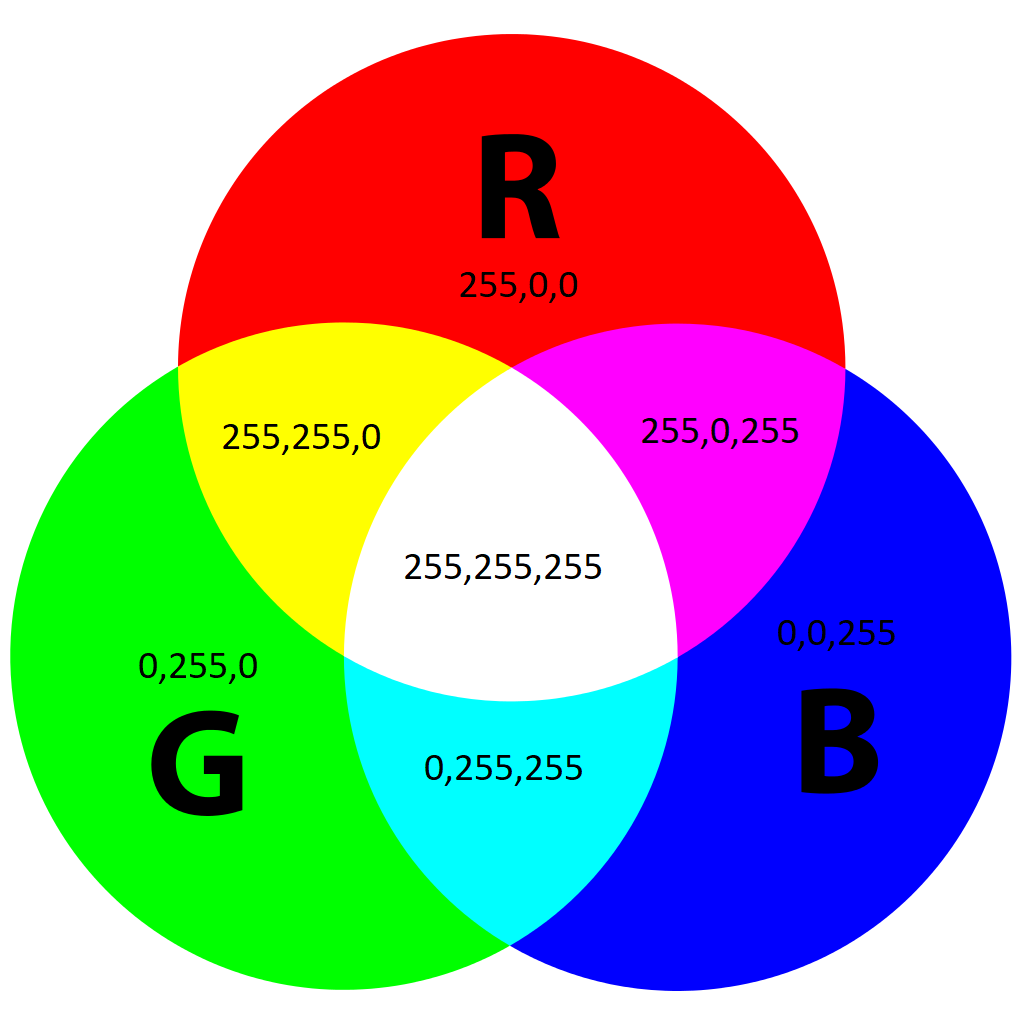
Let’s practice with turtles drawing with random colors and random movements. Colors on computers and on the web can be set using RGB (red, green, blue) values that range from 0 to 255 (which can be saved in 8 bits). Try the Color Picker and look at the RGB values for different colors below the selected color box. Any color can be made by mixing different amounts of red, green, and blue light. Mixing light is different than mixing paint, so when you mix red, green, and blue light, you get white light.
Activity 1.7.15.
What RGB values do you need to make black? Try the Google color picker to test.
-
0, 0, 0
-
Correct! Black light is the default state of no light. For example at nighttime, all is black because of there is no sunlight.
-
255, 255, 255
-
This is white, not black. If you mix all three primary RGB colors of light, you get white.
-
255, 0, 0
-
This is red light, not black. Red light is made with all red and no green or blue.
-
0, 255, 255
-
This is cyan light, not black. Cyan light is made with all green and blue and no red.
Activity 1.7.16.
The assignment statement
x = random.randint(-200, 200) can be used to generate a random x-coordinate for a turtle, because it is initially placed at coordinates (0, 0) and can move 200 pixels to the right to 200 or left to -200. Which of the following numbers cannot be generated by this expression?
-
0
-
0 is between -200 and 200, so it can be generated.
-
-200
-
-200 is between -200 and 200, so it can be generated.
-
200
-
200 is between -200 and 200, so it can be generated.
-
-255
-
-255 is not between -200 and 200, so it cannot be generated by random.randint(-200, 200).
Project 1.7.17 Random Turtle Project.
In the code below, you will use random numbers to set the background color, pen color, and turtle coordinates. Right now it uses default colors. Change the lines of code that say "# Change these to use random.randint". Also calculate the distance that the turtle has traveled. Run the code a few times to see that it generates different random colors and movements each time it runs.
Activity 1.7.18 Project Reflection.
Describe how you used random numbers in your turtle project. What was the range of random numbers you used for the RGB values and the x, y coordinates? How did the random numbers enhance the project?
Subsection 1.7.7 Vocabulary Review
Activity 1.7.19.
Subsection 1.7.8 App Inventor Project Continued (Optional)
If your class started the Paint Pot app using MIT’s App Inventor, you can now finish the Paint Pot Tutorial part 2, enhancements, and reflections.
You have attempted of activities on this page.

