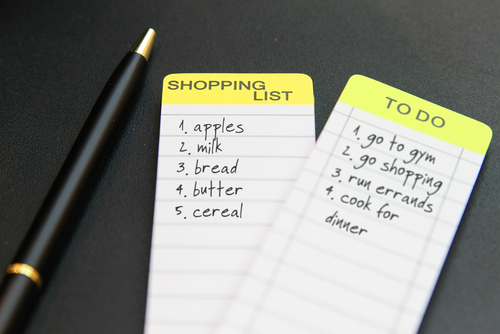
We use lists every day to keep track of things, for example, shopping lists, to-do lists, or song playlists. Python makes it easy to work with lists. In this topic, we will learn to use lists to store values, manipulate list contents, and traverse lists with loops.
All programming languages have ways to store collections of data. Python has a built-in data type called a list which can store an ordered sequence of items. Lists are sometimes called arrays in other programming languages.
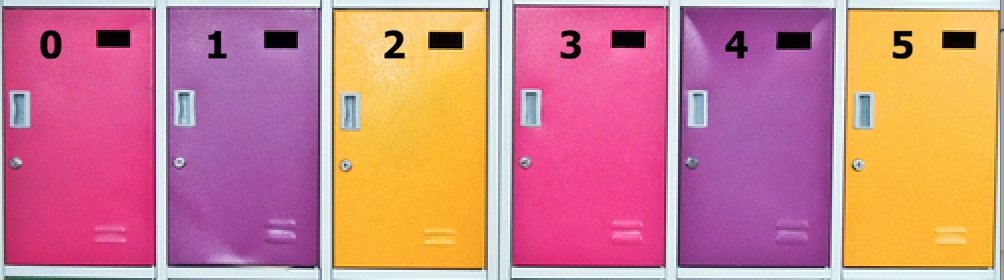
You can imagine a list as a row of lockers where each locker holds one item or element. The lockers are numbered with an index that starts at 0 for the first locker, 1 for the second locker, and so on.
Here are some examples of lists in Python. Notice how square brackets [] are used to collect multiple values to store in one list variable. Instead of using many variables like score1, score2, etc., which would get unmanageable pretty quickly, you can use a single list variable like scores or shopping_list to store a collection of values.
To access elements in a list, we use the list name and the index (the position or number) of the element in square brackets. For example, shopping_list[0] accesses the first element in the shopping_list, which is "milk". Most programming languages, including Python, use zero-based indexing where the first item in the list is at index 0. Just like binary code, computers almost always start counting at 0.
Note that the AP CSP exam currently starts indexing at 1 in its pseudocode including in the 2027 exam, but will switch to zero-based indexing as of 2028.
Imagine a Python list called lockers. Let’s put your books in locker 0 and a backpack in locker 1 with the code below. To get to a specific locker or a specific element in a list, use the list name followed by square brackets and the index (number) of the element you want to access like below.
Using the lockers list below, print what is in the first and last locker using the list name and the index in square brackets, for example: lockers[0].
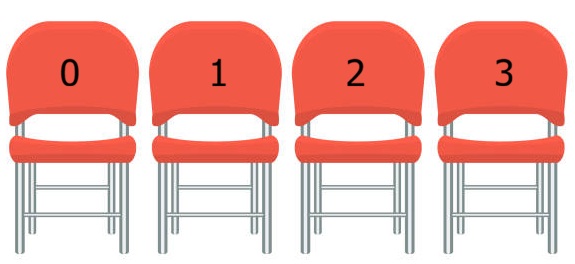
In groups or as a class or individually, simulate a list using students in chairs. Organize a line of empty chairs as the list in memory. Each student who sits in a chair represents a value in the list. The first chair in the line of chairs has the index 0. The second chair has the index 1, and so on. Have students follow the code similar to the example below. Substitute in the names of students in your class. For example, chairs[0] = "Pat" means that the student in chair 0 gets up and Pat sits down. If Pat was already in a chair, they would have to get up; in real Python, assignment copies values, but in this simulation, we can’t make copies of students, so we have to simplify by emptying chairs.
# Fill the chairs with students
chairs = ["Alex", "Sam", "Ryan"]
# Students should yell out their names!
print(chairs[1])
print(chairs[0])
print(chairs[2])
# Alex gets up, Pat sits down in chair 0!
chairs[0] = "Pat"
chairs[1] = "Riley"
chairs[2] = "Alex"
How many chairs did you use in your list? What was the index of the first and last chairs in your class? What would happen if you tried to access a chair that was larger than the last index in your list? Write your own code to swap students in chairs and print them out in a different order. Try it out with your classmates!
Subsection3.1.4Changing List Elements with Assignment
Assignment (=) can be used to change the value of an element in a list. You can use an indexed list variable like myList[index] = value on the left side of the assignment operator just like a regular variable. For example, the code below changes the value in scores[0] to 100 using assignment:
Click on the Next button at the bottom of the code to see how the values in the list change as you step through the running program. You can see interactive tracing in any Active Code exercise by clicking the Code Lens button.
Before making changes to a list, programmers sometimes make a copy of it first using assignment. Then the original list can be preserved and used later if needed.
# A list of scores
scores = [95, 87, 92, 100]
# Make a copy of the scores list
scores_bonus = scores
# Add bonus points to the first two scores in the copy
scores_bonus[0] += 5
scores_bonus[1] += 5
If you do not know what values you want to store in a list when you create it, you can start with empty list ([]) which is a list that contains no elements and add in elements while the program is running. For example, we can start with an empty shopping list.
# An empty shopping list
shopping_list = []
shopping_list.append("milk")
shopping_list.append("eggs")
shopping_list.append("bread")
print(shopping_list)
In Python, you can get the length of a list by using the len(aList) function, note the shortened form of len for length. In AP Pseudocode, the function used is length(aList).
Python also provides built-in functions to change list elements. We already saw the append() function, which adds an element to the end of a list. We can also use list.insert(index, element) that adds an element at a specific index and moves the elements after it one position to the right. It’s important to remember that append, insert, and remove always change the length of the list moving elements to the right or left as needed!
In the AP CSP Pseudocode, the functions to change a list are similar to those in Python, but the AP CSP pseudocode list.remove(index) function removes the element from the list at a certain index. Python has list.remove(value) which deletes the very first occurrence of a specific value from the list or list.pop(index) which removes and returns the element at a specific index, but not a list.remove(index) function.
The code below uses a list to keep track of dogs at the animal shelter. Try the insert and remove functions in the code below. Then follow the directions in the comments to insert and remove elements from the list.
Subsection3.1.7Tracing List Operations and Index Errors
Project3.1.11Unplugged List of Chairs Revisited.
Let’s revisit the unplugged activity with students in chairs and simulate append, insert, and remove operations. In groups or as a class or individually, organize a line of empty chairs as the list. Have some extra chairs ready to append or insert. Each student who sits in a chair represents an element in the list. The first chair in the line has the index 0. The second chair has the index 1, and so on. Have students follow the code below to insert and remove students and chairs. Substitute in the names of students in your class.
# Fill the chairs with students
chairs = ["Alex", "Sam", "Ryan"]
# Example code to insert and remove students in chairs
chairs.append("Dani") # Add a new chair and student to the end of the list
# Remove the student in chair 1, move students left 1 chair,
#   and remove the last chair
chairs.remove(1)
# Insert a new student in chair 1 and move students to the right to make room.
chairs.insert(1, "Taylor")
How do append, insert, and remove affect the list differently than changing the values of existing elements? Write your own code below using append, insert, and remove, and then act it out.
What are the values in the list after executing the following AP Pseudocode? Remember that list indexing starts at 0 and the pseudocode uses list.insert(index, value) and list.remove(index) to change the list. Insert and remove always change the length of the list moving elements to the right or left as needed. To trace this code, write down the list after each line of code.
What happens if you try to access an element that is not there? Try to access puppies at index 7 below to see what happens. The index must be between 0 and the length of the list - 1 or it will give an error message "IndexError: list index out of range".
Sometimes you may want to pick a random element from the list. One way to do this is to generate a random index. It would start at 0 and go up to the length of the list minus 1. If there are 3 elements in the list, the valid indices would be 0, 1, and 2. In Python, you can use the random.randint() function to generate a random index. The valid indices are 0 through len(list) - 1. For example, if you have a list of songs, you can select a random song from the playlist using the code random.randint(0, len(songs) - 1). Python actually has a built-in function called random.choice(list) that will select a random element from a list, but we will use the random index method here to match AP pseudocode.
Use the code below to select a random emoji from the list. Use the random.randint() function to generate a random index and then use that index to access an element in the list. Run the code multiple times to see different emojis printed!
Python also has a cool slicing operator ([start:end]) that allows you to extract a portion of a list from a start index up to (but not including) an end index, just like we saw with strings.
An index-controlled for-loop using range(len(aList)) or a while loop can also be used to traverse a list. The loop variable is the index to access each element in the list. This is why programmers often use the variable i, short for index, as the loop variable. However, it is a lot more complex. If you do not need the index, it is simpler to use the for item in list loop instead. The code below compares all three loops. The first one is the simplest and most often used with lists.
aList = [1, 2, 3, 4, 5]
# Simple for loop for lists
for item in aList:
    print(item)

# More complex indexed for-loop
for i in range(len(aList)):
    print( aList[i] )

# More complex while loop
i = 0
while i < len(aList):
    print( aList[i] )
    i += 1
Activity3.1.17.
Write code that uses an indexed for loop using range(0,len(list)) to print out each emoji in the list on a separate line with the index.
When we were learning about loops, we learned about the accumulator pattern which uses a loop and an accumulator variable to keep track of the running total as each number is added in. This accumulator pattern is often used to process lists and perform calculations on the elements.
For example, the count variable can be an accumulator variable to count the number of elements in a list or sum can be an accumulator variable to calculate the sum of all the elements in a list. We can compute the average of a list by dividing the sum by the length of the list using len(list).
scores = [ 100, 90, 95, 85, 93 ]
sum = 0

for number in scores:
    sum += number
Activity3.1.18.
The following program has the correct code to return the average of a list of numbers, but the code is mixed up. Drag the blocks from the left into the correct order on the right. You will be told if any of the blocks are in the wrong order or are indented incorrectly.
Subsection3.1.11Coding Challenge: Parallel Lists in a Bakery
A bakery uses parallel lists to store the names, emoji images, and prices of baked goods in three lists. The lists are kept in parallel order so that an index can be used to access the corresponding elements in each list. For example, the first element in the list of baked goods corresponds to the first element in the list of prices, the second element corresponds to the second element, and so on. This allows a program to easily look up the price and image of a baked good by index. In the following coding challenge, you will use an input-controlled while loop to ask the user to choose baked goods from the bakery and put its index in an order list. You will then print out their receipt and calculate the total cost of their order using a for loop and the order list.
A bakery uses 3 parallel lists below to store the names, emoji images, and prices of baked goods. The while-loop below prints the lists and asks for the user’s order by choosing an index number. You will write code to append the chosen index to the order list after checking that it is in range. You will then print out their receipt and calculate the total cost of their order using a for loop and the order list.
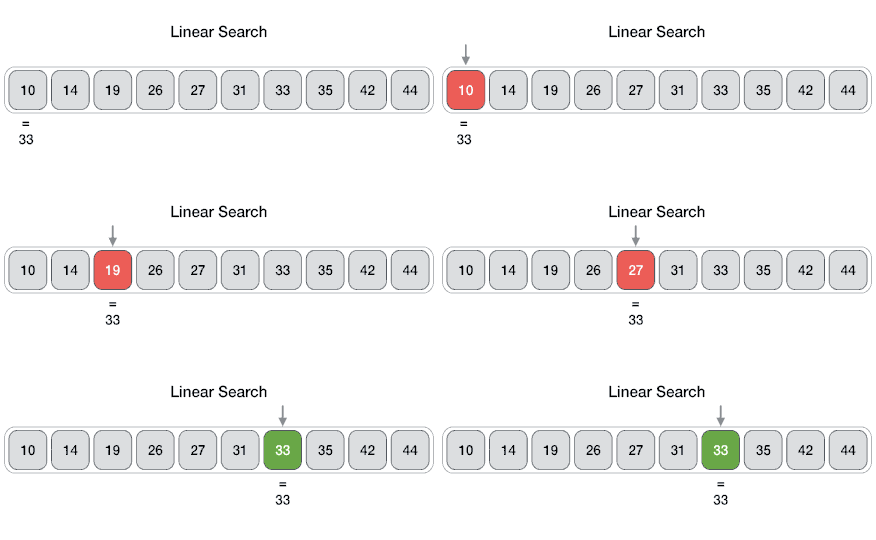
Another common algorithm with lists is searching for a particular item in the list. Linear Search (also called sequential search) is a simple search algorithm that checks each element in the list one by one until it finds the desired value or reaches the end of the list. Watch the animation of the algorithm below of searching for the value 33 in a list of numbers.
numbers = [10, 20, 30, 40, 50]
search_value = int(input("Enter a number to search for: "))
for number in numbers:
    if number == search_value:
        print("Found!")
If you are only looking for the first occurrence of a value, you can use a break statement on a line on its own to exit the loop once the value is found. This is called a partial traversal where only some elements of the list are visited. The break statement will immediately exit the loop. A boolean flag variable can be used to indicate whether the value was found. Try it out below.
The following program has the correct code for linear search, but the code is mixed up. Drag the blocks from the left into the correct order on the right. You will be told if any of the blocks are in the wrong order or are indented incorrectly.
numbers = [10, 20, 30, 40, 50]
found = False
search_value = 100
---
for number in numbers:
---
    if number == search_value:
---
        found = True
        break
---
if found:
---
    print("Found!")
---
else:
---
    print("Not found.")
Complete the following linear search algorithm. This algorithm uses a boolean flag to indicate whether the value was found and allows for early termination of the loop with break.
The find minimum and maximum algorithms that we looked at with loops are just a variation the search pattern. They also have an if-statement inside the loop to check if the current element is less than or greater than the current minimum or maximum.
When tracing through code with lists, it helps to draw the list and its elements on paper or a whiteboard to visualize the process. The Code Lens button on the activecode activities or Python Tutor can also help you visualize the execution of your code step by step.
list = [1, 0, 4, 2]
x = 99
for item in myList
{
    <MISSING CODE>
}
print(x)
if (item > 99)
    x = item
No. This condition looks for an item greater than 99, but none of the items in the list meet that condition.
if (item < 99)
   x = item
Not quite. This would assign every item that is less than 99 to x, so the final value would be 2 rather than the minimum value, 0.
if (item > x)
    x = item
No. This condition would replace x when an item is greater than the current value of x, which would find a maximum rather than a minimum.
if (item < x)
    x = item
Correct! Starting with x equal to 99, the code replaces x whenever it finds a smaller item. After checking every item, x contains the minimum value, 0.
In previous lessons, we talked about abstraction in computer science which is about focusing on the general features while hiding the specific details. Data Abstraction is the process of hiding the complex implementation details of a data structure and showing only the needed features to the user. Variables are a type of data abstraction because they allow programmers to use a name to represent a value without needing to know how the value is stored in memory. Lists are another type of data abstraction because they allow programmers to use a single variable name to represent a collection of values without needing to know how the values are stored or organized in memory. Data abstraction using lists reduces complexity in code and makes it easier to read, write, and maintain.
A programmer creates a program that displays the names of all students enrolled in a class. Which implementation best demonstrates the use of data abstraction?
No. This implementation uses a separate variable for each student rather than treating the related values as a single collection.
students = ["Alex", "Marion", "Jordan"]
Yes. A list allows related values to be treated as a single data abstraction. The programmer can use the name students to work with the collection without needing separate variables for each student.
studentCount = 3
No. This variable stores the number of students but does not provide a collection containing the students’ names.
print("Alex")
print("Marion")
print("Jordan")
No. This implementation contains repeated statements instead of using a single abstraction to represent the related student names.
Data abstraction also makes it easier to add data without having to rewrite the algorithms. Try adding data to the list below. You will see that you do not need to rewrite the loop processing the list at all. This makes it much easier to maintain and update the code.
Data abstraction using lists also removes a lot of repetitive duplication in code. Instead of having multiple variables and repeated code to process each variable, we can use a single list and a loop to process all the elements.
Refactoring code means to rewrite the code to improve it while maintaining the same functionality. Adding data abstraction is a great way to refactor code to reduce its complexity and make it more maintainable and easier to understand. Try it below!
Refactor the following code to use a list instead of individual variables. Make sure you use a for-loop to traverse the list and print each favorite food.
The same algorithm can process the data even if we add new temperatures or update or remove temperatures.
Yes. The loop processes each element in the list, so the same algorithm can work with different amounts of data without needing to be rewritten.
The list reduces the need for repeated variables and statements for processing individual temperatures.
Yes. Without a list, the programmer might need separate variables and repeated statements for each temperature. Using a list and loop reduces this repeated code.
The list automatically calculates the sum of the temperatures.
No. The list only stores the temperatures. The for loop and addition operation are responsible for calculating the sum.
The list guarantees that there are no duplicate temperatures.
No. A list can contain duplicate values. Preventing duplicate values is not a reason why using a list reduces program complexity.
If your class is using MIT’s App Inventor, you may want to do the optional App Inventor Quiz App Lesson (sections 3.8.1-3.8.3) before you try it in the Python coding challenge below. You can finish sections 3.8.4-3.8.5 which use a search procedure in the next lesson on procedures.
In this challenge, you will use parallel lists that contain data about the Computer Science Pioneers shown below. You will create a search app and a quiz app. There are 3 parts to this challenge: the search app, the quiz app, and the create your own data and app.
The search app allows users to search for information in the 3 parallel lists that store the names of pioneers, facts about their contributions, and their images. A special function called draw is provided to display the image of the pioneer. First, present the list of pioneers using a simple for item in list loop. Ask the user who they want to learn about. Then, use a for-loop with range(len(pioneers)) to search through the pioneers list and check if the user’s input is in the list. If it is, print the corresponding fact and display the image of the pioneer by using draw(images[i]) where i is the index of the pioneer in the pioneers list.
The second part of the challenge is to create a quiz app about pioneers in computer science. The pioneers, facts, and images are in parallel lists where the first pioneer in the pioneers list corresponds to the first fact in the facts list and the first image in the image list, and so on for each element in the lists.
A quiz app uses 3 parallel lists to store the names of pioneers, facts about their contributions, and their images. Use for loops to print out questions from the facts list and check the user’s answers against the pioneers list.
The final part of this challenge is to create your own data lists and use it in a quiz app. Create 2 parallel lists with at least 3 elements each about something you are interested in, for example famous athletes and their teams, singers and their albums, actors and their movies, animals and their habitats, or any other topic you are interested in. If you’d like to do images, you can copy in the import and draw function from the previous quiz app and use complete http or https links to small images on the web.
Create your own Quiz App using 2 parallel lists with at least 3 elements each about something you are interested in, for example famous athletes and their teams, singers and their albums, actors and their movies, animals and their habitats, or any other topic you are interested in. First, present some information about the topic using a search algorithm like in part 1 of this challenge. Then, create a quiz app like in part 2 of this challenge.
Review the vocabulary in this lesson. Drag the vocabulary term from the left and drop it on its correct definition on the right. Click the "Check Me" button to see if you are correct.