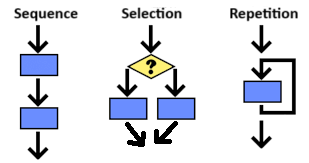
In this lesson, we will practive developing and comparing algorithms using repetition and selection. We will learn some common algorithms and patterns using loops that can be used to solve problems, for example calculating the sum or average of a group of numbers or finding the maximum or minimum value in a group of numbers.
For example, in the last lesson, we saw an algorithm that printed out the even numbers from 0 up to 10. We can easily adapt that algorithm to print out the odd numbers from 0 up to 20 by changing the condition in the selection and iteration statements. Try it below.
Here is a for loop that prints the even numbers from 0 up to 10. Can you change the code so that it prints the odd numbers from 0 up to 20 instead? You only need to change the range and the operator == in the if statement.
Subsubsection2.5.2.1Sum and Average Accumulator Algorithms
One common algorithm is to compute the sum or average of a set of numbers. This is called the accumulator pattern; it uses a loop and an accumulator variable to keep track of the running total as each number is added. The accumulator pattern has 4 steps:
For example, this loop calculates the sum of 0 through 100 using range(101) since this generates numbers up to 101 but not including 101. The sum variable is the accumulator variable and number is added into the sum each time through the loop. Then, the average is calculated by dividing the sum by the number of values.
sum = 0
for number in range(101):
    sum += number
print("The sum of 0 through 100 is", sum)
average = sum / 100
print("The average of 0 through 100 is", average)
The following program has the correct code to return the average of 10 random numbers, but the code is mixed up. Drag the blocks from the left into the correct order on the right. You will be told if any of the blocks are in the wrong order or are indented incorrectly.
import random
---
total = 0
---
for i in range(10):
---
    rnd = random.randint(1, 100)
---
    total += rnd
---
print("The average of 10 random numbers is", total / 10)
Complete the code below to calculate the sum and average of 2 to 5 (including 5). Use the accumulator pattern to calculate the total, then calculate the average. Try Code Lens to see the variable values change as the program runs.
The following code calculates the sum and average of numbers entered by the user. Input-controlled loops usually use while loops. Since we do not know how many numbers the user will enter, we will use -1 to end the loop and count the number of inputs.
Another common algorithm is to find the minimum or maximum value in a group of numbers. This is a variation of the accumulator pattern where there is an if-statement inside the loop that tests each value being considered in the loop. To determine the minimum or maximum value, the algorithm uses a variable to store the current minimum or maximum value. The algorithm loops through the sequence of numbers and updates the minimum or maximum value if it finds a number that is lower or higher than the current minimum or maximum. This pattern can also be used to search for a specific value in a group of numbers. For example, this loop chooses 10 random numbers and finds the minimum value among them. Click on next to see each step.
The following program has the correct code to find the maximum of positive numbers entered by the user, but the code is mixed up. Drag the blocks from the left into the correct order on the right. You will be told if any of the blocks are in the wrong order or are indented incorrectly.
max = -99 # start low
---
number=int(input("Enter number (-1 to stop):"))
---
while number != -1:
---
    if number > max:
---
        max = number
---
    number=int(input("Enter another number (-1 to stop):"))
---
print("The maximum value is", max)
Another common algorithm is to check whether a number is evenly divisible by another. The algorithm uses the mod operator (%) to determine whether the remainder of the division is zero. We’ve already used this to see if a number is even or odd by checking if the number is divisible by 2. But we can generalize this algorithm to check for divisibility by any number.
Change the code below which checks whether a number is even to instead check if a number is divisible by 5. If it is, print "Divisible by 5", otherwise print "Not divisible by 5".
A problem can be solved with different algorithms. A simple example is the problem of calculating the sum of a list of numbers. We can use for loop or a while loop which look very different to solve the same problem. Compare the two algorithms below. Do they produce the same output?
Compare the two algorithms below. Do they produce the same output? Change each algorithm to calculate the sum of numbers from 1 to 10 instead of 1 to 5. Do they still produce the same output?
The following for loop prints the numbers 0 to 6. Rewrite it as a while loop that does the same thing. Don’t forget the 3 steps of writing a while loop: initialize, test, and update the loop variable.
Sometimes two algorithms may produce the same output but have different side effects. Side effects are anything an algorithm changes besides producing its main output, for example changing a variable’s value or changing something on the screen.
# Algorithm A
for i in range(3):
    print("Hello")

# Algorithm B
count = 1
while count <= 3:
    print("Hello")
    count += 1
Same outputs and same side effects
No, the algorithms update different variables, which is a side effect.
Same outputs and different side effects
Yes, the two algorithms produce the same output (printing "Hello" 3 times) but have different side effects (Algorithm A updates variable i from 0 to 2, while Algorithm B updates the variable count) from 1 to 3.
Different outputs and different side effects
No, both algorithms produce the same output (printing "Hello" 3 times).
Different outputs and same side effects
No, both algorithms produce the same output (printing "Hello" 3 times).
Sometimes side effects are unintended and can cause problems. For example, if you are playing a game and finish a level, and you notice that your score was reset to 0 in the next level, that may be an unintended side effect or bad design.
In the following coding challenge, you will code a guessing game where the computer picks a random number from 0-100 and the user has to guess it. After each guess, the computer will give clues like “Too high” or “Too low”. We encourage you to work in pairs on this challenge.
Before you start coding, play the guessing game a few times in pairs. One student should play the part of the computer and think of a random number between 0 and 100. The other student should try to guess the number. After each guess, the student playing the computer should give clues like “Too high” or “Too low” until the correct number is guessed. Count the number of guesses you took. Switch roles and play again.
What is a good guessing strategy for guessing a number between 0 and 100? What was your first guess? One great strategy is to always split the guessing space into two and eliminating half, so guessing 50 for the first guess. This is called a divide and conquer or binary search algorithm because it divides the search space in half with each guess. If your guess is between 0-100, you should be able to guess the number within 7 guesses.
Follow the pseudocode below to code the guessing game. Work in pairs. What’s the loop variable for this program? Can you identify the 3 steps of writing this loop with respect to the loop variable?
Consider the conditional (if) statements in your project code above. Identify the boolean expressions in the conditional statements by writing them below. Explain what happens if they are true or false. Instead of the two separate if statements, try rewriting it as a single if/else statement below. Would the program still work the same way? Explain why or why not.
Consider the first iteration statement in your project code above (the while loop). Identify the loop variable by writing it below. Identify the number of times the body of your iteration statement will execute. Describe a condition or error that would cause your iteration statement to not terminate and cause an infinite loop. Explain how the loop condition could be modified to cause an infinite loop.
Discuss the 3 algorithms below in pairs or groups. Do they produce the same output? Do they have the same side effects? Trace through them to determine what each prints out.
# Alg A
total = 0
for number in range(1, 6):
    total += number
print(total)

# Alg B
total = 1
for number in range(2, 6):
    total += number
print(total)

# Alg C
total = 0
for number in range(5):
    total += number
print(total)
Review the vocabulary in this lesson. Drag the vocabulary term from the left and drop it on its correct definition on the right. Click the "Check Me" button to see if you are correct.