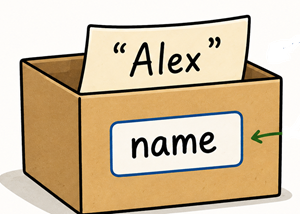
Variables are named memory locations that store values used by a program. These values can change or vary as the program runs. A variable is like a box with a label where different values can be put into the box. For example, when you interact with an app or game, there may be variables that store your name or your score, and these variables can be used by the app to customize how it behaves or the information it displays. In this section, you will learn how to identify variables in apps and how to use them in Python print and input statements.
Try the following pizza web app by typing in your name and choosing different options. Think about the inputs and outputs to the app. When you type in your name and other inputs, your information gets saved in variables in the program. These values can then be used in the outputs of the app.
Some video games keep a list of players with the highest scores in the game. Each entry in the list a snapshot of the program state at a certain time. For example, the player with the name or initials "AKI" had a score of 12,000 at a certain point.
Variables are names for memory locations that store values used in a program. In Python, a variable is created when a value is assigned to it. For example, the following code creates a variable named name and assigns the value "Dani" to it and a variable named age with the value 16. Note that text values like "Dani" are placed in quotes (""), but numbers like 16 are not.
In Python, multiple values can be printed out separated by commas. The variables, name and age, are never put inside quotes because we do not want to literally print the variable names; we want to print the values stored in the variables.
Drag or click on the blocks you need to move them from the top section into the yellow area to create a print statement with the variable name. For example, if name = "Alex", it will print "Hello Alex!". There are extra blocks that you don’t need.
The pizza app above stores lots of different types of data: the user’s name, their age, their favorite color, and whether they like pizza. The user’s name is text (which is called a string in coding, but the age is a number. Whether they like pizza or not could be stored as a Boolean value of true or false (the type Boolean is named after the mathematician George Boole who invented symbolic logic). These are all different data types.
In some languages, you have to declare the data type of a variable, but in Python, the data type is assigned automatically depending on its value during run time. Python has several built-in data types, including:
print(type(name)) # This will print str, for a string or text data type
print(type(age)) # This will print int for an integer whole number
Activity1.6.5.
Run the following code to see the data types of the variables. Add another print to see the type of the last variable which is a number inside quotes. You’ll see that anything in quotes is a string, even if it is a number inside.
Although you can name a variable almost anything you want, there are some rules and conventions to follow. In Python, variable names must follow these rules:
Python has a few dozen keywords that you can’t use as variable names. Here is a list of the most common ones. If you ever have an error based on one of your variable names and do not know why, compare your name to this list to make sure you are not using a keyword as your variable name.
An assignment statement assigns a value to a variable using the assignment operator =. The first assignment to a variable initializes the variable to its first value. It can then be changed with other assignment statements. For example, the variable score is initialized to 0 and then changes to 50 below. Note that the variable name must match exactly with the same capitalization and spelling to have it refer to the same variable.
Variables can be assigned values or an empty string "" that will be filled in later. Python allows double quotes "" or single quotes ’ for string values.
name = "Sam"                 # double quotes
email = '[email protected]'      # single quotes
message = ""                 # empty string
We can concatenate or append or add strings in Python using the operator +, which can be used to add numbers or strings. Blank spaces are not automatically added when you use + (unlike ,), so if you want a blank space, you need to type it inside the quotes or add in a string with just a space in it " " as shown below.
Since the operator + is used to add numbers or concatenate strings in Python, the interpreter will get confused and show an error if you use it to concatenate a string with a number. To concatenate the number with a string we need to convert the number into a string first. The str(num) function will convert a number into a string. Another option is to use the , instead of + in print statements because that will print different data types with no problem, but it can only be used in print statements.
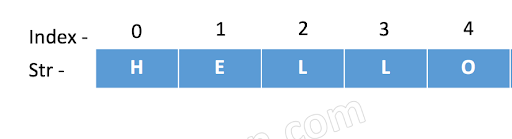
In Python, every character in a string is associated with an index starting with 0. Square brackets and an index can pull out any character from a string.
Python has a special slicing operator to pull out a substring from a start index up to an end index (but not including the end index), message[start:end].
Python has an input function that can be used to get input typed in by user. This input must be saved into a variable. This is another way to initialize or assign to a variable. The syntax for an input statement is:
variable_name = input("Input prompt or question? ")
The following code will ask the user for their name and then print out a greeting. Try it out by clicking the "Run" button. Run it twice and put in different names! Does it work? Yes, that is the power of abstraction! Our code is now more general or abstract and can work for any name! The input variable is an abstraction that can hold any name.
Drag or click on the blocks you need to move them from the top section into the yellow area to create an input statement that will ask for the user’s age. There are extra blocks that you don’t need.
The input() function in Python always returns a string, even if the user enters a number. For example, if the user enters "25", the variable will store the string "25", not the integer number 25. However, to do math with a number, as we will see in the next lesson, we need to store the value as a number rather than a string.
To convert a string to an integer whole number or a floating point decimal number, use the int() or float() functions. We will use these functions in the next lesson when performing calculations and making comparisons with user input. For example:
ageString = str(age) # Convert the integer back to a string
Activity1.6.15.
Run the following code to see that there are some errors caused by the data types. Try using int or str functions to convert the variables to the correct data type.
Finish the input statements below to ask the user for 2 colors and a food item. Run to see the silly poem. Then, ask the user for more input words and create your own poem or story using the variables in print statements.
Review the vocabulary in this lesson. Drag the vocabulary term from the left and drop it on its correct definition on the right. Click the "Check Me" button to see if you are correct.