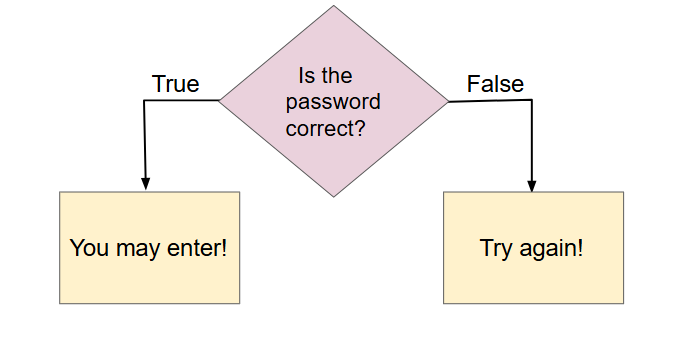
Apps are a lot more fun if they can respond to different user actions and decisions. For example, if you are playing a game, the app can check whether you have enough points to move to the next level. A social media app needs to ask you for your password and check that it is correct before allowing you to post a comment. Apps use Boolean expressions to make decisions based on true or false conditions, like in the flowchart below. In this lesson, you will learn how to use Boolean expressions in your code to change an app’s behavior.
Interact with the pizza app above. Which of the following are Boolean expressions (True or False) that the app uses to determine its output? Select all that apply.
Relational operators are operators like less than (<), greater than (>), and equal to (==) that compare two values or expressions. They are often used to compare a variable against a constant value or another variable or an expression. For example, the following Boolean expressions (which evaluate to true or false) can be used to see whether a number is positive or negative by seeing if it is greater than 0 or less than 0:
# Test if a number is positive (greater than 0)
number > 0
# Test if a number is negative (less than 0)
number < 0
The relational operators == and != (not equal) can be used to compare values for equality. They return True or False boolean values. In Python, they can be used to compare numbers, strings, and other data types. For string comparisons like "hello" != "Hello", Python will check that each character is the same (including its case) in the two strings. Don’t confuse = and ==. One = sign changes the value of a variable. Two == equal signs are used to test if a variable holds a certain value, without changing its value!
The relational operators < and > can be used to compare values and determine whether one is less than or greater than the other. If you have trouble telling < and > apart, remember that less than sign (<) looks more like an L and always starts with the small pointy-end. To remember the correct order of the two characters in <= and >=, just write them in the same order you would say them in English: “less than or equal to” not “equal to or less than”.
Try to guess what the code below will print out before you run it. Note that 1 equal sign (=) is used for assigning a value and 2 equal signs (==) for testing values. Then, add 3 more lines of code that sets credit to 15 and prints out whether cost is equal to credit and whether cost is not equal to credit.
Try to guess what the code below will print out before you run it. Then, set cash to 15 and print the boolean expression for whether cost is less than or equal to cash.
Logical operators like and, or, and not are used to combine Boolean expressions. For example, the following Boolean expression (which evaluates to true or false) can be used to see whether a number is between 1 and 10:
# Test if a number is between 1 and 10
number > 1 and number < 10
Activity2.2.7.
Drag or click on the blocks you need to move them from the top section into the yellow area to create a boolean expression that tests for a number between -5 and 5 (including both). Number should be greater than or equal to -5 and less than or equal to 5. There are extra blocks that you don’t need.
The operator and is used to combine two things and verify that BOTH are true. The operator or is used to verify that at least one is true. The operator not is used to see if something is not true. With numerical values, the and operator is often used to see if a number is in an range, for example to get a B grade, your grade must be between 80 and 90 (not including 90).
In English, we often use an exclusive-or like in the sentence “do you want to be player 1 or player 2?” where you can’t be both player 1 and player 2. In programming, the or-operator is an inclusive-or which means that the whole expression is true if either one or the other or both conditions are true.
For complex logical expressions, it helps to first figure out the values of each boolean expression and then put it together with the logical operators. For example, try to figure out the logical expression ((age >= 12) and (age <= 18)) or (occupation == "student") in the code below.
What is printed when you run this code? Try the CodeLens button to step through the code. Then, change the value of age to 19, try to guess the result, and run to check. Change the value of occupation and run again.
Do the following project in a group of 4 people. If you don’t have a group, imagine that you are doing this activity with 3 other friends or family members and write down their names and ages. (Thank you to Jill Westerlund of Hoover High School and Art Lopez of Sweetwater High School for this activity suggestion).
Write down the age of each person in your group in the circles. If two or more people are the same age, put the age in the intersecting parts of their circles.
Write a Boolean expression that compares the age of each person in the group using ==, <, >, and, for example Ada’s age > Alan’s age and Alan’s age == Grace’s age.
Then, ask each person in your group their favorite food. If two or more people have the same favorite food, put the food in the intersecting parts of their circles.
Write a Boolean expression that compares the favorite foods in the group using ==, !=, and and, for example Ada’s favorite food pizza == Alan’s favorite food pizza and Alan’s favorite food != Grace’s favorite food.
Review the vocabulary in this lesson. Drag the vocabulary term from the left and drop it on its correct definition on the right. Click the "Check Me" button to see if you are correct.
Subsection2.2.6App Inventor Project Continued (Optional)
If your class started the Lights Off app in MIT’s App Inventor, you can continue to do section 2.14.3 Iteration 2 of your project in the App InventorLights Off App Lesson. The rest of the sections can be completed after the next lesson.