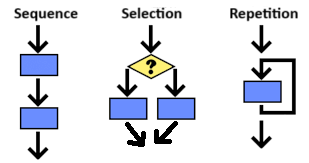
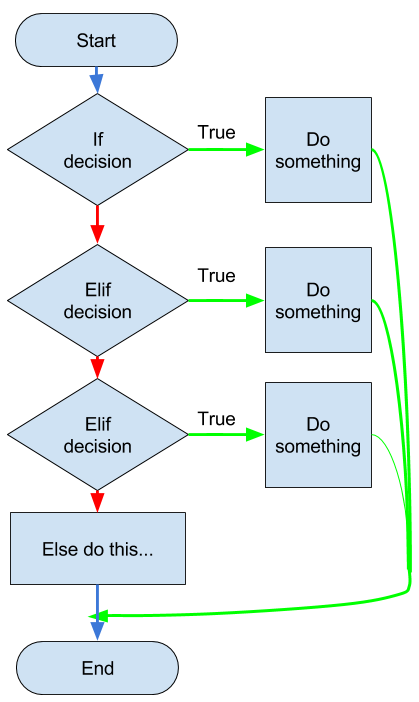
Up until now, we have been writing code one line at a time in sequence which then gets executed by the computer in that sequential order by default. However, we can create more complex algorithms that do not follow the default sequential order. The building blocks of algorithms are sequencing, selection, and repetition. In this lesson, we will learn to use selection to branch the code into different paths based on a condition. This allows us to create algorithms that can make decisions and respond to different situations.
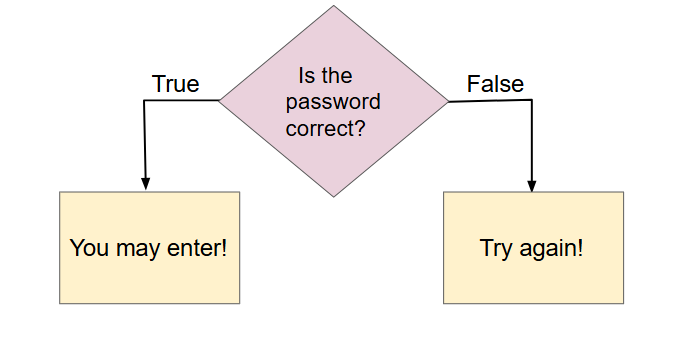
Selection is making a choice based on a true or false decision. For example, every time you login, the system checks your password and either grants access or denies it based on whether the password is correct.
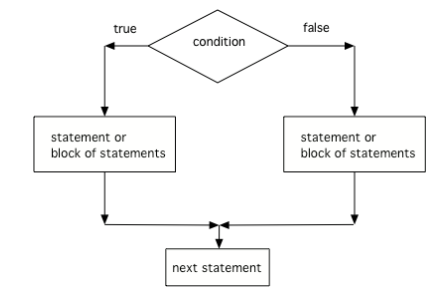
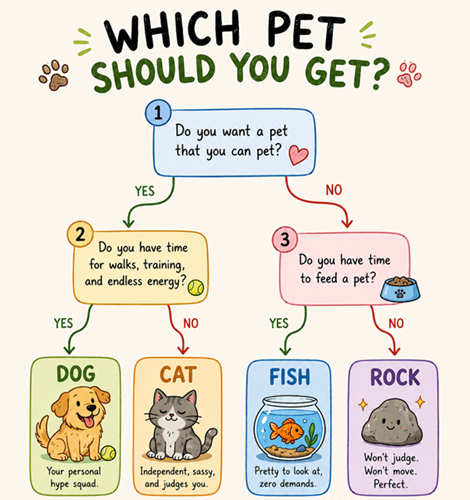
In flowcharts, selection is represented by a diamond shape with a condition inside. The flowchart branches into different paths based on the outcome of the condition.
In groups or as a class or individually, play a game of Simon Says Ifs. One person will give commands using if statements and if-else statments. The players will follow the commands only if the condition is true or false for them. You do not have to say or listen for "Simon Says". Here are some examples:
Almost all programming languages have a keyword called if which is used to implement selection (also called conditional statements). If-statements are followed by a block of statements that are only executed if the condition is true. In languages like C, C++, Java, JavaScript, and the AP Pseudocode above, the block of code is marked by using curly braces {}. But Python uses colon (:) after the if condition and indentation to mark the block of statements under the if; the parentheses around the condition are optional in Python and usually left out. The syntax for a Python if-statement is below:
The condition in an if-statement is any Boolean expression (like we learned in the last lesson) that evaluates to either true or false, for example number > 0. If you forget to indent the statements under the if statement, you will get an indentation error. Try it in the code below.
The following code asks for your name and then prints out a greeting. Run the code twice and enter "Bart" the first time, and your name another time. The code prints different things depending on the input! Change the code to check against your name instead of "Bart" and run again.
Python also has a very useful operator called in that checks if a substring is inside a string. Try it in the code above instead of using "==" to check if part of your name is in the input string. For example,
Do not confuse the equality operator (==) with the assignment operator (=). The equality operator checks if two values are equal, while the assignment operator assigns a value to a variable. If statements always use == to test a variable to see if it is equal to another value or expression.
If the variable in an if statement is a number that is user input, you must convert it to an integer or decimal (floating point number) using the int() or the float() function before you can use it in a comparison with relational operators, as seen below.
The following code checks if an inputted number is positive. Add another if statement to check if the number is negative. Run the code twice to test it once with a positive number and once with a negative number.
Since 10 is greater than or equal to 10, A will be printed, but then the program continues running after the if statement, so more will be printed.
B
10 is greater than or equal to 10
A and B
Correct. Since 10 is greater than or equal to 10, A will be printed, but then the program continues running after the if statement, so B will also be printed.
If you want to choose between two actions, use an if-else statement. Although curly braces are used in some programming languages, in Python, the syntax for an if-else statement uses a : and indentation like below:
if condition:
   first block of statements
else:
   second block of statements
If the condition in an if-else statement is true, the first block of statements executes. If the condition is false, the second block of statements executes. In the activecode activity above, we wrote two if statements to check for positive and negative numbers, but we could have used an if-else statement to make the code more efficient.
if number > 0:
   print("The number is positive.")
else:
   print("The number is negative or 0.")
Activity2.3.7.
The following program segment should ask whether the user wants to terminate the program and print out the appropriate statement based on the user’s response. The blocks have been mixed up and include extra blocks that aren’t needed in the solution. Drag the needed blocks from the left and put them in the correct order on the right. Make sure it is indented correctly!
response = input("Terminate the program (Y/N)?")
---
if response == "Y":
---
if response = "Y":  #paired
---
 print("The program is now ending.")
---
else:
---
 print("The program will continue to run.")
Change the following code so that the if condition checks against your favorite color (for example, "blue"). Add an else statement that prints out "That’s not my favorite color. My favorite color is ..." if the user enters a different color. Add another if/else statement to check if their favorite ice cream flavor is your favorite flavor (for example, "chocolate"). If it is, print out "That’s my favorite flavor too!", else print out "That’s not my favorite flavor. My favorite flavor is ..."
Given the code below, what will be printed if x = 9? In this code, mod (%) is used to check if a number is even or odd with the expression x % 2 == 0, because when even numbers are divided by 2, there is no remainder, but odd numbers always have a remainder when divided by 2.
Subsection2.3.6Logical Operators (and/or) in If Statements
To check multiple conditions in an if statement, you can use the logical operators and and or. Put complete tests using relational operators in each condition. With the and operator, both conditions must be true for the if statement to execute. With the or operator, at least one of the conditions must be true. The and operator is often used to check if a number is in a range, for example between 1 and 10 like below. The or operator can be used to check if a value is one of several possible values (for example uppercase or lowercase name like below) or error conditions like in the activity below.
if x >= 1 and x <= 10:
    print("x is between 1 and 10")

if name == "Ali" or name == "ali":
   print("Hello Ali!")
Activity2.3.10.
Fix the indentation errors in the code below, and change it to use only one if statement using the or operator. The code should print "Error" if the number is less than 1 or greater than 10.
The following code checks a student’s grade and prints out the letter grade. Run it to see that it prints both A and C for a grade of 90! This is because the second if statement is not quite right because 90 is >= 90 and 90 is >= 70. Fix the if statement for the C grade so that it only prints C if the grade is >= 70 and < 80. Then add another if statement to check for a D grade (60- up to 70) and another if statement to check for an F grade (0- up to 60). Test your code by changing the grade and running it multiple times to test every if statement.
If statements can be nested inside other if statements forming nested conditionals. The inner if statement is only evaluated if the outer if statement’s condition is true. For example, the following code which could be written with nested if statements or an and logical operator. Notice that in Python, the nested if statement is indented within the block of the outer if statement to indicate that it is inside it.
# Nested if statements
if userLoggedIn:
    if userHasPermission:
        print("Access granted.")

# Or using an and logical operator
if userLoggedIn and userHasPermission:
    print("Access granted.")
Activity2.3.12.
The following code figures out a ticket price for a movie according to the user’s age and the time at which the movie starts. Add a nested if statement to check for whether the movie is playing before 3 PM for a matinee discount. The movie theater opens at 1 PM, so don’t worry about AM hours. The variables age and hour have been set for testing, but you can comment out those lines to use your input too.
Nested if statements inside of else blocks can be used to make multi-way selections. A single if-else statement allows us to select between 2 branches of code. But with nested if-else-if statements, we can make multiple branches. Python has a shortcut keyword for this called elif which stands for "else if". Here’s an example of how it is used to chain together many conditions with the pattern if-elif-elif-...-else to branch the code into many directions. This is the same example of grade determination that we saw before, but this pattern of coding is shorter and easier to read. The extra tests for the maximum of each grade range is not needed because the tests are chained together. If the grade is not greater than or equal to 90, then it must be less than 90 when you reach the second test.
Keep clicking on the Next button at the bottom of the code to see how the values of the variables change as you step through the running program. You can see interactive tracing in any Active Code exercise by clicking the CodeLens button.
In this challenge, you can create your own text adventure game using if and elif statements. Your instructor may let you work in pairs. Where will your adventure take place? Will it be in a cave, a forest, a city, an island, a haunted house? You get to choose!
Create an adventure game with nested if-else statements. First, spend some time planning and designing your adventure locations. You may want to create a flowchart or other design documentation! Run the program below to see a template for your adventure game. Fill in the ...’s in the print statements and add more if statements for different choices in the adventure. Be careful with the nested indentation! Be creative!
Describe a logic error (especially in the condition of the if statements) that you made or another programmer could make in your project code above. Describe the program behavior resulting from this error.
Explain how you tested your code with different inputs to make sure it worked correctly. If you have access to a Gen AI system, ask it what test cases it would recommend for your code and describe your prompt and its response.
Review the vocabulary in this lesson. Drag the vocabulary term from the left and drop it on its correct definition on the right. Click the "Check Me" button to see if you are correct.
Subsection2.3.10App Inventor Project Continued (Optional)
If your class started the Lights Off app in MIT’s App Inventor, you can finish your app in section 2.14.4 Iteration 3 which uses if blocks and 2.14.5 Reflection in the App InventorLights Off App Lesson.