Subsection 3.2.1 What is a Procedure or Function
A
procedure or
function is a named block of code that performs a task when it is called.
We have already used several built-in Python functions in our programs, for example
input() and
print() which are input/output functions built into Python. Notice that functions end with parentheses () which can contain
arguments, the data that the function needs to do its job, for example what to print for the
print("Print this!") function. Some functions like
input() or
random.randint() also return values back like the user’s input or a random number that we usually store in a variable.
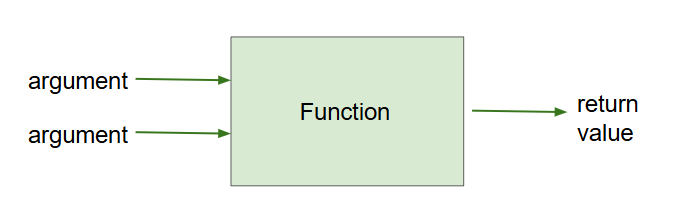
A function is like a
black box where you know what data goes in and what data comes out, but not necessarily how it works inside. We don’t really need to know exactly how
print() or
input() works internally; we just need to know what it does. This is called
procedural abstraction where the code is grouped into manageable chunks called procedures or functions that can be called by name, hiding the detailed implementation steps from the rest of the program. This allows programs to be more complex without being overwhelming. Here are some of the Python functions that we have used so far.
# The print() function takes 1 argument that it prints to the screen
print("Hello World!")

# The input() function takes 1 argument, the prompt, and returns the user's input
#     which we save in a variable
name = input("Enter your name: ")

# The random.randint() function takes 2 arguments, the low and high values,
# and returns a random number between those values (inclusive)
random_number = random.randint(1, 10)
Project 3.2.1 Unplugged: Functions.
In groups, choose one person to be the function. The person playing the function should choose a secret math formula with a variable and 2 operations, for example
2*x + 1. Don’t tell the rest of the group what the formula is!
The other members of the group will give the function different argument values for
x, and the function will return the result of the formula. Write down the input/output pairs for each argument and return value.
For example, if the function’s formula is
2*x + 1 and a group member provides
3 as the argument, the function returns
7. After each member gets a return value, the group should try to figure out the function’s secret formula. Then, discuss and answer the following questions as a group.
-
What arguments did your group provide to the function? What return value did the function produce for each argument?
-
What was the function’s secret formula? How did your group use the input/output pairs to try to figure it out?
-
How does this activity demonstrate that a function can be reused with different arguments?
-
Can you use a function without knowing how it works inside? How does this activity demonstrate that a function is a procedural abstraction like a "black box"?
Subsection 3.2.2 Procedure/Function Calls and Definitions
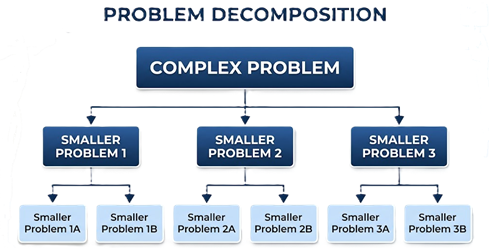
Let’s learn how to define our own functions and call them to do their jobs! The main reasons to divide up a program into multiple functions are to organize the code to reduce its complexity and to avoid repetition of code. For example, the "This Old Man" song below has a lot of repetition (
listen here). Instead of writing the same code over and over in order to print the song, we can write functions for different parts of the song and run them when needed. Click on all lines of code that are repeated in the song below, and then we will learn how they can be replaced with a function called
chorus().
Activity 3.2.2.
Click on all the lines that are completely identical and repeated.
Look for lines of Python code that are completely identical.
print("This old man, he played one.")
print("He played knick-knack on my thumb.")
print("With a knick-knack paddywhack, give a dog a bone,")
print("This old man came rolling home.")
print("This old man, he played two.")
print("He played knick-knack on my shoe.")
print("With a knick-knack paddywhack, give a dog a bone,")
print("This old man came rolling home.")
There are two steps to writing a function: the
function definition and the
function call. A function in Python is defined by using the keyword
def followed by the function name which the programmer chooses. Indented inside the function, we write the code that will be executed when the function is called. We can call a function or procedure by using its name, for example
chorus(). Functions always have parentheses () after their name even if it’s empty parentheses. In Python, functions always have to be defined before they can be called, so programmers put the function definitions at the top of the program and the main program below.
# Function definition
def functionName():
    <block of statements>

# Function call
functionName()
In AP CSP pseudocode, functions are called
procedures, and the keyword
procedure is used instead of
def to define a function. Curly braces are used to enclose the block of statements, instead of just indentation. Procedure calls just use the name of the procedure with parentheses like in Python.
# AP pseudocode procedure definition
procedure procName()
{
    <block of statements>
}

# AP pseudocode procedure call
procName()
When a function is called to do its job, the computer jumps to the function definition and runs the code inside it. When the function is finished, the computer jumps back to the line after the function call and continues running the program. See how the
chorus() function is called in the code below by clicking on the next button. Watch the red arrow as the program jumps to the function definition and then returns to the line after the function call. Notice how we have reduced repetition of code by abstracting the chorus into a function that can be called multiple times.
Activity 3.2.3.
Click on the next button below the code to step through the code. Watch the red arrow as the program calls the
chorus() function and then returns to the line where the function was called.
Try writing your own function calls below to reduce repetition of code and organize your program.
Activity 3.2.4.
Replace the repeated chorus lines in the code below with a function call to
chorus() to reduce repetition of code.
Activity 3.2.5.
Trace through the code below and determine what it prints.
def fruit():
    print("apples and bananas!")

def song():
    print("I like to eat, eat, eat")
    fruit()
    fruit()

song()
-
I like to eat eat eat
-
Try tracing through the song function and see what happens when it calls the other functions.
-
I like to eat eat eat fruit fruit
-
There is a fruit() function but it does not print out the word fruit.
-
I like to eat, eat, eat
apples and bananas!
-
There are 2 calls to the fruit() function in song().
-
I like to eat eat eat
apples and bananas!
apples and bananas!
-
Yes, song() prints the first line and then calls fruit() twice to print the other lines.
In the previous unit, we learned how to draw squares with loops. Let’s put that code in a function, so that it can be called multiple times to draw multiple squares. First, try it with a mixed up code problem, and then write the code yourself.
Activity 3.2.6.
The following code should define a function that draws a square using a turtle called tina, but it is mixed up. Drag the needed code to the right side in the correct order. Remember that the statements in the function must be indented! To indent a block drag it further right.
def drawSquare():
---
    for i in range(4):
---
        tina.forward(50)
        tina.right(90)
Activity 3.2.7.
Write a function called
drawSquare() with no parameters that draws a square of size 50 using the turtle. Move the loop into this function and then call the function to draw the square multiple times.
Subsection 3.2.3 Arguments and Parameters
Let’s take another look at the "This Old Man" song and see if we can replace more repeated code. Each verse of the song is similar except it uses a different number and rhyme. If we can pull these out into variables, we can write a single function that can print any verse of the song! Click on the words that are different in the lines that are repeated to discover what variables we need to add to the functions.
Activity 3.2.8.
Click on the words that are different in the repeated lines.
Look for lines that are similar except for a different number or action and click on those words.
print("This old man, he played one.")
print("He played knick-knack on my thumb.")
print("With a knick-knack paddywhack, give a dog a bone,")
print("This old man came rolling home.")
print("This old man, he played two.")
print("He played knick-knack on my shoe.")
print("With a knick-knack paddywhack, give a dog a bone,")
print("This old man came rolling home.")
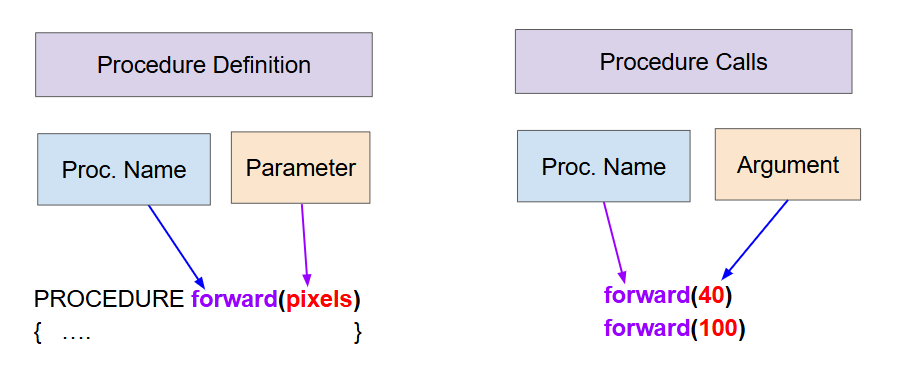
We can make functions even more powerful and more abstract by giving them parameters for the data that they need to do their job. A
parameter is a variable listed in the definition of a function and can be used inside the function body. This allows values, called
arguments, to be passed into the function. The argument value is copied into the corresponding parameter variable. Many people use the terms "parameter" and "argument" interchangeably, but formally, the parameter is the variable in the function definition and the argument is the value passed to the function when it is called.
For example, here is a procedure called
forward with a parameter variable called
pixels that we used with turtles with procedure calls like
forward(50) telling it to move forward 40 or 100 pixels. The value 40 is the argument that is passed to the parameter variable
pixels in the procedure definition.
Going back to our song, we can make a function called
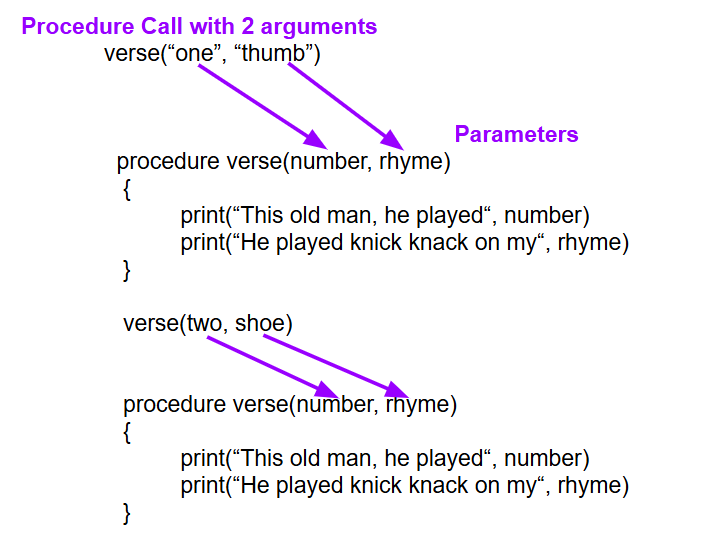
verse that takes the number and the rhyme as parameters and uses them to print any verse! The parameter variables
number and
rhyme will hold different values each time the function is called.
# This function prints a verse for a given number and rhyme.
# @param number - the number used in the verse
# @param rhyme - the word that rhymes with the number

def verse(number, rhyme):
    print("This old man, he played", number, ".")
    print("He played knick-knack on my", rhyme, ".")
    chorus()
The
verse function can now be used to print any verse of the song. The values passed to the function become the values of the parameter variables. The main part of the program can be just calls to the
verse function. Main program code often looks like an outline for the program, calling all the functions to do the work.
verse("one", "thumb")
verse("two", "shoe")
Notice that the same function is called two times with different arguments. When
verse("one", "thumb") is called, the parameter
number gets the value
"one" and the parameter
rhyme gets the value
"thumb". When
verse("two", "shoe") is called, the same parameters receive different values. The function does not need to change. The arguments provide the values that make each verse different.
Activity 3.2.9.
Click on the next button below the code to step through the code. Watch the red arrow jump to the
verse function each time it is called. Pay attention to how the arguments are passed into the parameter variables.
Let’s try adding more verses to the song. With the power of procedural abstraction using a function with parameters, it becomes very easy to add more verses to the song, just by calling the
verse function with different arguments. Parameters make it more general, flexible, and reusable!
Activity 3.2.10.
Run the following code to see the song "This Old Man" using the
verse function. Add another verse using
"three" and the rhyme
"knee" and another verse using
"four" and the rhyme
"door" by calling the
verse function with the two arguments.
Let’s add one more abstraction! Let’s add
data abstraction using lists along with
procedural abstraction. We can create two parallel lists of the
number and
rhyme values and iterate through them. This abstraction makes our code even more flexible and makes it even easier to add another verse by just adding a new element to each list.
numbers = ["one", "two", "three"]
rhymes = ["thumb", "shoe", "knee"]
# Iterate through the lists and call verse() for each number and rhyme
for i in range(len(numbers)):
    verse(numbers[i], rhymes[i])
Activity 3.2.11.
Change the code below to use two parallel lists of the
number and
rhyme values and iterate through them to call the
verse function for each number and rhyme. For help, see the code above. Create your list with 3 elements to start with and then extend it to 4 or 5 elements to see how easy it is to add more verses to the song using lists and a for loop.
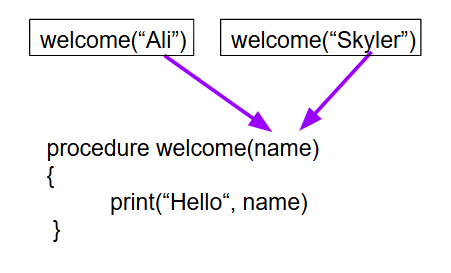
Let’s now write our own functions with parameters. Let’s write a procedure or function that welcomes a user. In AP CSP pseudocode, we would start the procedure definition with the header
procedure welcome(name) where the parameter variable is put inside the parentheses after the procedure name. Then, we can call
welcome with different values for the parameter variable
name to print a personalized welcome message.
In AP CSP pseudocode, a procedure with parameters is defined using the following syntax:
procedure procedureName(param1, param2, ...)
{
   <block of statements>
}
In Python, a function with parameters is defined using the following syntax:
def functionName(param1, param2, ...):
    # function body
Python and AP CSP pseudocode have very similar simple procedure or function call with the procedure name followed by the argument values inside the parentheses. The number of arguments in a call must match the number of parameters in the procedure definition. Each argument value is assigned to the matching parameter in the procedure definition in order.
# Python and AP CSP pseudocode procedure/function call
functionName(arg1, arg2, ...)
Activity 3.2.12.
Write a procedure called
welcome that takes a parameter for the user’s name and prints Hello using the name. Then call the procedure with your name as the argument.
Let’s also add parameters to our turtle square function so that we can draw squares of different sizes and colors.
Activity 3.2.13.
Write a function called
drawSquare(size, color) that draws a square of the specified size and color using the turtle.
When tracing through code that has procedures/functions, it is important to write down and keep track of the parameter variables and their values with each function call. Remember to match the arguments with the parameter in order.
Activity 3.2.14.
Consider the following pseudocode for a procedure
song.
procedure song(food1, food2)
{
    print("I like to eat, eat, eat", food1, "and", food2, "!")
}
Given the following procedure calls, what would be printed when the code is run?
song("bananas", "apples")
song("pizza", "pineapples")
-
I like to eat, eat, eat apples and bananas!
-
The first procedure call is song("bananas", "apples"), so the first argument, "bananas", is assigned to the food1 parameter.
-
I like to eat, eat, eat bananas and apples!
I like to eat, eat, eat pizza and pineapples!
-
Correct! The first procedure call is song("bananas", "apples"), so the first argument, "bananas", is assigned to the food1 parameter and the second argument, "apples", is assigned to the food2 parameter. The second procedure call is song("pizza", "pineapples"), so the first argument, "pizza", is assigned to the food1 parameter and the second argument, "pineapples", is assigned to the food2 parameter.
-
I like to eat, eat, eat apples and bananas!
I like to eat, eat, eat pineapples and pizzas!
-
Remember that arguments are assigned to parameters in order. The first argument is assigned to the first parameter variable, etc.
-
I like to eat, eat, eat pizzas and pineapples!
-
Both procedure calls will print a line, so there should be two lines printed.
Subsection 3.2.5 Event-Handling Functions and Global Variables
Event-handling functions are called when an event occurs in a graphical user interface (GUI), for example when a button is clicked or a key is pressed. Python turtles can respond to mouse clicks and keyboard presses with some fun event-handlers called
onscreenclick and
onkey that call a specified function like
myFunction when a mouse or key press event occurs. This is the only place where () are not used after a function name in Python.
# Call myFunction when the mouse is clicked on the screen
# myFunction must take 2 parameters for the x and y coordinates of the click
turtle.onscreenclick(myFunction)

# Call myFunction when the "Up" arrow key is pressed
turtle.onkey(myFunction, "Up")
turtle.listen()  # Start listening for key presses

# Call myFunction after 500 milliseconds (reduce to make faster)
turtle.ontimer(myFunction, 800)
If we want the turtle to turn with the arrows on the keyboard, we need to use the
setheading function which turns the turtle to a specific north, south, east, or west direction. Since the Python turtles always start facing east or to the right of the screen, that is set to
setheading(0) for 0 degrees. From their starting position, the turtle can be turned to face north/up with
setheading(90), west/left with
setheading(180), and south/down with
setheading(270). In the code below, event handling functions have been written for the mouse click and the up and right arrow keys. Try adding the event handling functions for the down and left arrow keys to move the turtle in those directions.
Activity 3.2.15.
Try the event-handling functions below to move the turtle around the screen with mouse clicks and arrow keys. Note that when you click on Run in Runestone, the turtle window will only respond for 20 seconds. You will need to click inside the turtle window to give it focus before pressing the arrow keys.
Change the onclick_handler to change the turtle’s color. Change it back when the up arrow is pressed. Add the functions for the "Down" and "Left" arrow keys using the
setheading function with 270 and 180 degrees. Draw something fun with the turtle and the keyboard arrow keys!
Local variables are variables that are defined inside a function and can only be used within that function.
Global variables are variables that are defined outside of any function and can be used anywhere in the program. In Python, if you change a variable using assignment (
=) inside a function, it becomes a local variable. If you want to refer to a global variable, you need to declare that variable as
global before using it, usually in the first line of the function definition. Another option is to pass and return the variable as a parameter to the function.
# Global variable
score = 0

def increase_score():
    global score       # Declare that we are using the global variable
    amount = 5         # amount is a local variable
    score += amount    # Increase the global score by amount
Activity 3.2.16.
Try running the code below to see the error where score is assumed to be a local variable, and the global variable score is not changed. Add the line
global score in the first line of the
increase_score() function to fix the error.
Let’s create a whack-a-mole game where the turtle randomly moves on the screen, and the user tries to catch it with mouse clicks. This game will use a global score variable.
Activity 3.2.17.
Create a whack-a-mole game where the turtle randomly moves on the screen, and the user tries to catch it with mouse clicks. Use a global score variable to keep track of how many times the turtle is caught. The turtle will stop after 40 moves, so try to catch the turtle as many times as you can before it stops!
Optional enhancements: change the colors with each move, increase the speed if the turtle is caught!
Subsection 3.2.6 Return Values
Some procedures or functions also return a value back to the code that called them. For example, we have used the Python built-in
input() function, which returns the user’s input as a string, and the
random.randint() function, which returns a random integer. You can imagine a function as a calculating machine that takes numbers as arguments and returns a calculated result, or like a toaster that takes bread as an argument and returns toast.
When writing your own functions, you can use the keyword
return to return a variable or value or expression. If you do not have a return statement in your function, Python automatically returns the special value
None by default. So, all Python functions actually return a value, even if it’s just
None. The return statement also immediately ends the function, so any code after the return statement is not executed.
Consider a simple function that squares a number. For example,
square(3) returns 9.
# Define function square
def square(number):
  return number * number

# Call the function
print( square(3) )  # prints 9
result = square(4)
print(result)  # prints 16
Let’s try this below. Click on the next button to step through the code and see how the argument is passed to the parameter and how the return value is sent back to the calling code.
Activity 3.2.18.
Click on the next button below the code to step through the code. Watch the red arrow move to the function that is being called, see how the argument is passed into the parameter variable, and watch the return value move back to the calling code.
After calling a function, the return value can be printed or stored in a variable or used as part of an expression. The value is substituted in place of the function call.
# Print the return value
print( square(3) )  # prints 9
# Save the return value in a variable
# and use it in an expression
result = square(4) + square(2) + 1
Activity 3.2.19.
What does the following code print when run?
def square(x):
  return x * x

def divide(x, y):
  return x / y

print(square(2) + divide(10, 2))
-
9.0
-
Yes. The square(2) function returns 4. The divide(10, 2) function returns 5.0. The sum of 4 and 5.0 is 9.0.
-
45
-
Sometimes string concatenation happens, but in this case, the + operator performs addition because both functions return numeric values.
-
square(3)+divide(5,2)
-
The functions return values that are then added.
-
Nothing, it does not run.
-
Try the code in an active code window. Both functions are valid Python functions and the expression produces a numeric result.
Here are some common errors when working with functions:
-
Giving the wrong number of arguments to a function.
-
Giving the arguments in the wrong order.
-
Forgetting to use what a function returns.
Activity 3.2.20.
Fix the function calls below. Make sure the correct number and order of arguments are used. Do not change the function definitions.
Activity 3.2.21.
A summer camp offers a morning session and an afternoon session.
The list
morningList contains the names of all children attending the morning session, and the list
afternoonList contains the names of all children attending the afternoon session.
Only children who attend both sessions eat lunch at the camp. The camp director wants to create
lunchList, which will contain the names of children attending both sessions.
The following code segment is intended to create
lunchList, which is initially empty. It uses the procedure
IsFound(list, name), which returns
true if
name is found in
list and returns
false otherwise.
for child in morningList
{
	<MISSING CODE>
}
Which of the following could replace <MISSING CODE> so that the code segment works as intended?
if (IsFound(afternoonList, child))
{
    lunchList.append(child)
}
-
Correct! Since the loop goes through every child in morningList, checking whether the child is also found in afternoonList identifies children who attend both sessions.
if (IsFound(lunchList, child))
{
    afternoonList.append(child)
}
-
Incorrect. lunchList is initially empty, so this condition cannot be used to determine whether a child attends the afternoon session.
if (IsFound(morningList, child))
{
    lunchList.append(child)
}
-
Incorrect. The loop already considers only children in morningList. The code must check whether each child is also in afternoonList.
if ( IsFound(morningList, child)  or
     IsFound(afternoonList, child) )
{
    lunchList.append(child)
}
-
Incorrect. The child must attend both sessions, so the condition should check for membership in afternoonList. Using OR would not correctly represent the requirement.
Subsection 3.2.8 Coding Challenge: Draw Functions
In the activities above, you created a
drawSquare() and a
drawSquare(size, color) function. In this project, we will abstract even further and create a function
drawPolygon(sides, size, color, fill) to draw any polygon with the specified number of
sides. The angle of each turn in the polygon can be calculated by dividing 360 by the number of sides, since 360 degrees is a complete circle. For example, for a square which has 4 sides, the angle of each turn is 360/4 = 90 degrees. For an octagon which has 8 sides, the external angle of each turn is 360/8 = 45 degrees. We can also use a boolean parameter
fill to determine whether the polygon should be filled with color or not, adding calls to
begin_fill() and
end_fill() if the boolean parameter is true.
We will also add two more functions:
drawCircle(radius, color, fill) and
drawStar(size, color, fill). To draw a circle, use the
tina.circle(radius) method of the turtle. To draw a star, use a for loop that repeats 5 times, moving forward and turning right by
144 degrees each time. The star can also be filled with color if the fill parameter is true.
Once you create these functions, create a function called
drawSnowflake(sides, size, color, rotation) that uses a loop and calls your drawPolygon function and then turns a little to draw a spiralling pattern. Experiment with different types of polygons and rotation amounts to create a cool snowflake design. Then, create another function called
drawMyDesign()to draw a more complex design, for example, a house, a creature, a car, a face, a flag, etc. The code below also has some advanced turtle movement functions that will move the turtle anywhere you click on the screen and move the turtle with the arrow keys. Try running it to see it in action! See if you can incorporate the mouse and keyboard controls into your design.
Project 3.2.25 Coding Challenge: Draw Functions.
Create the following functions:
-
drawPolygon(sides, size, color, fill) which draws a polygon with the specified number of sides, size, and color. Use if statements to check if fill is True to call begin_fill() and end_fill(). For the angle, use 360/sides.
-
drawCircle(radius, color, fill) which draws a circle using tina.circle(radius) and if statements for the fill.
-
drawStar(size, color, fill) which draws a 5-pointed star using a for loop that repeats 5 times, moving forward by the size and turning right by 144 degrees each time.
-
drawSnowflake(sides,size,color,rotation) which uses a loop that runs 360/rotation times and in the loop, calls the drawPolygon function with no fill and turns the turtle by the rotation amount afterwards to get ready for the next shape. For an additional challenge, you can use an if-else statement to check if the loop counter is even or odd, and change the color to create a multi-colored snowflake.
-
drawMyDesign() that draws a more complex design, for example, a house, a creature, a car, a face, a flag, etc., using your other functions. You can also ask the user for input on different colors or sizes. You can call your function after all the other function definition. You can also call functions from the goto function below that draws things starting at a clicked location.
If you need to clear the screen, use
tina.clear().
There are also some cool mouse and keyboard controlling functions introduced in the code below. Try running and clicking below to see
onscreenclick in action. This will also work with a tap on a touch screen or touch pad. Try using the arrow keys to move the turtle around the screen.
Activity 3.2.26 Procedural Abstraction Reflection.
Consider one of the procedures (i.e. functions) that you wrote in the drawing project above. Describe the functionality provided by this procedure. Explain the advantages of implementing this functionality as a procedure (i.e. function). Describe how the program would be coded if this functionality was not in a procedure. What are the benefits of using procedural abstraction in your code?
Activity 3.2.27 Procedure Calls Reflection.
Consider one of the procedures (i.e. functions) that you wrote in the drawing project above. Write two calls to your procedure that each cause a different code segment in the procedure to execute. Describe the expected behavior of each call. Describe why this is a good use of procedural abstraction. If it is not possible for two calls to your procedure to cause different code segments to execute, explain why this is the case for your procedure.