Debugging is a normal part of coding. It can be frustrating at times, but you will get better at it with practice! Watch the following video to see that all coders get bugs.
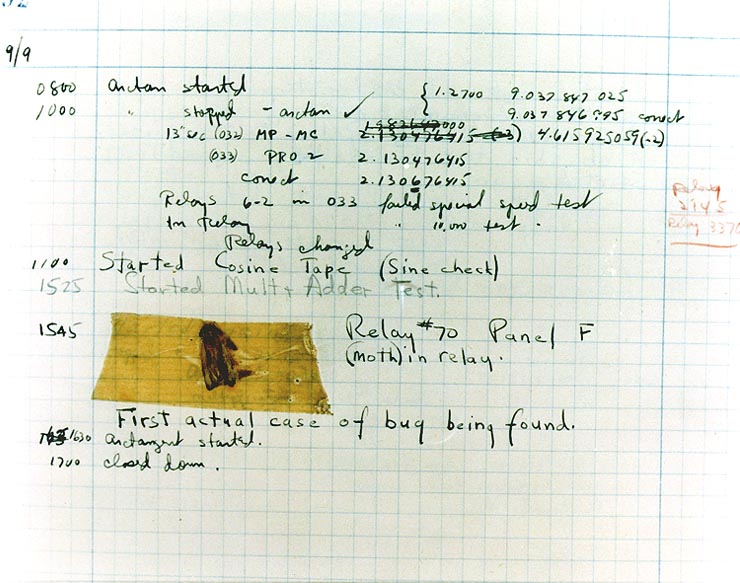
One of the first documented computer bugs was discovered by an early computer science pioneer Grace Hopper, and it was a moth that flew into a panel of a large computer in 1947! Grace Hopper debugged the computer and pasted the actual bug in her logbook.
Everyone who codes encounters bugs or errors in their programs. Sometimes the user of your program will report the problem and the programmer will have to figure out what went wrong.
When you are coding, the most common type of error is a syntax error, which means that you didn’t write the Python code correctly. For example, if you forget to close a parenthesis or use the wrong indentation, you will get a syntax error reported by the Python interpreter.
The Python interpreter tries to run your code, but if your code has syntax errors, you will see error messages displayed below the code. The error messages will tell the line number of the error and the type of error. The error messages are not always easy to understand and sometimes the actual error is before the line reported, but that is where the interpreter crashed on your code. Try to debug the code below. Read the error messages underneath to help you. Here are some common syntax errors to look for:
Some errors cannot be detected by the interpreter. These are called logic errors or run-time errors. Logic errors occur when the program runs, but the output is not what you expected. For example, a programmer might have made a math mistake so the wrong value is calculated. Logic errors can be detected by testing the program with specific data to see if it produces the expected outcome.
The following code has a logic error. It is supposed to calculate the average of three scores. Try running it and you will see that it does not give the correct answer. Fix the math operator in the code to correct the logic error and run to test.
Run the following code to see the run-time error of dividing by zero (which is not allowed). Fix the code to correct the run-time error and run to test.
Tracing is a great way to debug code, especially with logic or runtime errors. To trace code, pretend you are the computer and go through each line of code step by step, keeping track of the values of variables as you go. The Code Lens button in the active code exercises can help you to debug your code. It is based on the Python Tutor website. Try using the Code Lens button or the Python Tutor tool to trace the code in the debugging exercises above.
Another way to keep track of what is happening in your code is to add print statements to display the values of variables at key points in the program. Try it below.
The following code has a logic error. The loop is supposed to total the numbers 0 through 5, but it only adds 0 through 4. Add a print statement inside the loop to display the value of the variable number at each iteration. Then run the code to see what is happening and fix the logic error.
Subsection2.6.2Rubber Duck and AI Tools for Debugging
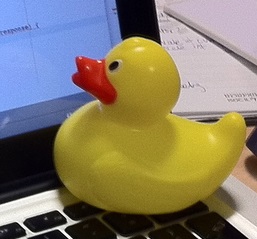
If you get stuck trying to find the bugs, sometimes another pair of eyes really helps. Ask a friend if you get stuck or try explaining your code line by line to someone or even a rubber duck. Rubber duck debugging is a lot of fun!
Many programmers use Gen AI tools to help them debug their code. Some AI tools like Co-pilot are built into the IDE and can suggest code to fix errors. Other AI tools like ChatGPT or Gemini can be used to explain what your code is doing and suggest ways to fix errors. However, remember that AI tools are not perfect and can make mistakes, so it is important to verify any suggestions they provide by testing your code and checking the results.
When testing code, programmers create test cases with specific inputs and expected outputs. They run the code with the test case inputs and compare the actual output to the expected output. If the actual output does not match the expected output, then there is a bug in the code that needs to be fixed. A test plan with a table like the one below can be used to record the testing results for a program.
In code with selection statements, it is important to test each branch of the conditional to ensure that the program behaves correctly for all possible inputs. With loops, it is important to use boundary test cases to test the loop’s behavior at the limits of its range. Invalid test cases with inputs just beyond the limits of the conditions for selection or loops should also be tested.
Try the code below which has some logic errors. Use the test plan in the table in the activity below to test it. After you have filled in the actual output column, you can fix the code by changing "if" to "elif" after the first "if" to chain all the conditions together.
Review the vocabulary in this lesson. Drag the vocabulary term from the left and drop it on its correct definition on the right. Click the "Check Me" button to see if you are correct.