Section 1.1 Apps

45 minutes
Computer Science is an exciting field that is transforming the way we live and work. Watch the video below to learn more about how computers and software are changing the world.
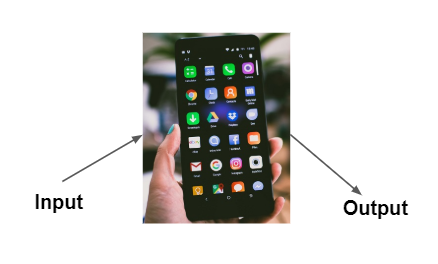
In this lesson, we will explore the purpose and behavior of apps by interacting with them and observing their input and output.

Subsection 1.1.1 Purpose and Behavior of Apps

Think about your favorite apps on your phone and their purpose. App is short for application, which is a program that runs on a computer or any computing device including your phone.
An app’s purpose is why it was created, its ultimate goal or the problem it solves. For example, the purpose of a texting app on a phone is to help us to communicate with each other.
Take a look at the Google Stopwatch or Github Stopwatch app below. Why would someone use this app? What is its purpose? What happens when you click the Start button? What happens when you click the Pause or Reset buttons? Try it out below.

Activity 1.1.1.

What is the purpose of the Google Stopwatch app?
  • To tell time
  • That would be a watch or clock app.
  • To time an event by counting down from a set amount of time
  • A timer counts down from a set amount of time. A stopwatch counts up from zero.
  • To measure how much time has passed starting from zero
  • Correct! A stopwatch keeps track of how much time has passed starting from zero, such as timing a race or an activity.
  • To perform calculations
  • Calculations are done with a calculator app, not a stopwatch.
Some apps are easy to use with clear purposes and behaviors, but sometimes apps and other designs can fail to meet user needs or expectations. Watch the following video about bad design choices.
Take a look at this app with bad design below or the userinyerface.com funny website. The purpose of the app is to accept your date of birth, but the app is not a successful design. Try to put in your birthdate. Is it frustrating to use?

Activity 1.1.2.

What are the issues with the Bad Date app and how does it behave when you interact with it? How could it be improved to better meet user needs and expectations?

Activity 1.1.3.

Take a look at Google Maps. What is the purpose of Google Maps? People may interact with Google Maps in different ways. Describe the behavior of Google Maps including how you interact with it and how it responds to do two different tasks.

Subsection 1.1.2 Inputs and Outputs

Watch the following video about what makes a computer a computer.
As seen in the video, all computing devices and the apps that run on them are created to receive input from users, store it as data, process the data, and produce output to communicate with users.
Input is data sent to a computer for processing by a program, and output is the data sent back from the program to the device. Input and output can come in many forms, such as tactile (for example touching a button or the device vibrating), audible (a sound), visual (an image), or text.

Activity 1.1.4.

Which of the following are examples of input and output in the Google Stopwatch app?
  • Tapping the Start button
  • Correct! Tapping a button is user input.
  • The system time
  • The system time is used by the stopwatch app to calculate the elapsed time but it is not input or output to the user.
  • The elapsed time displayed on the screen
  • Correct! The app displays the elapsed time as output.
  • The color of the displayed time
  • The color of the displayed time is set by the app code but it is not input or output to the stopwatch app.
  • Pressing the reset button
  • Pressing the reset button is an input to the stopwatch app.
The door design video above mentioned feedback in human-centered design, where feedback tells the user that something happened after their input.

Activity 1.1.5.

Which app below is most likely to use tilting the device (accelerometer) as an input or vibration as an output?
  • A car racing game
  • Yes, a car racing game could use tilting the phone to steer the car and phone vibration as output during a crash.
  • A calculator app that adds two numbers
  • A calculator typically uses taps as input and text as output, not tilt or vibration.
  • A tic tac toe game
  • Tic tac toe games mainly use touch input and visual output.
  • A weather app that displays today’s forecast
  • Weather apps primarily display information on the screen rather than using tilt or vibration.

Activity 1.1.6.

Describe a device or app that uses input from a sensor or camera. If you cannot think of one, search online for examples.
Most apps these days use event-driven programming, which means they display the user interface (UI) and wait for user events to trigger actions, for example for the user to touch a button. In event-driven programming, the code is attached to input such as button click and only run when triggered. The app’s behavior is determined by the code that runs in response to the input.
Try the following pizza web app by typing in your name and choosing different options. Think about the inputs and outputs to the app.

Activity 1.1.8.

Which of the following output types does the pizza app above use? Check all that apply.
  • text
  • The app prints out text output when the button is clicked.
  • vibration
  • This app cannot vibrate.
  • image
  • Pizza images are displayed as output if the user likes pizza.
  • sound
  • There is no sound with this app.
  • color
  • Yes, the background color changes as a result of user interactions.

Subsection 1.1.3 Vocabulary Review

Activity 1.1.9.

You have attempted of activities on this page.