Worksheet 13.7 Group Work: HTML Basics

It is best to use a POGIL approach with the following. In POGIL students work in groups on activities and each member has an assigned role. For more information see cspogil.org.

Note 13.7.1.

If you work in a group, have only one member of the group fill in the answers on this page. You will be able to share your answers with the group at the bottom of the page.
Learning Objectives
Students will know and be able to do the following.
Content Objectives:
Process Objectives:
HTML stands for Hyper Text Markup Language. It is used to create web pages. HTML describes the elements of the webpage such as the title, paragraphs, images, and links. For more information on HTML see the tutorial at w3schools.com.
HTML uses tags to describe the elements of the document. Tags are enclosed in < and >.

Note 13.7.2.

HTML is not a programming language. It is a markup language for describing documents.

Activity 13.7.1.

Click on the "Render" button to see the resulting web page.
Try adding a h2 and h3 header to the HTML above after the paragraph. What happens to the text as the header level increases (h1, h2, h3)?
The following is an explanation of the HTML above
  • The first tag, <!DOCTYPE html>, indicates that this is an HTML document. While it is best to include this tag, the page will typically display fine even if you don’t include it.
  • The html tag is the root (start) tag for the document.
  • The head tag contains meta information about the document such as the title.
  • The body tag contains the items that will be displayed.
  • The h1 tag is for a first-level (most important) header. There are additional types of headers: h2, h3, etc.
  • The p tag indicates a paragraph of text.

Activity 13.7.2.

Subsection 13.7.1 Start and End Tags

Most HTML elements have start tags and end tags. The page is started with the start tag <html> and ends with the end tag </html>. Indentation isn’t required, but makes it easier to read the HTML.

Activity 13.7.3.

Activity 13.7.4.

Activity 13.7.5.

Fix the errors in the HTML below so that every start tag has an end tag and every end tag has a start tag.

Subsection 13.7.2 List Tags

You can include both ordered (numbered) and unordered (bulleted) lists in HTML.

Activity 13.7.6.

Render the HTML below.

Activity 13.7.7.

Subsection 13.7.3 Tag Relationships: Parent, Child, Sibling

The HTML tag has two children tags: <head> and <body>. The head contains meta information about the page including the page title. The body contains the elements that are displayed in the page such as the headers and paragraphs.

Activity 13.7.8.

Put the blocks into order to define a simple HTML page. Indent the blocks to show the structure.

Activity 13.7.9.

Put the blocks into order to define a simple HTML page with a header and a paragraph in that order. Indent the blocks to show the structure.
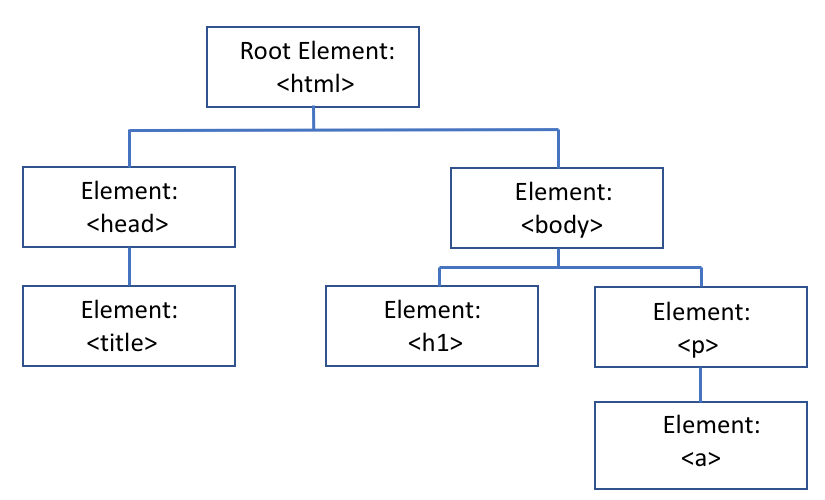
In an HTML page the root element is the β€œhtml” tag. A root is the start of a structure. This type of structure is called a tree. The html tag has two children elements: the head and body tags. These tags are called sibling tags since they share the same parent tag. The parent for the head and body tags is the html tag. The body tag is the parent of the h1 and p tags.
A Tree Representation of an HTML page
Figure 13.7.3.

Activity 13.7.10.

Which tag is the parent of the a (hyperlink) tag in the above structure?
  • h1
  • No, the parent is connected in the tree structure.
  • p
  • Yes, the parent is the paragraph (p) tag.
  • body
  • No, the body is the parent of the p tag.
  • html
  • No, the html tag is the parent of the head tag.

Activity 13.7.11.

Which tag is the parent of the title tag in the above structure?
  • h1
  • No, the title is not connected to the h1 tag.
  • body
  • No, the title is not connected to the body tag.
  • head
  • Yes, the parent tag is the head tag.
  • html
  • No, the html tag is the parent of the head tag.
If you worked in a group, you can copy the answers from this page to the other group members. Select the group members below and click the button to share the answers.
The Submit Group button will submit the answer for each each question on this page for each member of your group. It also logs you as the official group submitter.

You have attempted of activities on this page.