Skip to main content
Contents Index
Search Book
Search Results:
No results.
Read aloud Readability settings Prev Up Next Scratch ActiveCode Profile title here \(
\newcommand{\lt}{<}
\newcommand{\gt}{>}
\newcommand{\amp}{&}
\definecolor{fillinmathshade}{gray}{0.9}
\newcommand{\fillinmath}[1]{\mathchoice{\colorbox{fillinmathshade}{$\displaystyle \phantom{\,#1\,}$}}{\colorbox{fillinmathshade}{$\textstyle \phantom{\,#1\,}$}}{\colorbox{fillinmathshade}{$\scriptstyle \phantom{\,#1\,}$}}{\colorbox{fillinmathshade}{$\scriptscriptstyle\phantom{\,#1\,}$}}}
\)
Section 14.6 Plan 5: Get info from all tags of a certain type
To get information from the Cottage Inn locations page, we need to figure out which tags we should get from the soup, and what information we should get from the tags.
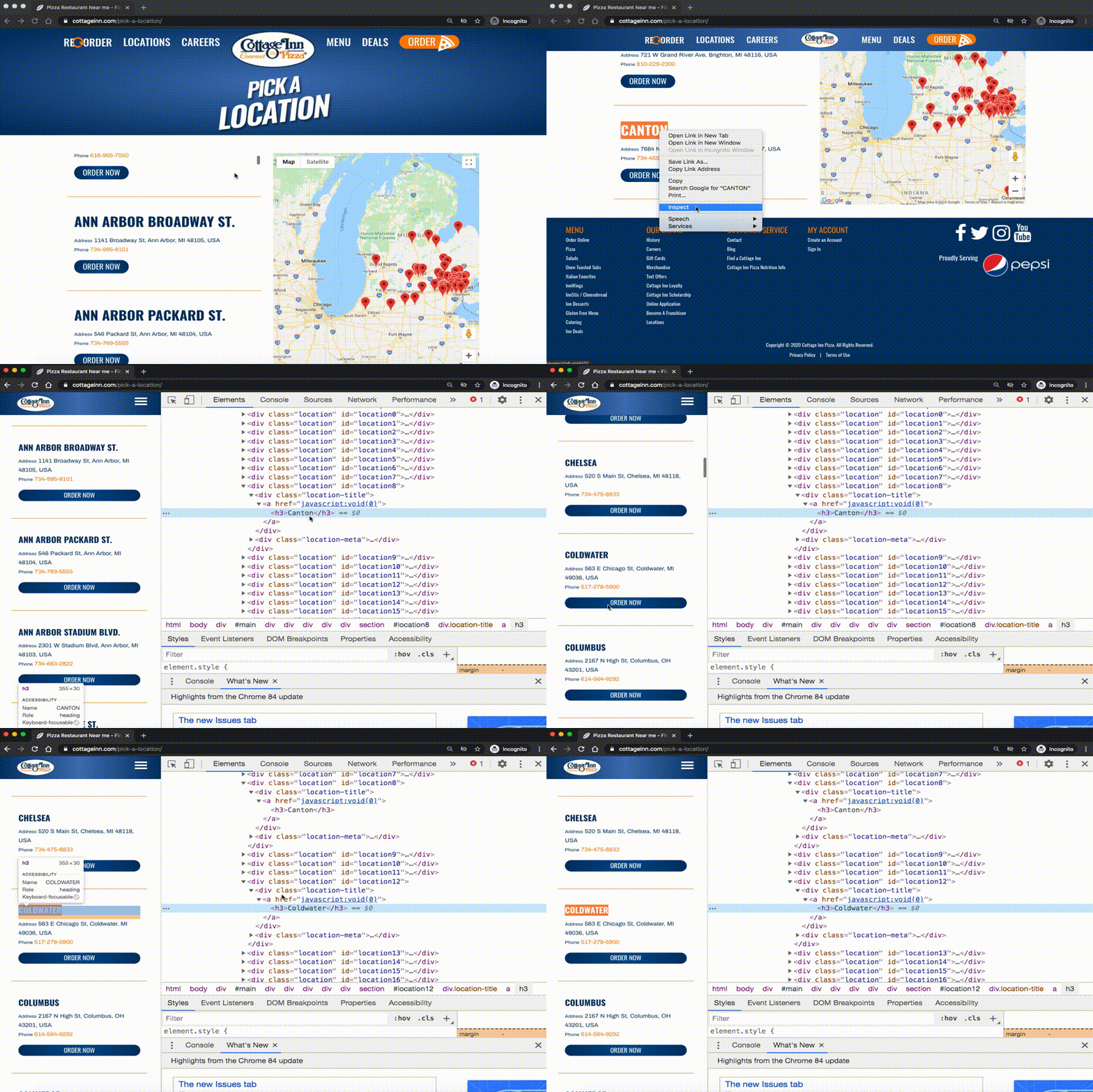
A great way to figure this out is to use the "inspect" function on your browser.
Figure 14.6.1. By inspecting the locations, we see that they are all h3 tags.
We see that we need to get info from all the
h3 tags from the webpage. The
text in those tags has the information we need!
Subsection 14.6.1 Looking closer at a tag
Behind every webpage is HTML code. HTML code is made up of
tags .
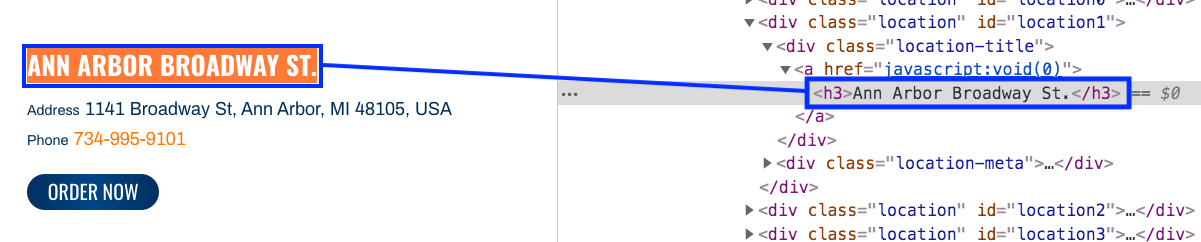
Here is the tag that creates the name of one of the Cottage Inn Pizza locations. The tag is surrounded by the blue rectangle. It is an ’h3’ tag.
Figure 14.6.2. h3 tag example
The name of this tag is ’h3’. In-between the start and end tag (between the
<h3> and
</h3>) is the tag’s text. For this tag, the text is Ann Arbor Broadway St.
Subsection 14.6.2 Plan 5: Example
Here is how to get text from all the ’h3’ tags from webpage:
# Get all tags of a certain type from the soup
tags = soup.find_all('h3')

# Collect info from the tags
collect_info = []
for tag in tags:

    # Get info from tag
    info = tag.text
    collect_info.append(info)
Subsection 14.6.3 Plan 5: How to use it
Once you’ve found the tags you want to get information from, do two things:
1. Find the tag description and put it into the first slot.
How do you do that? Here are some examples:
Table 14.6.3. Tag Description Examples
<p>->
'p'
<h3>->
'h3'
<div class="comment">->
'div', class_='comment'
<span style="X5e72;">->
'span', style='X5e72;'
<a class="css4z" href="/orders">->
'a', class_='css4z'
2. Determine if you want to get text from a tag, or a link from a tag
Table 14.6.4. Info Types
The tag’s text
->
text
The tag’s link
->
get('href') or get('href', None)
Subsection 14.6.4 Plan 5: Exercises
Activity 14.6.1 .
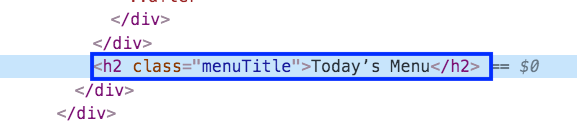
What is the text of the tag below?
Figure 14.6.5. h2 tag on dining page
Today’s Menu
Correct! This text is between the <h2 class="menuItem"> and </h2>
h2
No, h2 is the tag name
menuTitle
No
class
No
Activity 14.6.2 .
What is the tag description of the tag below?
Figure 14.6.6. h2 tag on dining page
’h2’, class_=’menuTitle’
Correct! This is how you would describe the tag type in our web scraping code.
’h2’
That is a part of the tag description, but we can be more specific.
’h2’, class=’menuTitle’
Very close, but in web scraping code you should use class followed by an underscore
<h2 class="menuTitle">
This is what is actually in the tag, but it’s not how we would describe the tag in web scraping code.
Activity 14.6.3 .
Right now, this code gets the
text from all ’h3’ tags in the webpage. If you wanted to get the
urls from all the ’a’, class_=’headline’ tags in the webpage, which part(s) of the code below would you change?
# Get all tags of a certain type from the soup
tags = soup.find_all( ’h3’ )
# Collect info from the tags
collect_info = []
for tag in tags:
# Get info from tag
info = tag. text
collect_info.append(info)
Activity 14.6.4 .
Activity 14.6.5 .
Which tag in the picture below has text?
Figure 14.6.7. span tag on dining page
’h2’
No, there is no h2 tag in this image.
span, style=’font-weight: 400;’
Correct! The text starts with "With its chandeliers and dramatically vaulted ceiling..."
’p’
No, this tag contains the span tag.
’style’
No, style is an attribute
You have attempted
of
activities on this page.