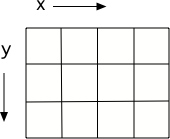
Images (pictures) on a computer are broken up into little bits called pixels, for picture (pix) elements (els). These are laid out on a grid, from left to right (horizontal or x dimension) and top to bottom (vertical or y dimension).
Pixels are quite small. Even the small image below has 180 columns and 240 rows of pixels. Each pixel has a color associated with it: an amount of redness, an amount of greenness, and an amount of blueness. Let’s remove the red from this picture. Now, there are lot of lines in the program below, but fortunately, you can ignore most of them.
11-9-2: What happens when you set all the colors to 0? Try adding p.setBlue(0) and p.setGreen(0) to the program above after the p.setRed(0) and run it to check.