Section 22.4 Visualizing mail data
Up to this point in the book, you have become quite familiar with our
mbox-short.txt and
mbox.txt data files. Now it is time to take our analysis of email data to the next level.
In the real world, sometimes you have to pull down mail data from servers. That might take quite some time and the data might be inconsistent, error-filled, and need a lot of cleanup or adjustment. In this section, we work with an application that is the most complex so far and pull down nearly a gigabyte of data and visualize it.
You can download this application from:
We will be using data from a free email list archiving service called
www.gmane.org. This service is very popular with open source projects because it provides a nice searchable archive of their email activity. They also have a very liberal policy regarding accessing their data through their API. They have no rate limits, but ask that you don’t overload their service and take only the data you need. You can read gmane’s terms and conditions at this page:
When the Sakai email data was spidered using this software, it produced nearly a Gigabyte of data and took a number of runs on several days. The file
README.txt in the above ZIP may have instructions as to how you can download a pre-spidered copy of the
content.sqlite file for a majority of the Sakai email corpus so you don’t have to spider for five days just to run the programs. If you download the pre-spidered content, you should still run the spidering process to catch up with more recent messages.
Activity 22.4.1.
True or False? When running the following program, it is required to spider the Sakai email data.
-
True
-
Try again! In the README.txt file, there are instructions to download a pre-spidered file.
-
False
-
In the README.txt file, there are instructions to download a pre-spidered file. It is useful to spider after this, to stay up to date on new messages.
The first step is to spider the gmane repository. The base URL is hard-coded in the
gmane.py and is hard-coded to the Sakai developer list. You can spider another repository by changing that base url. Make sure to delete the
content.sqlite file if you switch the base url.
The
gmane.py file operates as a responsible caching spider in that it runs slowly and retrieves one mail message per second so as to avoid getting throttled by gmane. It stores all of its data in a database and can be interrupted and restarted as often as needed. It may take many hours to pull all the data down. So you may need to restart several times.
Here is a run of
gmane.py retrieving the last five messages of the Sakai developer list:
How many messages:10
http://download.gmane.org/gmane.comp.cms.sakai.devel/51410/51411 9460
    [email protected] 2013-04-05 re: [building ...
http://download.gmane.org/gmane.comp.cms.sakai.devel/51411/51412 3379
    [email protected] 2013-04-06 re: [building ...
http://download.gmane.org/gmane.comp.cms.sakai.devel/51412/51413 9903
    [email protected] 2013-04-05 [building sakai] melete 2.9 oracle ...
http://download.gmane.org/gmane.comp.cms.sakai.devel/51413/51414 349265
    [email protected] 2013-04-07 [building sakai] ...
http://download.gmane.org/gmane.comp.cms.sakai.devel/51414/51415 3481
    [email protected] 2013-04-07 re: ...
http://download.gmane.org/gmane.comp.cms.sakai.devel/51415/51416 0

Does not start with From
The program scans
content.sqlite from one up to the first message number not already spidered and starts spidering at that message. It continues spidering until it has spidered the desired number of messages or it reaches a page that does not appear to be a properly formatted message.
Sometimes
gmane.org is missing a message. Perhaps administrators can delete messages or perhaps they get lost. If your spider stops, and it seems it has hit a missing message, go into the SQLite Manager and add a row with the missing id leaving all the other fields blank and restart
gmane.py. This will unstick the spidering process and allow it to continue. These empty messages will be ignored in the next phase of the process.
One nice thing is that once you have spidered all of the messages and have them in
content.sqlite, you can run
gmane.py again to get new messages as they are sent to the list.
The
content.sqlite data is pretty raw, with an inefficient data model, and not compressed. This is intentional as it allows you to look at
content.sqlite in the SQLite Manager to debug problems with the spidering process. It would be a bad idea to run any queries against this database, as they would be quite slow.
The second process is to run the program
gmodel.py. This program reads the raw data from
content.sqlite and produces a cleaned-up and well-modeled version of the data in the file
index.sqlite. This file will be much smaller (often 10X smaller) than
content.sqlite because it also compresses the header and body text.
Each time
gmodel.py runs it deletes and rebuilds
index.sqlite, allowing you to adjust its parameters and edit the mapping tables in
content.sqlite to tweak the data cleaning process. This is a sample run of
gmodel.py. It prints a line out each time 250 mail messages are processed so you can see some progress happening, as this program may run for a while processing nearly a Gigabyte of mail data.
Loaded allsenders 1588 and mapping 28 dns mapping 1
1 2005-12-08T23:34:30-06:00 [email protected]
251 2005-12-22T10:03:20-08:00 [email protected]
501 2006-01-12T11:17:34-05:00 [email protected]
751 2006-01-24T11:13:28-08:00 [email protected]
...
The
gmodel.py program handles a number of data cleaning tasks.
Domain names are truncated to two levels for .com, .org, .edu, and .net. Other domain names are truncated to three levels. So si.umich.edu becomes umich.edu and caret.cam.ac.uk becomes cam.ac.uk. Email addresses are also forced to lower case, and some of the @gmane.org address like the following
[email protected]
are converted to the real address whenever there is a matching real email address elsewhere in the message corpus.
In the
mapping.sqlite database there are two tables that allow you to map both domain names and individual email addresses that change over the lifetime of the email list. For example, Steve Githens used the following email addresses as he changed jobs over the life of the Sakai developer list:
[email protected]
[email protected]
[email protected]
We can add two entries to the Mapping table in
mapping.sqlite so
gmodel.py will map all three to one address:
[email protected] ->  [email protected]
[email protected] -> [email protected]
You can also make similar entries in the DNSMapping table if there are multiple DNS names you want mapped to a single DNS. The following mapping was added to the Sakai data:
iupui.edu -> indiana.edu
so all the accounts from the various Indiana University campuses are tracked together.
You can rerun the
gmodel.py over and over as you look at the data, and add mappings to make the data cleaner and cleaner. When you are done, you will have a nicely indexed version of the email in
index.sqlite. This is the file to use to do data analysis. With this file, data analysis will be really quick.
The first, simplest data analysis is to determine “who sent the most mail?” and “which organization sent the most mail”? This is done using
gbasic.py:
How many to dump? 5
Loaded messages= 51330 subjects= 25033 senders= 1584

Top 5 Email list participants
[email protected] 2657
[email protected] 1742
[email protected] 1591
[email protected] 1304
[email protected] 1184

Top 5 Email list organizations
gmail.com 7339
umich.edu 6243
uct.ac.za 2451
indiana.edu 2258
unicon.net 2055
Note how much more quickly
gbasic.py runs compared to
gmane.py or even
gmodel.py. They are all working on the same data, but
gbasic.py is using the compressed and normalized data in
index.sqlite. If you have a lot of data to manage, a multistep process like the one in this application may take a little longer to develop, but will save you a lot of time when you really start to explore and visualize your data.
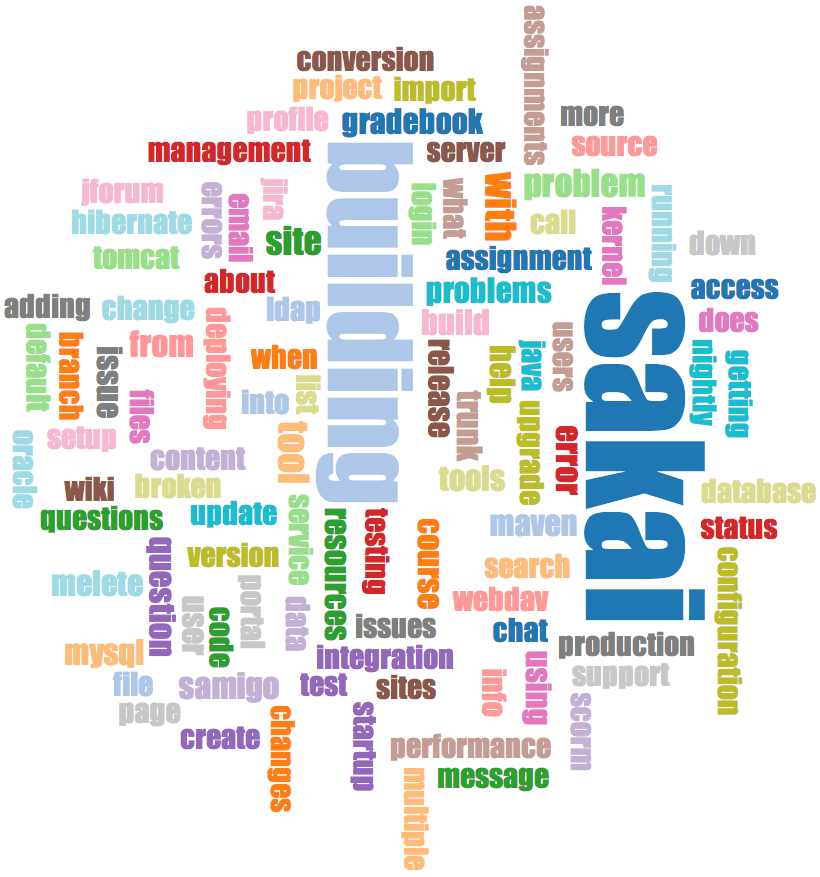
You can produce a simple visualization of the word frequency in the subject lines in the file
gword.py:
Range of counts: 33229 129
Output written to gword.js
This produces the file
gword.js which you can visualize using
gword.htm to produce a word cloud similar to the one at the beginning of this section.
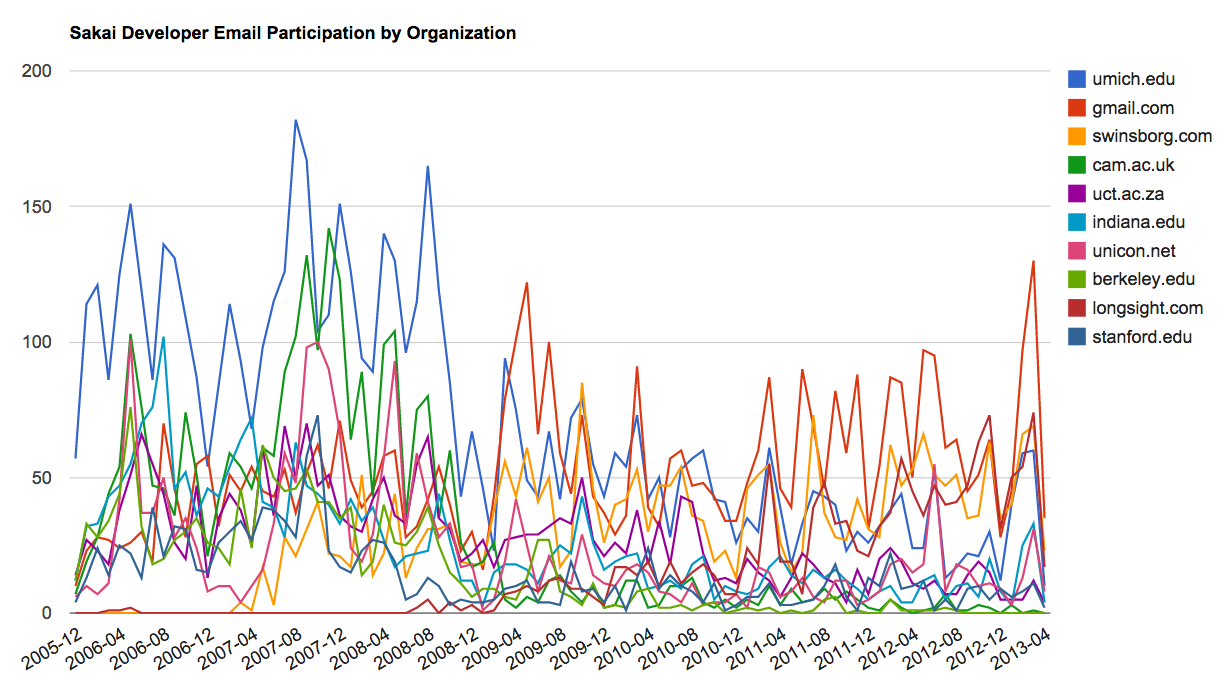
A second visualization is produced by
gline.py. It computes email participation by organizations over time.
Loaded messages= 51330 subjects= 25033 senders= 1584
Top 10 Oranizations
['gmail.com', 'umich.edu', 'uct.ac.za', 'indiana.edu',
'unicon.net', 'tfd.co.uk', 'berkeley.edu', 'longsight.com',
'stanford.edu', 'ox.ac.uk']
Output written to gline.js
Its output is written to
gline.js which is visualized using
gline.htm.
This is a relatively complex and sophisticated application and has features to do some real data retrieval, cleaning, and visualization.
You have attempted
of
activities on this page.