Skip to main content\(
\newcommand{\lt}{<}
\newcommand{\gt}{>}
\newcommand{\amp}{&}
\definecolor{fillinmathshade}{gray}{0.9}
\newcommand{\fillinmath}[1]{\mathchoice{\colorbox{fillinmathshade}{$\displaystyle \phantom{\,#1\,}$}}{\colorbox{fillinmathshade}{$\textstyle \phantom{\,#1\,}$}}{\colorbox{fillinmathshade}{$\scriptstyle \phantom{\,#1\,}$}}{\colorbox{fillinmathshade}{$\scriptscriptstyle\phantom{\,#1\,}$}}}
\)
Section 18.2 Understanding Image Representation
Understanding images requires understanding a set of abstractions:
-
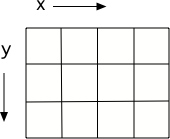
Images are made up of little pixels (objects of the Pixel class), laid out on an (x,y) grid.
-
Each pixel contains a red value, a green value, and a blue value.
-
Each color value is actually a number between 0 and 255.
-
If a pixel has red=0, green=0, and blue=0 then the color is black since this is an absence of any color of light.
-
If a pixel as red=255, green=255, and blue=255 then the color is white. Try tilting the bottom of a cd in white light to see the colors in the light.
Figure 18.2.1. Figure: A grid with horizontal (x) and vertical (y) dimensions
Activity 18.2.1.
11-9-1: Where is x = 0 y = 0 on an image?
-
Middle of the image in width on the left side
-
y is 0 at the top left corner
-
Top right corner of the image
-
x is 0 at the left corner
-
Middle of the image in width and height
-
y is 0 at the top left corner and x is 0 on the left
-
Top left corner of the image
-
Correct! x is 0 and y is 0 at the top left corner of the image
-
Bottom left corner of the image
-
y is 0 at the top and increases towards the bottom
Activity 18.2.2.
11-9-2: What color would red = 255, green = 0, blue = 0 be?
-
black
-
Black is an absence of light (all values are 0).
-
white
-
White is when all values are 255.
-
red
-
If the green and blue are 0 and the red is 255 this will be red.
-
green
-
This would be true if the green was 255 and the other values were 0.
-
blue
-
This would be true if the blue was 255 and the other values were 0.
You have attempted
of
activities on this page.