Section 17.2 Practice with Turtles

The following problems have a Help Me button. You can click the Help Me button after you have made at least three full and distinct attempts to solve the problem to make the problem easier.

Activity 17.2.1.

Construct a block of code that asks the user for a number and prints three times that number.
Figure 17.2.2. Capital L drawn by turtle

Activity 17.2.3.

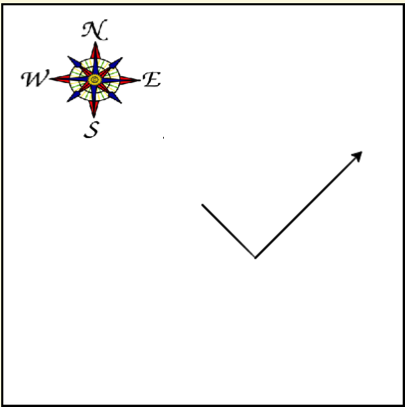
The following program uses a turtle to draw a checkmark as shown below but the lines are mixed up. The program should do all necessary set-up: import the turtle module, get the screen/space to draw on, and create the turtle. The turtle should turn to face southeast, draw a line that is 75 pixels long, then turn to face northeast, and draw a line that is 150 pixels long. We have added a compass to the picture to indicate the directions north, south, west, and east. Northeast is between north and east. Southeast is between south and east. Drag the needed blocks of statements from the left column to the right column and put them in the right order. There may be additional blocks that are not needed in a correct solution. Then click on Check to see if you are right. You will be told if any of the lines are in the wrong order or are the wrong blocks.
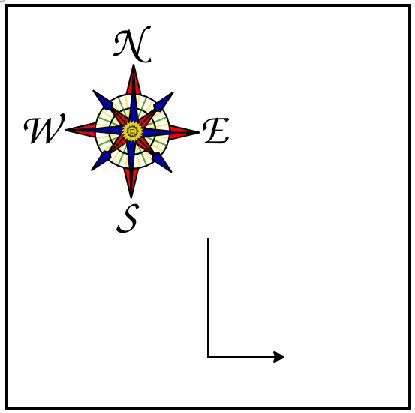
Figure 17.2.4. Checkmark drawn by turtle

Activity 17.2.5.

Activity 17.2.6.

Click the Run button to see what this code does. The drawing will happen below the code.

Activity 17.2.7.

The following example has four errors. Can you fix the errors so that the code runs correctly to print a capital L?

Activity 17.2.8.

The following example has 4 errors. Can you fix the errors so that the code runs correctly to print a capital C?

Note 17.2.9.

Case matters in Python so screen is not the same as Screen. Also the open and close parentheses are required after every function and procedure call, even if it doesnโ€™t take any input.
You have attempted of activities on this page.