Skip to main content
Contents Index
Search Book
Search Results:
No results.
Read aloud Readability settings Prev Up Next Scratch ActiveCode Profile title here \(
\newcommand{\lt}{<}
\newcommand{\gt}{>}
\newcommand{\amp}{&}
\definecolor{fillinmathshade}{gray}{0.9}
\newcommand{\fillinmath}[1]{\mathchoice{\colorbox{fillinmathshade}{$\displaystyle \phantom{\,#1\,}$}}{\colorbox{fillinmathshade}{$\textstyle \phantom{\,#1\,}$}}{\colorbox{fillinmathshade}{$\scriptstyle \phantom{\,#1\,}$}}{\colorbox{fillinmathshade}{$\scriptscriptstyle\phantom{\,#1\,}$}}}
\)
Section 14.5 Plan 4: Get info from a single tag
Subsection 14.5.1 Plan 4: Example
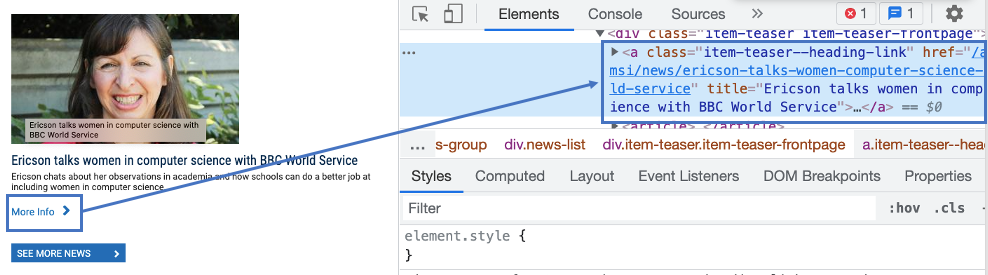
Maybe we want to get just one piece of information from a webpage. In this example, we want to get the first link to a news story from a professor’s page.
Here’s what we see when we use the "inspect" function in the browser.
Figure 14.5.1. The tag that has a link to the news article
Since that tag is the first of its type on the page, we can use the plan Get info from a single tag.
# Get first tag of a certain type from the soup
tag = soup.find('a', class_='item-teaser--heading-link')

# Get info from tag
info = tag.get('href')
Subsection 14.5.2 Plan 4: When to use it
Use this when you want to get information that is in the first tag of a certain type on the page.
Subsection 14.5.3 Plan 4: How to use it
Once you’ve found the tag you want to get information from, do two things:
1. Find the tag description and put it into the first slot.
How do you do that? Here are some examples:
Table 14.5.2. Tag Description Examples
<p>->
'p'
<h3>->
'h3'
<div class="comment">->
'div', class_='comment'
<span style="X5e72;">->
'span', style='X5e72;'
<a class="css4z" href="/orders">->
'a', class_='css4z'
2. Determine if you want to get text from a tag, or a link from a tag
Table 14.5.3. Info Types
The tag’s text
->
text
The tag’s link
->
get('href')
One type of tag, the
a tag, is a link to another url.
Here is the tag that creates the link to the North Quad dining hall page. It is an ’a’ tag.
Figure 14.5.4. Link to the North Quad dining hall page
If you want to get the link from a tag, use
get('href') in the second slot in this plan.
Subsection 14.5.4 Plan 4: Exercises
Activity 14.5.1 .
What is the link of the tag below?
Figure 14.5.5. Link to Barb’s page
https://www.si.umich.edu/people/barbara-ericson
No, this is the full link, but there is a relative link in the tag.
/people/barbara-ericson
Correct!
a
No, this is the name of the tag
Barbara Ericson
No, this is the text of the tag
Activity 14.5.2 .
If you wanted to get a link from the first ’a’ tag on a webpage, which part(s) of the code below would you change? Click on those parts of the code.
Check out the example of this plan above to identify the area that should be changed.
# Get first tag of a certain type from the soup
tag = soup.find( ’div’, class_=’Comments_StyledComments-dzzyvm-0 dvnRbr’ )
# Get info from tag
info = tag. text
Check out the image below, that inspects the description of the North Quad dining hall.
Figure 14.5.6. The tag that creates the description of North Quad
Activity 14.5.3 .
Choose the subgoals that prints the text from the tag that has the description of the North Quad dining hall, and put them in the right order. You do not need to use all the blocks.
# Get first tag of a certain type from the soup
tag = soup.find('span', style='font-weight: 400;')
---
# Get first tag of a certain type from the soup
tag = soup.find('span') #paired
---
# Get info from tag
info = tag.text
---
# Get info from tag
info = tag.get('href') #paired
---
# Print the info
print(info)
Activity 14.5.4 .
You have attempted
of
activities on this page.