Worksheet 13.13 Group Work on BeautifulSoup with Requests

It is best to use a POGIL approach with the following. In POGIL students work in groups on activities and each member has an assigned role. For more information see https://cspogil.org/Home.

Note 13.13.1.

If you work in a group, have only one member of the group fill in the answers on this page. You will be able to share your answers with the group at the bottom of the page.

Learning Objectives
Students will know and be able to do the following.
Content Objectives:
Process Objectives:

Subsection 13.13.1 Getting a tag from a soup object

BeautifulSoup makes it easy to extract the data you need from an HTML or XML page. It creates a soup object that contains all the tags in the page. You can use find or find_all to find either the first of a type of a tag or a list of a type of tag.
We will use the requests library to get a response object from a URL, create a BeautifulSoup object from the HTML content in the response, use find to find the first paragraph tag, and then print the first paragraph tag.

Activity 13.13.1.

This will find and print the first paragraph tag from the Michigan Daily site. It will interpret the tag as HTML and show just the text of the tag.
The html.parser is the HTML parser that is included in the standard Python 3 library. It is used to parse the HTML into a tree of tags. Information on other HTML parsers is available at:

Activity 13.13.2.

Put the following blocks in order to print the second paragraph from the Michigan Daily website. It uses the find_all method on BeautifulSoup to get a list of all of the paragraphs.

Subsection 13.13.2 Getting text from a tag

Some tags have text like a paragraph tag or a span tag. You can use tagName.text to get the text. You can also find a tag with a particular CSS class.

Activity 13.13.3.

This will print the text for the site description paragraph.

Note 13.13.2.

When you specify a CSS class you must use class_ as the keyword. This is becuase class is already a keyword that is used to define a new class in Python.

Activity 13.13.4.

Put the following blocks in order to print the text for span tag which is a child of a h3 tag with a class of css-1pjbq1w.

Subsection 13.13.3 Getting data from tags with attributes

Some tags have attribute and value pairs like the link (anchor) tag. You can get the value for an attribute of the tag. A link or anchor tag looks like <a href="url">link text</a>. An example is <a href="https://www.w3schools.com">W3Schools</a>.
Activity 13.13.5.

This will find all of the link tags in the New York Times site and print the href for each of them.

Activity 13.13.6.

Put the following blocks in order to find all the link tags and print the href for each one for the Michgian Daily.

Subsection 13.13.4 How to Find Tags Inside of Tags

Sometimes the tags that you want to find don’t have a particular class that makes it easy to find them. Then you can find a parent tag with a particular class and then use that tag to look for the child tag you want.

Note 13.13.3.

You can use β€˜find_all’ to get a list of all tags of a type and then loop through those tags and get the first tag of a type.
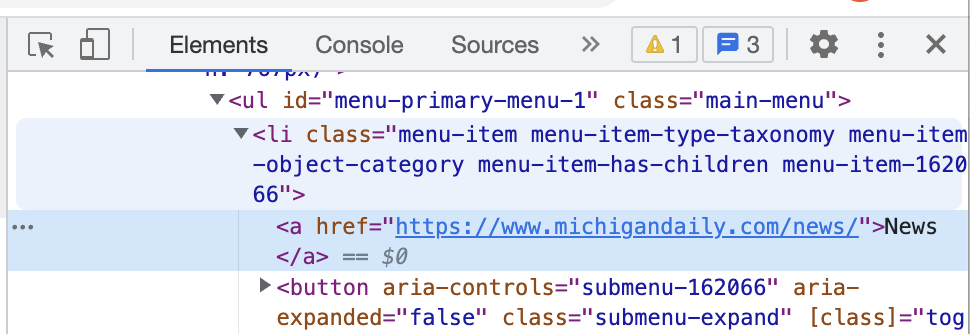
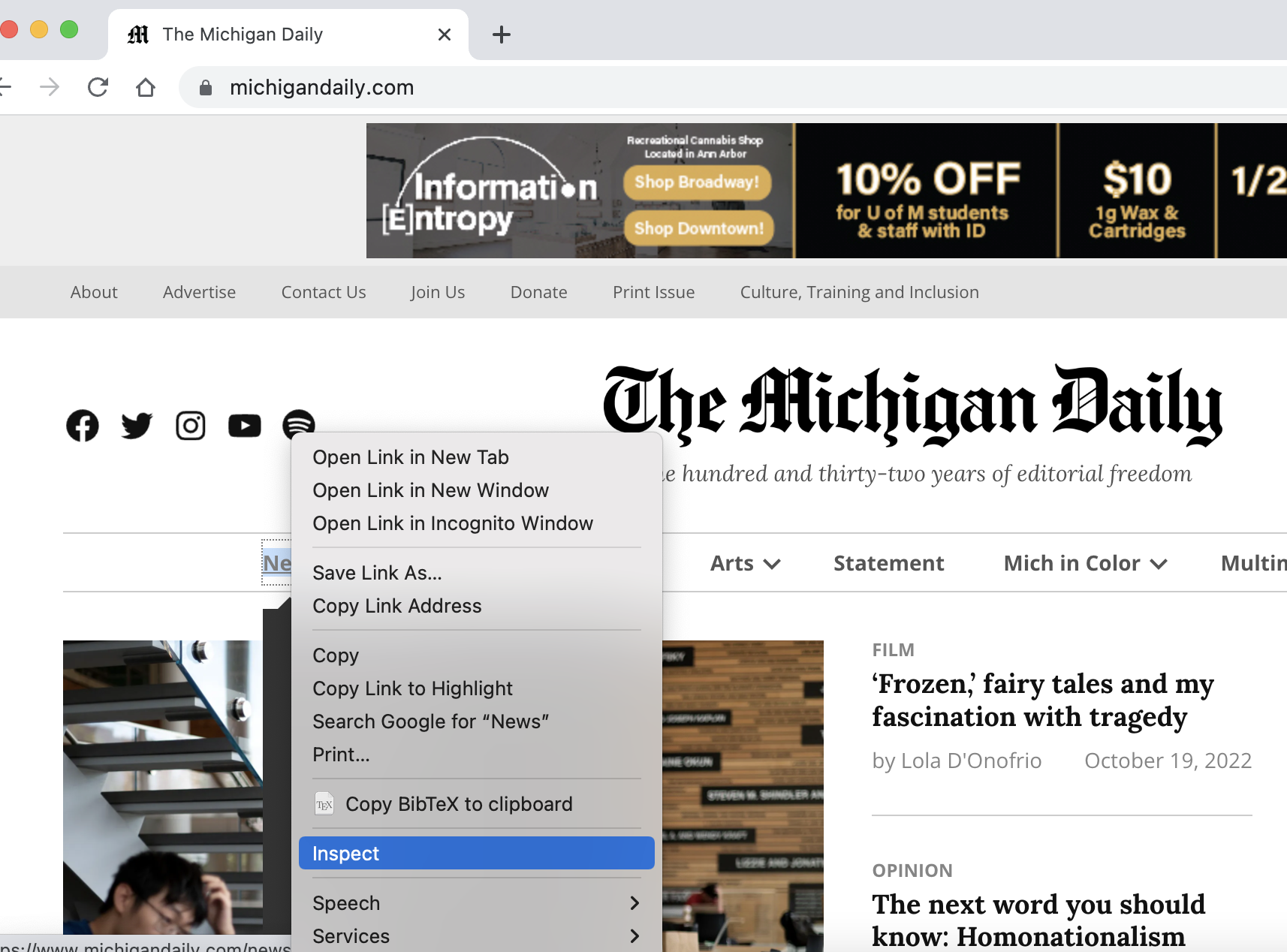
You will typically first inspect a webpage to determine how to find what you are looking for in the page. You can do that with the developer tools in the Chrome browser. Click on the three dots on the top right of the page and then β€œMore Tools” and then β€œDeveloper Tools”. You you can also just right-click on what you are interested in viewing on a webpage, and then click on β€œInspect”.
Figure 13.13.4.
You will see the HTML source for the thing you inspected.
Figure 13.13.5.
You can use this information to find a parent tag such as the β€œli” tag that contains the β€œa” tag in the nagivation bar in the Michigan Daily webpage. Use find_all to get all the β€œli” tags and then loop through those tags and use find to get the first β€œa” tag in each β€œli” tag.

Activity 13.13.7.

This will print the first β€œhref” inside each list item (li) with a class of β€œmenu-item-has-children”.

Note 13.13.6.

You don’t have to use all the classes that a tag has. Try to find a class that is specific to the tags you are looking for.

Activity 13.13.8.

Put the following blocks in order to print the href for the first β€˜a’ tag in each h2 tag with a class of β€œentry-title”
The Michigan Daily has a β€œMost Read” section. It is in a β€œdiv” tag with a class of β€œjetpack_top_posts_widget”. Inside that tag there are β€œli” (list item) tags. In each β€œli” tag is an β€œa” tag.

Activity 13.13.9.

Complete the code below to print the href values for the β€œa” tags in the β€œMost Read” section.
If you worked in a group, you can copy the answers from this page to the other group members. Select the group members below and click the button to share the answers.
You have attempted of activities on this page.
The Submit Group button will submit the answer for each each question on this page for each member of your group. It also logs you as the official group submitter.