Section 6.5 Memory Hierarchy

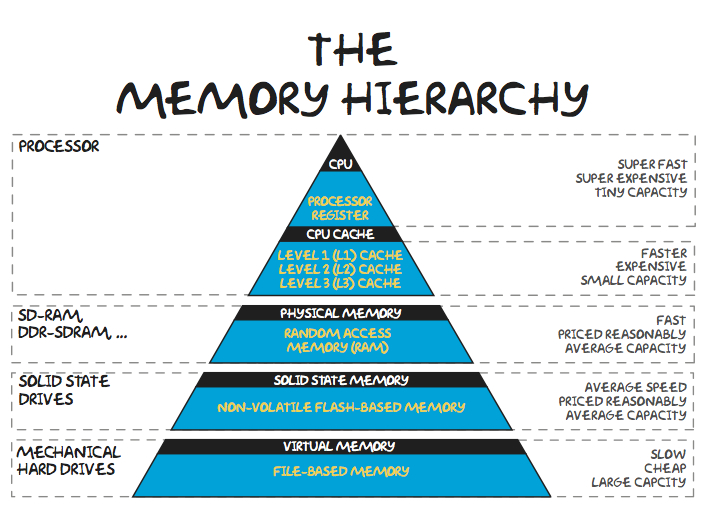
In an ideal, simple computer there would only be one memory - the main memory. That memory would be instantaneously accessible, allow permanent storage, require minimal energy, and be compact and cheap. Unfortunately, no technology offers all those features. Real-world constraints force computer engineers to use multiple different technologies, using each for the kind of thing it is best suited for. These different technologies form the memory hierarchy - a series of layers from small and fast to large and slow.
Figure 6.5.1. Image via teachbook.com.au

Subsection 6.5.1 Registers

The small memory location on the CPU itself. Because the memory is right on the CPU, and because of the way it is engineered, it provides instant access to the information it contains. But because the space on the CPU is limited, the real estate there is very valuable and there is generally not much room for registers. At any time, only the most important set of information (current instruction and a few pieces of data) is in the registers.

Subsection 6.5.2 Cache

This special memory is smaller and faster than the normal main memory and is housed closer to the CPU. It maintains a copy of parts of the main memory, allowing quicker access to some information. As far as the logic of a program goes, the cache doesnโ€™t existโ€ฆ we always request information from the main memory (RAM). The cache just makes it so that sometimes those memory requests come back extra fast. Lots of engineering goes into figuring out how the computer should decide what is important enough to get cached.

Subsection 6.5.3 RAM - Main Memory (Physical Memory)

The โ€œnormalโ€ main memory that we saw on the previous page. It generally runs significantly slower than the CPU - oftentimes hundreds of times slower. Thus each time the CPU has to access the main memory, it can represent a significant slowdown. RAM generally needs power to maintain its state; when the power is turned off, it forgets the information it is storing.
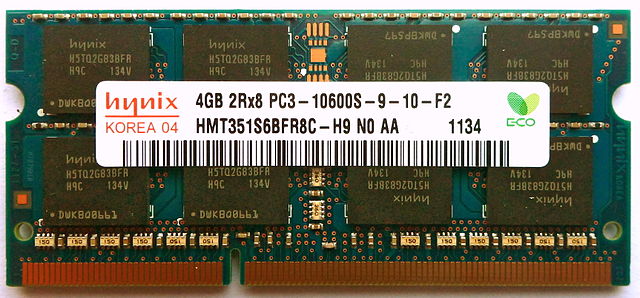
Figure 6.5.2. A stick of RAM that might go in a laptop computer.Image via Wikipedia Commons - Creative Commons CC BY SA 3.0

Subsection 6.5.4 Secondary Memory

Because main memory is generally built with circuits that need power, it cannot store information while the computer is off. Secondary memory is the general term for things like solid-state drives, spinning magnetic hard drives, CD drives, flash drives, etcโ€ฆ that can store information long-term. (Bottom two levels of the pyramid above). Not only can they retain information without power, but they also generally provide better density - you can store more information in less space and with less cost. Unfortunately, these technologies are all slower than main memory. Information stored in secondary memory must be loaded into main memory (RAM) before the processor can access it - when you wait for a program to start up, a big part of what you are waiting on is the needed information to be transferred from a slower hard drive to the fast RAM that the processor can talk to.

Subsection 6.5.5 Relative Speed

There is a famous (in computer science) dataset called latency numbers every programmer should know. Part of it is reproduced below. It is not something you actually need to memorize, especially since the exact numbers can vary based on the specific hardware and context, but it is useful to have a general understanding of the relative performance differences of the different levels of memory.
Table 6.5.3. Memory Latency
Event Nanoseconds CPU cycles
Register access 0.25 1
L1 cache reference 0.5 2
L2 cache reference 7 28
Main memory reference 100 400
Read 1 MB sequentially from memory 250,000 1,000,000
Read 1 MB sequentially from SSD 1,000,000 4,000,000
Disk seek (jump to location on spinning hard drive) 10,000,000 40,000,000
Read 1 MB sequentially from spinning hard drive 20,000,000 80,000,000
Notice that main memory is hundreds of times slower than the CPU! That is the reason why cache and memory are used - they provide ways to store information in a way that the CPU can access without having to wait that long.
Main memory in turn is dramatically faster than solid-state drives (SSDs) and spinning hard drives. That is why we canโ€™t just use the more permanent storage options as the primary storage for the CPU. Every time it needed to access a new piece of data it would have to wait millions of cycles.

Checkpoint 6.5.4.

Checkpoint 6.5.5.

Checkpoint 6.5.6.

You have attempted of activities on this page.