Skip to main content
Contents
Search Book
Search Results:
No results.
Read aloud Readability settings Prev Up Next Profile title here \(\newcommand{\N}{\mathbb N} \newcommand{\Z}{\mathbb Z} \newcommand{\Q}{\mathbb Q} \newcommand{\R}{\mathbb R}
\newcommand{\lt}{<}
\newcommand{\gt}{>}
\newcommand{\amp}{&}
\definecolor{fillinmathshade}{gray}{0.9}
\newcommand{\fillinmath}[1]{\mathchoice{\colorbox{fillinmathshade}{$\displaystyle \phantom{\,#1\,}$}}{\colorbox{fillinmathshade}{$\textstyle \phantom{\,#1\,}$}}{\colorbox{fillinmathshade}{$\scriptstyle \phantom{\,#1\,}$}}{\colorbox{fillinmathshade}{$\scriptscriptstyle\phantom{\,#1\,}$}}}
\)
Section 5.4 Merging the main Branch into a Feature Branch
Your local and origin
main branches now contain the changes that were made to the upstream main branch. The next step is to merge the changes from the
main branch into your feature branch.
Subsection 5.4.1 Branch Vocabulary
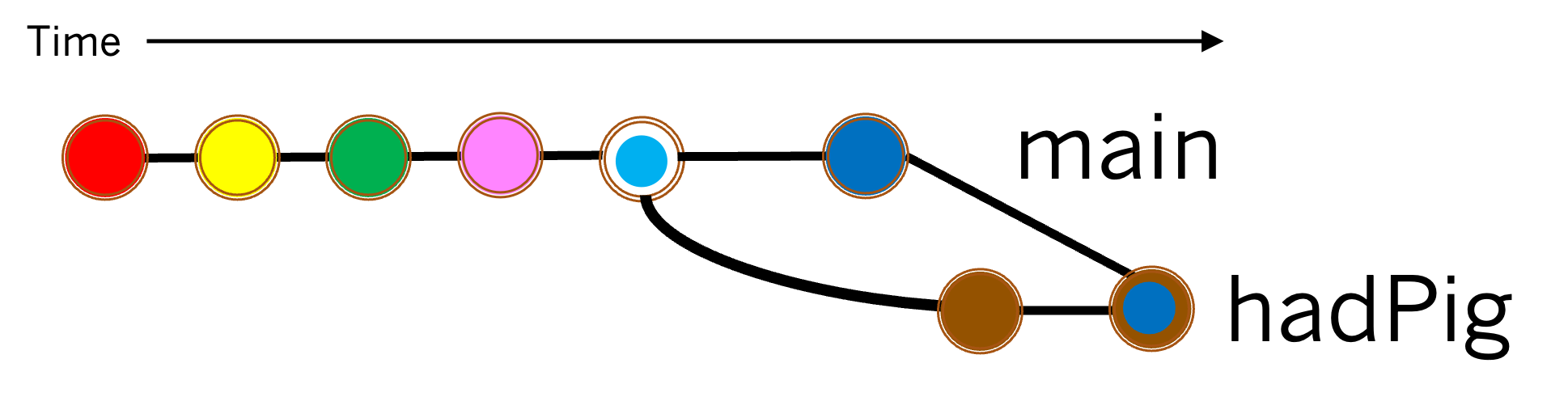
Diagram showing the commits on the main branch and the feature branch, and the merge commit when those branches were merged.
Figure 5.4.1. Merging the main branch into a feature branch.
When two branches are merged the branch containing the changes to be merged is called the
source branch , and the branch into which the changes are merged is called the
target branch .
When the changes in the source and target branches have been successfully merged a
merge commit containing the merged changes is added to the target branch.
Exercises
1.
Match the branch names to the appropriate term below.
mainSource Branch
feature branch (hadPig)
Target Branch
Hint .
Read the introduction to this section.
2.
Which commit (i.e. which color) in
Figure 5.4.1 is the merge commit created by merging the
main branch into the
hadPig branch?
Dark blue with a brown ring
Correct! The dark blue commit in main was merged with the brown commit in the hadPig branch.
Dark blue
The dark blue commit is a commit in the main branch.
Brown
The brown commit is a commit in the hadPig branch.
Pink
The pink commit is a commit in the main branch.
Light blue with a white ring
The light blue with a white ring is a merge commit in main. Likely from merging a pull request.
Hint .
Read the introduction to this section and examine
Figure 5.4.1 .
Subsection 5.4.2 The git merge Command.
The command
git merge <branch name> will attempt to merge the changes from
<branch name> into the active branch.
Exercises
1.
Imagine that the
main branch is the active branch. Select and arrange statements from those listed below such that the
main branch will be merged into the
hadPig branch as in
Figure 5.4.1 . Note: Not all statements will be used.
git switch hadPig

---

git merge main

---

git merge hadPig
 #distractor
---

git switch main
 #distractor
2.
To merge the
main branch into your feature branch, your feature branch must be the active branch. Let’s ensure that your feature branch is the active branch.
(a) Use the
git switch <branch> command to make your feature branch the active branch.
(b) Use the
git status command to check that your feature branch is now the active branch.
3.
Now that your feature branch is the active branch, give a command that will merge the
main branch into your feature branch.
4.
Now let’s try to merge the changes in the
main branch into your feature branch.
(a) Run your
merge command from
Exercise 5.4.2.3 in the terminal.
(b)
Which of the following statements best describes what happened when you ran your
merge command?
The "GNU nano" editor opens with the first line of text being "Merge branch ’main’ into" your feature branch.
Uh Oh! Something went wrong. Let’s try to fix it.
Press Ctrl-x to exit the nano editor.
Run the command git revert --hard HEAD~1
Go back to
Exercise 5.2.2 and ensure that your pull request contains a conflict.
Then try your merge command again.
The terminal displays a message indicating "Automatic merge failed; fix conflicts and then commit the result."
Correct! Because there is a merge conflict between the main branch and your feature branch, this is what we expect. Continue to the next exercise.
Something else happened.
Double check that your
merge command from
Exercise 5.4.2.3 is correct and that you typed it into the terminal correctly.
Hint .
Can the
main branch be merged into the feature branch if changes have been made to the same lines in each?
(c)
Which of the following things also happened when you ran your
merge command?
The terminal displays a message indicating that there is a "Merge conflict in README.md."
The README.md file is opened in the editor.
The conflict is automatically resolved.
The development environment plays a sad song because there is a conflict.
Hint .
Look at the output in the terminal and the file that is open in the development environment.
You have attempted
of
activities on this page.