Worksheet 15.1 eXtensible Markup Language - XML

XML is a mark-up language. HTML is also a mark-up language. XML looks very similar to HTML, but it is different from XML.
Some of the differences between XML and HTML are:
  • XML is used to store and transport data, not to create web pages like HTML.
  • XML tags are not predefined, but HTML tags are.
  • XML can be extended (you can add new tags). You can not add new tags to HTML.
For more information on XML see https://www.w3schools.com/xml/default.asp.
Here is a sample of an XML document:
<person>
  <name>Chuck</name>
  <phone type="intl">
    +1 734 303 4456
  </phone>
  <email hide="yes" />
</person>
Each pair of opening (e.g., <person>) and closing tags (e.g., <\person>) represents a element or node with the same name as the tag (e.g., person). Each element can have some text, some attributes (e.g., hide), and other nested elements. If an XML element is empty (i.e., has no content), then it may be depicted by a self-closing tag (e.g., <email />).

Activity 15.1.1.

In XML, a pair of opening and closing tags (<> and <\>) represent what? Select all that apply.
  • element
  • A pair of tags in XML can represent an element.
  • string
  • A pair of tags in XML does not represent a string.
  • node
  • A pair of tags in XML can represent a node.
  • method
  • A pair of tags in XML does not represent methods.
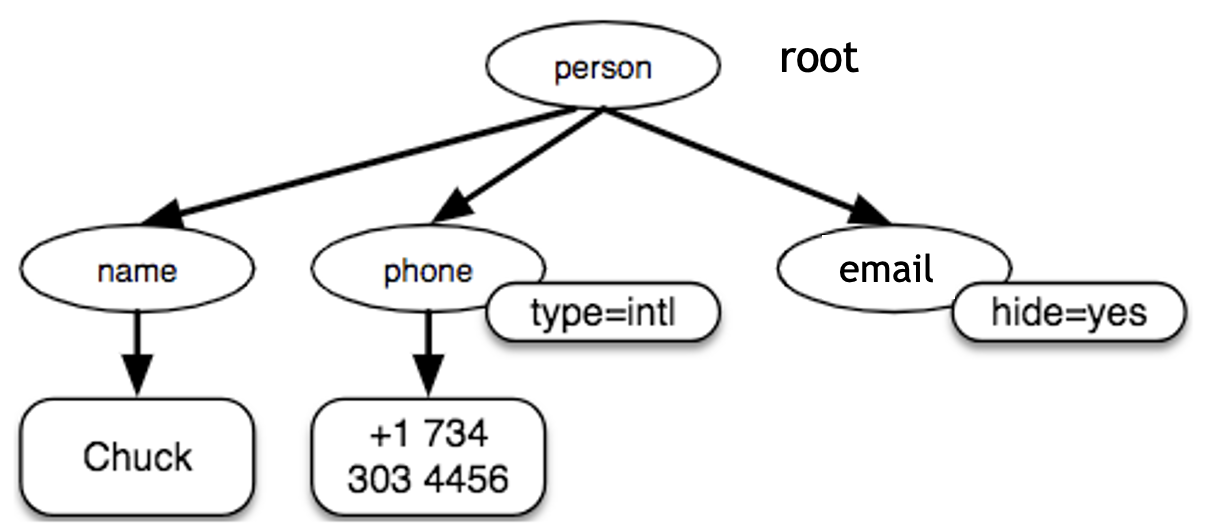
Often it is helpful to think of an XML document as a tree structure where there is a top/root element (here: person), and other tags (e.g., phone) are drawn as children of their parent elements.
Figure 15.1.1.

Activity 15.1.2.

What are the sibling tags of the email tag?
  • person
  • The person tag is the parent tag of the email tag.
  • name
  • The name tag is a sibling of the email tag.
  • phone
  • The phone tag is a sibling of the email tag.
  • hide
  • The hide is an attribute name of the email tag.

Activity 15.1.3.

Activity 15.1.4.

Activity 15.1.5.

You have attempted of activities on this page.