
Unused Input Challenges
20 Questions and Guessing Game
 Programming Challenge : 20 Questions

Have you ever played 20 Questions? 20 Questions is a game where one person thinks of an object and the other players ask up to 20 questions to guess what it is.
There is great online version called Akinator that guesses whether you are thinking of a real or fictional character by asking you questions. Akinator is a simple Artificial Intelligence algorithm that uses a decision tree of yes or no questions to pinpoint the answer. Although Akinator needs a very large decision tree, we can create a guessing game for animals using a much smaller number of if-statements.
The Animal Guessing program that we will make uses the following decision tree:
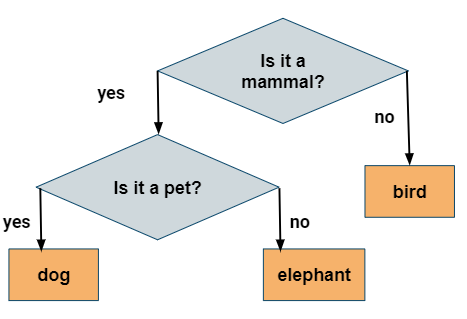
Figure 2: Animal Guessing Game Decision Tree
Try the Animal Guessing game below. In Runestone, you need to provide the input below the code before you run it. It is set to answer the questions with y and y. Run the code to see the result. Change the input below the coding window to y n and n to guess the other animals. It can only guess 3 animals. Let’s add more! To see this program in an interactive input IDE, try it in JuiceMind or replit or your local IDE (where you should change the lines with
scan.next()toscan.nextLine()).In the very last else clause, the program knows that it is not a mammal and it guesses a bird. Let’s add to that part. Instead of saying “I guess a bird! Click on run to play again.”, change it to ask a question that distinguishes between birds and reptiles (for example does it fly?). Then, get their response and use an if/else statement to guess “bird” or “turtle” (or another reptile). For example, here’s how we decided to choose between a dog or an elephant. We asked the question “Is it a pet?”, got the response, and then with an if statement on the y/n answer we determined dog or elephant. You would use similar code to distinguish between a bird and a turtle. Run your code and test both possibilities!
System.out.println("Is it a pet (y/n)?");
answer = scan.next(); // or nextLine() in your own IDE
if (answer.equals("y"))
{
    System.out.println("I guess a dog! Click on run to play again.");
}
else
{
    System.out.println("I guess an elephant! Click on run to play again.");
}
Did you notice that when it asked “Is it a pet?” and you said “y”, it immediately guessed “dog”? What if you were thinking of a cat? Try to come up with a question that distinguishes dogs from cats and put in code in the correct place (in place of the code that prints out “I guess a dog”) to ask the question, get the answer, and use an if/else to guess cat or dog. Run your code and test both possibilities by adding more input.
How many animals can your game now guess? How many test-cases are needed to test all branches of your code?
If your class has time, your teacher may ask you to expand this game or to create a similar game to guess something else like singers or athletes. Spend some time planning your questions on paper and drawing out the decision tree before coding it.
The code below is a simple 20 questions game that guesses an animal. In Runestone, you need to provide the input below the code before you run it. It is set to answer the questions with y and y. Run the code to see the result. Change the input to guess the other animals. It can only guess 3 animals. Let’s add more! Add a question and if/else statement on line 20 to distinguish a cat and a dog and on line 31 to distinguish a turtle and a bird. Add more input below the code to test your new questions.
Coding Challenge : Guessing Game
We encourage you to work in pairs on this guessing game. In the guessing game, the computer picks a random number from 0-100 and you have to guess it. After each guess, the computer will give you clues like “Too high” or “Too low”. Here’s the pseudocode for the guessing game. Pseudocode is an English description or plan of what your code will do step by step. What’s the loop variable for this program? Can you identify the 3 steps of writing this loop with respect to the loop variable?
Choose a random number from 0-100
Get the first guess
Loop while the guess does not equal the random number,
If the guess is less than the random number, print out “Too low!”
If the guess is greater than the random number, print out “Too high!”
Get a new guess (save it into the same variable)
Print out something like “You got it!”
As an extension to this project, you can add a counter variable to count how many guesses the user took and print it out when they guess correctly.
When you finish and run your program, what is a good guessing strategy for guessing a number between 0 and 100? What was your first guess? One great strategy is to always split the guessing space into two and eliminating half, so guessing 50 for the first guess. This is called a divide and conquer or binary search algorithm. If your guess is between 0-100, you should be able to guess the number within 7 guesses. Another extension to this challenge is to test whether the user got it in 7 guesses or less and provide feedback on how well they did.
For this project, you can use the Scanner class for input and JuiceMind or replit or another IDE of your choice.