
2.8. For Loops
Another type of loop (or iteration) in Java is a for loop. It is usually used when you know how many times you want the loop to execute, as a simple counter-controlled loop to do the loop body a set number of times.
If you took AP CSP with a block programming language like App Inventor, you probably used a for loop block like below that looks very similar to Java for loops. If you have used a language like Scratch or Snap!, you may remember the repeat(n) block where you type in a number of times you want the code to be repeated, just like the AP pseudocode REPEAT block. In fact, almost every programming language has a for or repeat loop.
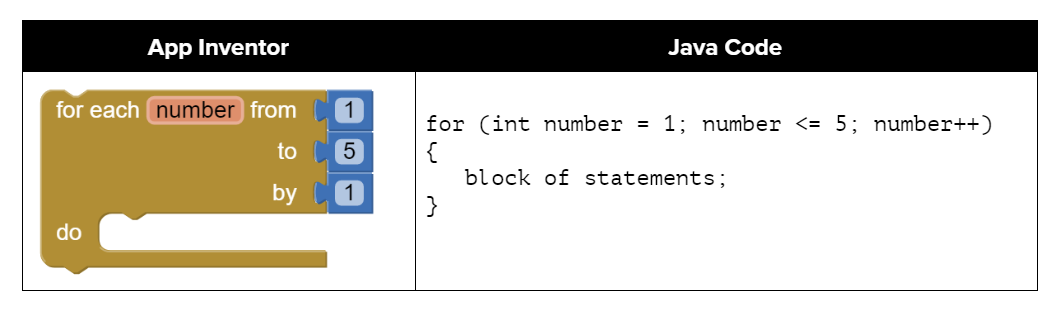
Figure 1: Comparing App Inventor and Java for loops
2.8.1. Three Parts of a For Loop
A for-loop combines all 3 parts of writing a loop in one line to initialize, test, and update the loop control variable. The 3 parts are separated by semicolons (;). Each of the three parts of a for loop declaration is optional (initialization; Boolean expression; update), but the semicolons are not optional.
for (initialize; test; update)
{
   loop body
}
The for-loop is almost a shortcut way to write a while loop with all three steps that you need in one line. A for loop can be rewritten into an equivalent while loop (and vice versa).
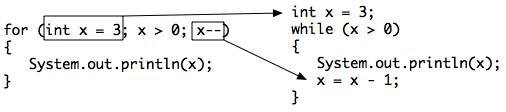
Figure 2: Showing how a for loop maps to a while loop
Watch the following video which compares a while loop and for loop line by line.
Here is a control flow diagram for a for loop. In a for loop, the initialization statement is only executed once before the first Boolean expression evaluation. The variable being initialized is referred to as a loop control variable. The Boolean expression is evaluated immediately after the loop control variable is initialized and then followed by each execution of the increment statement until it is false. In each iteration, the update is executed after the entire loop body is executed and before the Boolean expression is evaluated again. When the loop condition is finally false, we jump out of the loop and continue at the next statement after the body of the loop.
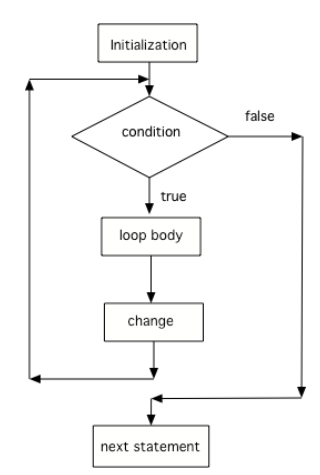
Figure 2: Control flow in a for loop
 Coding Exercise
Here is a for loop that counts from 1 to 5. Can you change it to count from 2 to 10?
Here is a while loop that counts from 5 to 10. Run it and see what it does. Can you change it to a for-loop? Run your for-loop. Does it do the same thing?
Note
Two common patterns in for-loops are to count from 0 up to an number (using <) or count from 1 to the number including the number (using <=). Remember that if you start at 0 use <, and if you start at 1, use <=. The two loops below using these two patterns both run 10 times. The variable i (for index) is often used as a counter in for-loops.
// These loops both run 10 times
// If you start at 0, use <
for(int i = 0; i < 10; i++)
{
   System.out.println(i);
}
// If you start at 1, use <=
for(int i = 1; i <= 10; i++)
{
   System.out.println(i);
}
 Check your understanding
- 3 4 5 6 7 8
- This loop starts with i equal to 3 but ends when i is equal to 8.
- 0 1 2 3 4 5 6 7 8
- What is i set to in the initialization area?
- 8 8 8 8 8
- This would be true if the for loop was missing the change part
(int i = 3; i < 8; )but it does increment i in the change part(int i = 3; i < 8; i++). - 3 4 5 6 7
- The value of i is set to 3 before the loop executes and the loop stops when i is equal to 8. So the last time through the loop i is equal to 7.
2-8-4: What does the following code print?
for (int i = 3; i < 8; i++)
{
   System.out.print(i + " ");
}
- 3 4 5 6 7 8
- What is i set to in the initialization area?
- 0 1 2 3 4 5 6 7 8 9
- What is i set to in the initialization area?
- 1 2 3 4 5 6 7 8 9 10
- The value of i starts at 1 and this loop will execute until i equals 11. The last time through the loop the value of i is 10.
- 1 3 5 7 9
- This loop changes i by 1 each time in the change area.
2-8-5: What does the following code print?
for (int i = 1; i <= 10; i++)
{
   System.out.print(i + " ");
}
- 10
- This would be true if i started at 0 and ended at 9. Does it?
- 6
- Since i starts at 3 and the last time through the loop it is 9 the loop executes 7 times (9 - 3 + 1 = 7)
- 7
- How many numbers are between 3 and 9 (including 3 and 9)?
- 9
- This would be true if i started at 0 and the value of i the last time through the loop it was 8.
2-8-6: How many times does the following method print a *?
for (int i = 3; i <= 9; i++)
{
   System.out.print("*");
}
The following method has the correct code to print out all the even values from 0 to the value of 10, but the code is mixed up. Drag the blocks from the left into the correct order on the right and indent them correctly. Even though Java doesn’t require indention it is a good habit to get into. You will be told if any of the blocks are in the wrong order or not indented correctly when you click the “Check Me” button.
2.8.2. Decrementing Loops
You can also count backwards in a loop starting from the last number and decrementing down to 0 or 1. All 3 parts of the loop must change to count backwards including the test of when to stop. For example, for (int i=5; i > 0; i--) counts from 5 down to 1.
Coding Exercise
What do you think will happen when you run the code below? How would it change if you changed line 11 to initialize i’s value to 3? Try the Code Lens button to visualize and trace through this code.
The method printPopSong prints the words to a song. It initializes the value of the variable i equal to 5 and then checks if i is greater than 0. Since 5 is greater than 0, the body of the loop executes. Before the condition is checked again, i is decreased by 1. When the value in i is equal to 0 the loop stops executing.
Can you make the loop count by 2s backwards? It should print out 5 3 1? Remember to change all 3 parts of the for loop.
2.8.3.  Coding Challenge : Turtles Drawing Shapes
Let’s use a for loop to have a Turtle draw different shapes. We encourage you to work in pairs.
The following code has 4 methods to draw shapes using a Turtle t passed in as an argument.
Complete the
drawSquaremethod to use aforloop to have the Turtle t draw a square.Complete the
drawTrianglemethod to use aforloop to draw an equilateral triangle. How many times should the loop run? It ran 4 times for a square, so how many for a triangle? What angle should you use for the turns? One way to figure this out is to notice that to complete a shape, all the exterior angles should add up to 360 degrees. So, for a square 4x90 = 360. What angle times 3 will give you 360?Complete the
drawPentagonmethod to use aforloop to draw a pentagon (which has 5 sides and looks like a stop sign). What external angle should you use for the turns? Remember they have to add up to 360 degrees after 5 turns.Complete the
drawPolygonmethod to use aforloop to draw any polygong withnsides of lengthpixelsgiven as arguments. Usenin your loop for the number of sides (or the number of iterations). Usepixelsfor the amount to move forward. Calculate the angle to turn by using a formula that uses n and 360, so that n turns add up to 360 degrees.In the main method, call the
drawPolygonmethod to draw a hexagon (6 sides). This method can draw a variety of shapes by just changing the value of the argument n. The power of abstraction! Try drawing other shapes with it. Note that if the turtle runs into walls, it stays there and will mess up the shape, so you may have to move the turtle or go forward smaller amounts.
Complete the methods below with for-loops to draw a square, triangle, pentagon, and then any polygon using a variable n that holds the number of sides. Call 1 more call to the method drawShapes in main. Note that the angles in the turns have to add up to 360.
2.8.4. Summary
(AP 2.8.A.1) A
forloop is a type of iterative statement. There are three parts in a for loop header: the initialization (of the loop control variable or counter), the Boolean expression (testing the loop variable), and the update (to change the loop variable).(AP 2.8.A.2) In a
forloop, the initialization statement is only executed once before the first Boolean expression evaluation. The variable being initialized is referred to as a loop control variable.(AP 2.8.A.2) The
forloop Boolean expression is evaluated immediately after the loop control variable is initialized and then followed by each execution of the increment (or update) statement until it is false.(AP 2.8.A.2) In each iteration of the
forloop, the update is executed after the entire loop body is executed and before the Boolean expression is evaluated again.(AP 2.8.A.3) A
forloop can be rewritten into an equivalentwhileloop (and vice versa).
2.8.5. AP Practice
I and II only
-
Note that I has an extra count++ at the beginning of the loop body that should be deleted.
II and III only
-
Correct! In the II, the loop counter increments by 2’s making sure it visits only even numbers and III generates the same sum but backwards.
I and III only
-
Note that I has an extra count++ at the beginning of the loop body that should be deleted.
III only
-
This is partially correct.
I, II, and III
-
Note that I has an extra count++ at the beginning of the loop body that should be deleted.
2-8-11: Consider the following code segment.
int count = 0, sum = 0;
while (count <= 6)
{
    count++;
    if (count % 2 == 0)
    {
        sum += count;
    }
}
System.out.println(sum);
Which of the following code segments will produce the same output as the code segment above?
I.  int sum = 0;
    for(int count = 0; count <= 6; count++)
    {
        count++;
        if (count % 2 == 0)
        {
             sum += count;
        }
    }
    System.out.println(sum);

II. int sum = 0;
    for(int i = 0; i <= 6; i += 2)
    {
       sum += i;
    }
    System.out.println(sum);

III. int sum = 0;
     for(int j = 7; j > 1; j--)
     {
        if (j % 2 == 0)
        {
             sum += j;
        }
     }
     System.out.println(sum);
The output of the code segment will be unchanged.
-
One will multiply odd numbers and the other even numbers.
The output will be the same, but the new loop will iterate more times.
-
One will multiply odd numbers and the other even numbers.
The output will be different, but both versions of the loop will iterate two times.
-
Correct! One will multiply 3*5 and the other 4*6.
The output will be different, and the new loop will iterate more times.
-
The output is different but they both would iterate 2 times.
This will cause an error.
-
It will not cause an error.
2-8-12: Consider the following code segment.
int result = 1;
for(int i = 3; i < 6; i += 2)
{
  result *= i;
}
System.out.println(result);
Which of the following best explains how changing the for loop header to for (int i = 4; i <= 6; i += 2) affects the output of the code segment?