
2.7. While Loops
When you play a song, you can set it to loop, which means that when it reaches the end it starts over at the beginning. A loop in programming, also called iteration or repetition, is a way to repeat one or more statements. If you didn’t have loops to allow you to repeat code, your programs would get very long very quickly! Using a sequence of code, selection (ifs), and repetition (loops), the control structures in programming, you can construct an algorithm to solve almost any programming problem!
A while loop executes the body of the loop as long as (or while) a boolean
condition is true. When the condition is false, we exit the loop and continue
with the statements that are after the body of the while loop. If the
condition is false the first time you check it, the body of the loop will not
execute.
Notice the while statement looks a lot like an if statement, but it runs
more than once. The curly braces ({}) are optional when there is just 1
statement following the condition, but required if there are more than 1
statement in the loop. In the AP exam, they will always use curly braces, which
is a good practice to follow.
// The statements in an if run one time if the condition is
// is true and zero times if it is false.
if (condition)
{
    statements;
}

// The statements in a while loop run zero or more times,
// determined by how many times the condition is true
while (condition)
{
    statements;
}
If you took AP CSP with a block programming language like App Inventor, you may
have used a loop block like below that looks very similar to Java while
loops (or you may have used a for loop which will be covered in the next
lesson). Almost every programming language has a while loop.

Figure 1: Comparing App Inventor and Java for while loops
If you’re used to a language like Snap! or Scratch, you may be familiar with the
Repeat Until loop. However, you have to be very careful comparing repeat until
to while loops. The while test is the opposite of the repeat until test.
For example, if you are repeatedly moving until reaching x position 100, you
must create a Java while loop that repeatedly moves while it has not yet
reached x position 100 or is less than 100 as below.
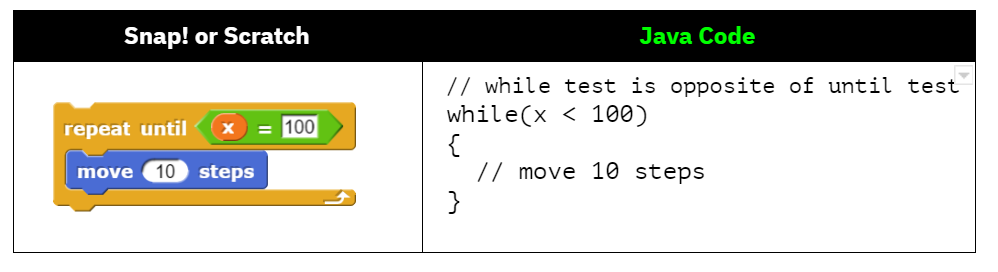
Figure 2: Comparing Snap! or Scratch Repeat Until Loop to Java while loop
The following video introduces while loops.
Here’s what the flow of control looks like in a Java while loop. Notice that while the condition is true, the loop body is repeated. Iteration statements change the flow of control by repeating a segment of code zero or more times as long as the Boolean expression controlling the loop evaluates to true. In while loops, the Boolean expression is evaluated before each iteration of the loop body, including the first. When the expression evaluates to true, the loop body is executed. This continues until the Boolean expression evaluates to false, whereupon the iteration terminates.
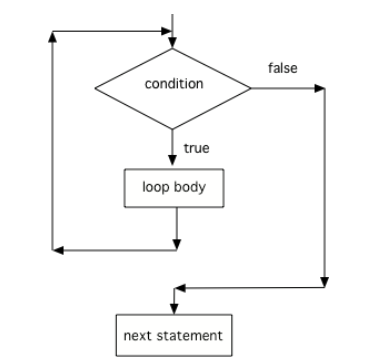
Figure 3: Control Flow in a while Loop
2.7.1. Three Steps to Writing a Loop
The simplest loops are counter-controlled loops like below, where the loop control variable is a counter that controls how many times to repeat the loop. There are 3 steps to writing a loop using this loop control variable as seen below in a loop that counts from 1 to 10.
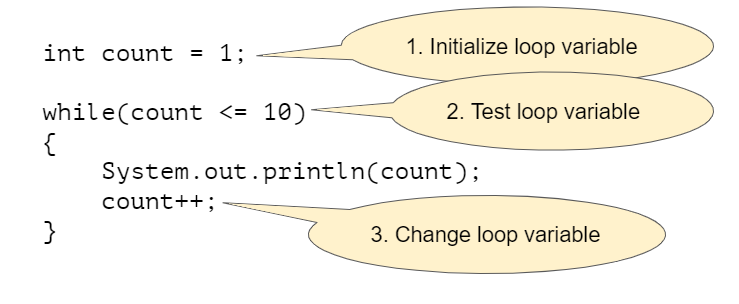
Figure 4: Three Steps of Writing a Loop
Note
Remember these 3 steps to writing a loop:
Initialize the loop variable (before the
whileloop)Test the loop variable (in the loop header)
Update the loop variable (in the while loop body at the end)
 Coding Exercise
Here is a while loop that counts from 1 to 5 that demonstrates the 3 steps of writing a loop. Can you change it to count from 2 to 10?
Java doesn’t require your code to be correctly indented (code moved to the right a few spaces) to make it clear what statements are part of the body of the loop, but it is standard practice to do so.
Note
On the free response part of the AP exam, the reader will use the indention when determining the meaning of your code, even if you forget the open or close curly brace.
 Check your understanding
The following method has the correct code to print out all the odd values from 1 to 10, but the code is mixed up. Drag the blocks from the left into the correct order on the right and indent them correctly. Even though Java doesn’t require indention it is a good habit to get into. You will be told if any of the blocks are in the wrong order or not indented correctly when you click the “Check Me” button.
- while (count == 10)
- This would not print out anything because count = 0 at the start of the loop, so it never equals 10.
- while (count < 10)
- This would print out 0 2 4 6 8. Try it in the Active Code window above.
- while (count <= 10)
- Yes, try it in the Active Code window above.
- while (count > 10)
- This would not print out anything because count = 0 at the start of the loop, so it is not greater than 10.
2-7-4: Consider the following code segment. Which of the following can be used as a replacement for the missing loop header so that the loop prints out “0 2 4 6 8 10”?
int count = 0;
/* missing loop header */
{
    System.out.print(count + " ");
    count += 2;
}
2.7.2. Tracing Loops
A really important skill to develop is the ability to trace the values of variables and how they change during each iteration of a loop.
You can create a tracing table that keeps track of the variable values each time through the loop as shown below. This is very helpful on the exam. Studies have shown that students who create tables like this do much better on code tracing problems on multiple choice exams.
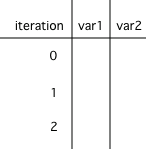
Figure 5: A trace table showing the values of all of the variables each time through the loop. Iteration 0 means before the loop.
Watch the following video for a tracing demo. When you are tracing through code, pretend to be the computer running the code line by line, repeating the code in the loop, and keeping track of the variable values and output.
Check your understanding
- 0
- Count is changed inside the loop and after the loop.
- 1
- Count is changed inside the loop and after the loop.
- 16
- Don't forget to subtract 10 from count after the loop.
- 6
- Yes, the loop will keep multiplying count by 2 to get 2, 4, 8, 16 and then it subtracts 10 from 16 after the loop.
2-7-6: Consider the following code segment. What is count’s value after running this code segment? (To trace through the code, keep track of the variable count and its value through each iteration of the loop.)
int count = 1;
while (count <= 10)
{
    count *= 2;
}
count = count - 10;
Step through the code above with the visualizer.
- 5 4 3 2 1
- x is initialized (set) to -5 to start.
- -5 -4 -3 -2 -1
- x is incremented (x++) before the print statement executes.
- -4 -3 -2 -1 0
- x is set to -5 to start but then incremented by 1 so it first prints -4.
2-7-7: What does the following code print? (To trace through the code, keep track of the variable x and its value, the iteration of the loop, and the output every time through the loop.)
int x = -5;
while (x < 0)
{
   x++;
   System.out.print(x + " ");
}
2.7.3. Common Errors with Loops
One common error with loops is to accidentally create an infinite loop. An infinite loop is one that never stops because the Boolean condition is always true.
Sometimes we will write an infinite loop on purpose like this:
while (true)
{
    System.out.println("This is a loop that never ends");
}
But if we create an infinite loop by accident, our program may seem to get stuck. For example look at this loop:
int i = 0;
while (i < 10)
{
    System.out.println(i);
}
That loop looks a lot like loops earlier in this chapter but it is actually an infinite loop. Can you see why?
The problem in this loop—and a common way to accidentally create an infinite
while loop—is that although it includes steps 1 and 2 (initializing the loop
variable and testing it) it forgot step 3 and never changes the loop variable.
The loop variable, i, starts at 0 and the loop loops as long as i <
10 which will always be true because there’s no code in the loop that changes
i. The simple fix is to add a line that increments i:
int i = 0;
while (i < 10)
{
    System.out.println(i);
    i++;
}
Another common error with loops is an off-by-one error where the loop runs
one too many or one too few times. This is usually a problem with step 2 the
test condition and using the incorrect relational operator < or <=.
Coding Exercise
The while loop should print out the numbers 1 to 8, but it has 2 errors that cause an infinite loop and an off-by-one error. Can you fix the errors? If you run an infinite loop, you may need to refresh the page to stop it (so make sure all active code windows on the page have been saved and click on Load History after refreshing).
Another possible error is not realizing that the loop body of an iterative statement will not execute if the Boolean expression initially evaluates to false. This is often a problem with the initial value of the loop control variable. For example, if you initialize the loop variable to 10 and test if it is less than 10, the loop body will not execute at all.
int i = 10;
while (i < 10)  // This loop will never run!
{
    System.out.println(i);
    i++;
}
2.7.4. Input-Controlled Loops
You can use a while loop to repeat the body of the loop a certain number of times in counter-controlled loop as we saw above. However, a while loop is typically used when you don’t know how many times the loop will execute. It is often used for a input-controlled loop where the user’s input indicates when to stop. For example, in the Magpie chatbot lab code below, the while loop stops when you type in “Bye”. The stopping value is often called the sentinel value for the loop. Notice that if you type in “Bye” right away, the loop will never run. If the loop condition evaluates to false initially, the loop body is not executed at all. Another way to stop the loop prematurely is to put in a return statement that makes it immediately return from the method.
Scanner in = new Scanner(System.in);
String statement = in.nextLine();
while (!statement.equals("Bye"))
{
    System.out.println(getResponse(statement));
    statement = in.nextLine();
}
2.7.5.  Coding Challenge : Turtle Squares
Do you remember when we used the turtle objects to draw shapes? To create a square without loops we had to repeat code to go forward and turn 90 degrees to the right 4 times like below. This is a lot of repeated code!
yertle.forward(100);
yertle.turn(90);
yertle.forward(100);
yertle.turn(90);
yertle.forward(100);
yertle.turn(90);
yertle.forward(100);
yertle.turn(90);
Can you change the code below to remove the repeated lines of code and use a while loop to draw 4 sides of the square? Did you notice that the code becomes a lot shorter? You should only need 1 call to forward and 1 call to turn in the loop. Whenever you find yourself repeating code, try to use a loop instead!
(If the code below does not work for you, you can copy the code into this replit link (refresh page after forking and if it gets stuck) or download the files here to use in your own IDE.)
Can you change the code below to remove the repeated lines of code and use a while loop to draw 4 sides of the square?
2.7.6. Summary
(AP 2.7.A.1) Iteration statements (loops) change the flow of control by repeating a segment of code zero or more times as long as the Boolean expression controlling the loop evaluates to true. Iteration is a form of repetition.
(AP 2.7.B.1) A while loop is a type of iterative statement. In while loops, the Boolean expression is evaluated before each iteration of the loop body, including the first. When the expression evaluates to true, the loop body is executed. This continues until the Boolean expression evaluates to false, whereupon the iteration terminates. Here is the general form of a while loop:
// The statements in a while loop run zero or more times,
// determined by how many times the condition is true
int count = 0; // initialize the loop variable
while (count < 10)  // test the loop variable
{
    // repeat this code
    // update the loop variable
    count++;
}
Loops often have a loop control variable that is used in the boolean condition of the loop. Remember the 3 steps of writing a loop:
Initialize the loop variable
Test the loop variable
Update the loop variable
(AP 2.7.A.2) An infinite loop occurs when the Boolean expression in an iterative statement always evaluates to true.
(AP 2.7.A.3) The loop body of an iterative statement will not execute if the Boolean expression initially evaluates to false.
(AP 2.7.A.4) Off by one errors occur when the iteration statement loops one time too many or one time too few.
Input-controlled loops often use a sentinel value that is input by the user like “bye” or -1 as the condition for the loop to stop. Input-controlled loops are not on the AP CSA exam, but are very useful to accept data from the user.
2.7.7. AP Practice
35
-
Keep track of the variables n, d, and result. Watch the tracing video.
15
-
Correct! The digits in n = 35 are 3 and 5 and 3*5 = 15.
10
-
Keep track of the variables n, d, and result. Watch the tracing video.
8
-
Although the sum of the digits in 35 are 8. This code uses multiplication.
33
-
Keep track of the variables n, d, and result. Watch the tracing video.
2-7-11: Consider the following code segment.
int n = 35;
int result = 1;
while (n > 0)
{
    int d = n % 10;
    result *= d;
    n /= 10;
}
System.out.println(result);
What is the output after the code has been executed?
while (count > 0)
-
This would cause an infinite loop.
while (count >= 8)
-
This would not print out anything since count is 0 before the loop and not greater than 8.
while (count < 8)
-
This would print out one too few numbers and would stop before it printed out 8.
while (count < 10)
-
Correct! This would stop the loop when count is 10.
while (count <= 10)
-
This would print out one too many numbers, 0, 2, 4, 6, 8, 10.
2-7-12: Consider the following code segment which is intended to print out the even numbers from 0 to 8 (including 8).
int count = 0;
/* missing loop header */
{
    if (count % 2 == 0)
    {
        System.out.println(count);
    }
    count++;
}
Which of the following could replace the missing loop header to ensure that the code segment will work as intended to print out the even numbers from 0 to 8?