Question 4. A grayscale image is represented by a 2-dimensional rectangular array of pixels (picture elements). A pixel is an integer value that represents a shade of gray. In this question, pixel values can be in the range from 0 through 255, inclusive. A black pixel is represented by 0, and a white pixel is represented by 255. The declaration of the GrayImage class is shown below.
public class GrayImage
{
    public static final int BLACK = 0;
    public static final int WHITE = 255;

    /**
     * The 2-dimensional representation of this image. Guaranteed not to be null.
     * All values in the array are within the range [BLACK, WHITE], inclusive.
     */
    private int[][] pixelValues;

    /**
     * Processes this image in row-major order and decreases the value of each
     * pixel at position (row, col) by the value of the pixel at position (row + 2,
     * col + 2) if it exists. Resulting values that would be less than BLACK are
     * replaced by BLACK. Pixels for which there is no pixel at position (row + 2,
     * col + 2) are unchanged.
     */
    public void processImage()
    {
        /* to be implemented in part (b) */
    }
}
Part b. Write the method processImage that modifies the image by changing the values in the instance variable pixelValues according to the following description. The pixels in the image are processed one at a time in row-major order. Row-major order processes the first row in the array from left to right and then processes the second row from left to right, continuing until all rows are processed from left to right. The first index of pixelValues represents the row number, and the second index represents the column number.
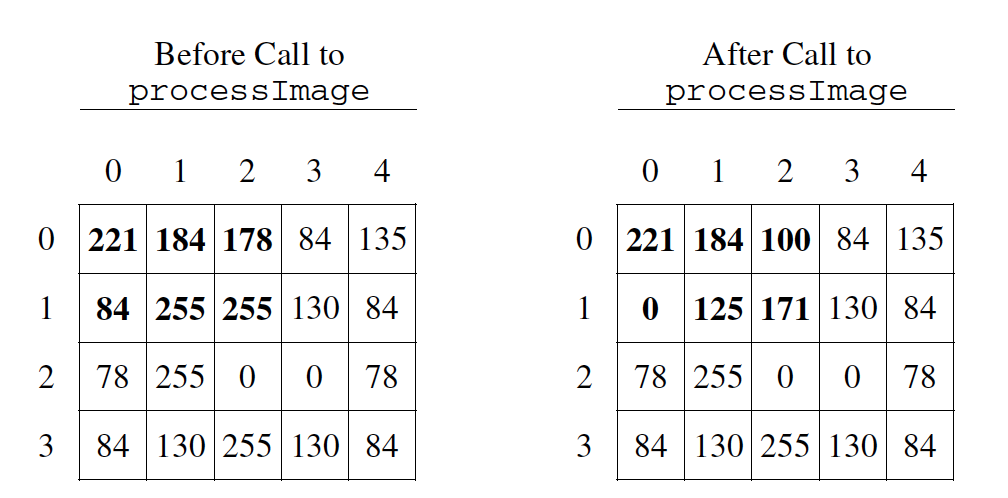
The pixel value at position (row, col) is decreased by the value at position (row + 2, col + 2) if such a position exists. If the result of the subtraction is less than the value BLACK, the pixel is assigned the value of BLACK. The values of the pixels for which there is no pixel at position (row + 2, col + 2) remain unchanged. You may assume that all the original values in the array are within the range [BLACK, WHITE], inclusive.
The following diagram shows the contents of the instance variable pixelValues before and after a call to processImage. The values shown in boldface represent the pixels that could be modified in a grayscale image with 4 rows and 5 columns.
Figure4.52.1.Example before and after a call to processImage
public class GrayImage
{
    public static final int BLACK = 0;
    public static final int WHITE = 255;

    /**
     * The 2-dimensional representation of this image. Guaranteed not to be null.
     * All values in the array are within the range [BLACK, WHITE], inclusive.
     */
    private int[][] pixelValues;

    /**
     * Processes this image in row-major order and decreases the value of each
     * pixel at position (row, col) by the value of the pixel at position (row + 2,
     * col + 2) if it exists. Resulting values that would be less than BLACK are
     * replaced by BLACK. Pixels for which there is no pixel at position (row + 2,
     * col + 2) are unchanged.
     */
    public void processImage()
    {
        /* to be implemented in part (b) */
    }
}
Subsection4.52.1How to solve this problem
Once again, this problem starts with looping through the array of pixels, using a nested for loop for the 2D array. As we loop we will need to subtract pixel values from one another.
Activity4.52.1.
Which is the simplest way to subtract one integer value from another integer value?
result = int1 - int2;
While the syntax here is correct, there’s an even simpler way to execute subtraction that doesn’t create a new variable.
int1 -= int2;
The "-=" syntax correct subtracts int2 from int1, without creating an additional variable, which is ideal in our solution for this problem.
int1.subtract(int2);
Because the pixels are of primitive type "int," there is not subtract() method which can be executed in this case.
Activity4.52.2.
Which loop is the best for iterating through the image?
two while loops
This is not the most efficient way to iterate through a 2D array.
linked for each loops
"linked" does not refer to anything specific in this context, and for each loops would not work in this situation.
nested for loops
Correct!
When comparing our pixel values to values deeper in the array, we need to be careful to correctly set the terminating conditions on the for loops.
The code below prints out the pixel value at position (row, col) after it is decreased by the value at position (row + 2, col + 2), but what if (row+2,col+2) is beyond the array bounds? Can you fix the terminating conditions of the loops so that we do not go beyond the array bounds? You can step through the code using the CodeLens button.
Activity4.52.3.
Fix the terminating conditions of the loops so that we do not go beyond the array bounds
Subsection4.52.2Algorithm
There are several ways to solve this problem, we will focus on two possible solutions below. It is not required for you to come up with both solutions but it would be good practice.
Activity4.52.4.
Explain in plain English what your code will have to do to answer this question. Use the variable names given above.
This set of questions will focus on a solution that starts indexing the array at zero, and stops 2 spaces before the end.
Activity4.52.5.
What could you write for the outer for loop so that it iterates through the rows but stops 2 before the end?
for (int row = this.pixelValues.length; row > 2; row--)
This starts and the end and stops two from the beginning.
for (int row = -2; row < this.pixelValues.length; row++)
Starting at -2 is out of the bounds of the array and will return an error.
Activity4.52.6.
What could you write for the Inner for loop so that it iterates through the rows but stops 2 before the bottom?
for (int col = 0; col < this.pixelValues[0].length - 2; col++)
Correct!
for (int col = 0; col < this.pixelValues.length - 2; col++)
it is important to specify the row of which you are finding the length of (which will give you the height).
for (int col = 0; col < row; col++)
having the comparison col < row will lead to unwanted behavior because col will not iterate through the full image.
for (int col = this.pixelValues[0] - 2; col > 0; col--)
The sets col equal to the first VALUE in the image -2 rather than having it only loop through the length - 2
Activity4.52.7.
The question requires if any value is less than the value BLACK after subtraction, it needs to be replaced with the value BLACK. How could you write this?
if (pixelValues[row][col] = -black) { this.pixelValues[row][col] = black }
We want to check if the pixel in below the value black, not -BLACK (which would be 0)
if (pixelValues[row][col] < black) { this.pixelValues[row][col] = black }
Variable names are case sensitive and the member variable for black is spelt in all caps.
if (pixelValues[row][col] = BLACK) { this.pixelValues[row][col] < BLACK }
This order does not make sense and would not contribute to the code.
if (pixelValues[row][col] < BLACK) { this.pixelValues[row][col] = BLACK }
Correct!
Next we will have questions focused on a solution that starts at the beginning of the loop and iterated through the entire thing, but checks for out of bounds errors as it subtracts.
Activity4.52.8.
What could you write for the outer for loop so that it iterates through the rows?
for (int row = 0; row < this.pixelValues.length; row++)
Correct!
for (int row = 1; row <= this.pixelValues.length; row++)