Strings in Java are objects of the String class. Strings represent sequences of characters and are used to store text like names, addresses, or messages. The String class is part of the java.lang package which is available by default in all Java programs.
Class names in Java, like String, begin with a capital letter. All primitive types: int, double, and boolean, begin with a lowercase letter. This is one easy way to tell the difference between primitive types and class types.
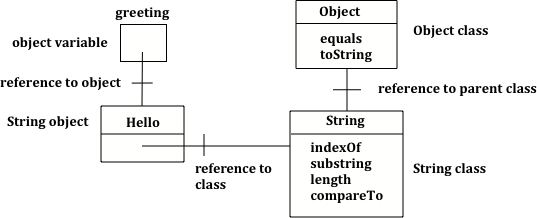
The code above declares an object variable named greeting and sets the value of greeting to the Java keyword null to show that it doesn’t refer to any object yet. So System.out.println(greeting); will print null.
Object variables refer to objects in memory. A reference is a way to find the actual object, like adding a contact to your phone lets you reach someone without knowing exactly where they are. The value of greeting is null since the string object has not been created yet.
In Java there are two ways to create an object of the String class. You can use the new keyword followed by a space and then the class constructor and then in parentheses you can include values used to initialize the fields of the object. This is the standard way to create a new object of a class in Java.
In both cases an object of the String class will be created in memory and the value of the variable greeting will be set to an object reference, a way to find that object.
The code below creates two greeting strings: one using a string literal and the other using new and the String constructor. Change the code to add 2 new strings called firstName and lastName, one using a string literal and the other using new, and print them out with the greetings.
The code above will first print class java.lang.String since greeting was created by the String class. The full name for the String class is java.lang.String. The java.lang part is the package name. Every class in the Java language is in a package and the standard classes like String are in the java.lang package. Every object in Java knows the class that created it. Also, every class knows its parent class. Yes, a class can have a parent class, just as people have parents. But, in Java a class can only have one parent. A class can inherit object fields and methods from a parent class, just like you might inherit musical ability from a parent. The last print statement will print class java.lang.Object because the parent class (superclass) of the String class is the Object class. All classes in Java inherit from the Object class at some point in their ancestry.
Figure1.15.3.Object variable of type String with a reference to a String object which has a reference to the String class which has a reference to the Object class.
Strings can be added to each other to create a new string using the + or += operator . This is also called concatenation. You can also add any other kind of value to a String with + or += and the other value will be converted to a String automatically.
A String object is immutable, meaning once a String object is created, its attributes cannot be changed. So when we add two Strings (or a String and another value converted to a String) we get a new String without making any change to the values being added together just like when we add the ints 1 + 2 the original 1 and 2 aren’t changed. When we use += we are making a new String by adding something to the current value of a variable and then assigning that new value back into the variable, again just like with numbers.
Try the following code. Add another variable for a lastname that is “Hernandez”. Use += or + to add the lastname variable after name to the result. Use += or + to add 2 more exclamation points (!) to the end of the happy birthday greeting in result.
Note that spaces are not added between strings automatically. If you want a space between two strings then add one using + ” ” +. If you forget to add spaces, you will get smushed output like “HiJose” instead of “Hi Jose”. And remember that variables are never put inside the quotes (“”) since this would print the variable name out letter by letter instead of its value.
You can even add other items to a String using the + operator. Primitive values like int and boolean will be converted to a String automatically when concatenated with a String. Any other objects concatenated with a String will be converted to String using their toString method. All objects inherit a toString method from the Object class that returns a String representation of the object and many classes override it to produce a useful human-readable value. Method overriding occurs when a public method in a subclass has the same method signature as a public method in the superclass, but the behavior of the method is specific to the subclass (overriding toString is no longer covered on the AP CSA exam).
What do you think the following will print? Guess before you hit run. If you want the addition to take place before the numbers are turned into a string what should you do? Try to modify the code so that it adds 4 + 3 before appending the value to the string. Hint: you used this to do addition before multiplication in arithmetic expressions.
Since the same operators are processed from left to right this will print 1243. First 4 will be turned into a string and appended to 12 and then 3 will be turned into a string and appended to 124. If you want to do addition instead, try using parentheses!
A string holds characters in a sequence. Each character is at a position or index which starts with 0 as shown below. An index is a number associated with a position in a string. The length of a string is the number of characters in it including any spaces or special characters. The string below has a length of 14.
The first character in a string is at index 0 and the last characters is at length -1. Attempting to access indices outside this range will result in an IndexOutOfBoundsException.
The String class includes many methods to process strings. For the AP CSA exam, you only need to know how to use the following String methods. Their descriptions are included in the AP CSA Java Quick Reference Sheet that you get during the exam so you don’t have to memorize these.
String substring(int from, int to) method returns a new string with the characters in the current string starting with the character at the from index and ending at the character before the to index (if the to index is specified, and if not specified it will contain the rest of the string).
int indexOf(String str) method searches for the string str in the current string and returns the index of the beginning of str in the current string or -1 if it isn’t found.
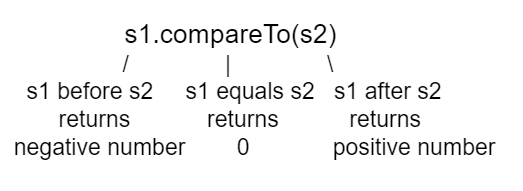
int compareTo(String other) returns a negative value if the current string is less than the other string alphabetically, 0 if they have the same characters in the same order, and a positive value if the current string is greater than the other string alphabetically.
boolean equals(Object other) returns true when the characters in the current string are the same as the ones in the other string. This method is inherited from the Object class, but is overridden which means that the String class has its own version of that method.
Run the code below to see the output from the String methods length, substring, and indexOf. The length method returns the number of characters in the string, not the last index which is length -1. The str.substring(from,to) method returns the substring from the from index up to (but not including) the to index. The method str.indexOf(substring) searches for the substring in str and returns the index of where it finds substring in str or -1 if it is not there.
This code shows the output from String methods length, substring, and indexOf. How many letters does substring(0,3) return? What does indexOf return when its argument is not found?
The following code breaks the preconditions of the substring method and throws an IndexOutOfBoundsException. Can you fix the code by changing the arguments for the substring method to print out the substring “o”?
This would be true if substring returned all the characters from the first index to the last inclusive, but it does not include the character at the last index.
b
This would be true if it was s1.substring(0,1)
ba
This would be true if it was s1.substring(0,2)
bab
Substring returns all the characters from the starting index to the last index -1.
We can compare primitive types like int and double using operators like == and < or >, which you will learn about in the next unit. However, with reference types like String, you must use the methods equals and compareTo, not == or < or >.
The method compareTo compares two strings character by character. If they are equal, it returns 0. If the first string is alphabetically ordered before the second string (which is the argument of compareTo), it returns a negative number. And if the first string is alphabetically ordered after the second string, it returns a positive number. (The actual number that it returns does not matter, but it is the distance in the first letter that is different, e.g. A is 7 letters away from H.)
The equals method compares the two strings character by character and returns true or false. Both compareTo and equals are case-sensitive. There are case-insensitive versions of these methods, compareToIgnoreCase and equalsIgnoreCase, which are not on the AP exam.
Run the example below to see the output from compareTo and equals. Since "Hello!" would be alphabetically ordered after "And", compareTo returns a positive number. Since "Hello!" would be alphabetically ordered before "Zoo", compareTo returns a negative number. Notice that equals is case-sensitive.
There are lots of other methods in the String class. You can look through the Java documentation for the String class online. You don’t have to know all of these for the exam, but you can use them if you want to on the exam.
Using == to test if two strings are equal. This is actually a test to see if they refer to the same object. Usually you only want to know if they have the same characters in the same order. In that case you should use equals or compareTo instead.
Can you speak Pig Latin? In Pig Latin, you take the first letter and put it at the end of the word and add the letters “ay” to the end. For example, “pig” becomes “igpay”.
Create a program that takes a word and transforms it to Pig Latin using String methods. You may need the word’s length, a substring that does not include the first letter, and a substring that is just the first letter (you can get the ith letter of a string using substring(i,i+1) so for example the letter at index 3 would be substring(3,4)).
Your teacher may ask you to create this program in a Java IDE that can use input to read in the word, for example in JuiceMind IDE using the Scanner class.
Write code in the pigLatin method below to use the substring method to transform a word given as its argument into Pig Latin where the first letter is put at the end and “ay” is added. The word pig is igpay in Pig Latin. Change the input below to try it on other words.
(AP 1.15.A.3) A String object is immutable, meaning once a String object is created, its attributes cannot be changed. Methods called on a String object do not change the content of the String object.
(AP 1.15.A.4) A primitive value can be concatenated with a String object. This causes the implicit conversion of the primitive value to a String object.
(AP 1.15.A.5) A String object can be concatenated with any object, which implicitly calls the object’s toString method (a behavior which is guaranteed to exist by the inheritance relationship every class has with the Object class). An object’s toString method returns a string value representing the object. Subclasses of Object often override the toString method with class-specific implementation. Method overriding occurs when a public method in a subclass has the same method signature as a public method in the superclass, but the behavior of the method is specific to the subclass. Overriding the toString method of a class is outside the scope of the AP CSA exam.
(AP 1.15.B.1) A String object has index values from 0 to one less than the length of the string. Attempting to access indices outside this range will result in an IndexOutOfBoundsException.
(AP 1.15.B.2) The following String methods and constructors, including what they do and when they are used, are part of the AP CSA Java Quick Reference Sheet that you can use during the exam:
boolean equals(Object other) : returns true if this (the calling object) is equal to other; returns false otherwise. Using the equals method to compare one String object with an object of a type other than String is outside the scope of the AP CSA exam.
int compareTo(String other) : returns a value < 0 if this is less than other; returns zero if this is equal to other; returns a value > 0 if this is greater than other. Strings are ordered based upon the alphabet.
String s1 = new String("hi there");
int pos = s1.indexOf("e");
String s2 = s1.substring(0,pos);
hi th
The substring method returns the string starting at the first index and not including the last index. The method indexOf returns the index of the first place the string occurs.
hi the
This would be correct if substring returned all characters between the first index and last index, but does it?
hi ther
This would be correct if indexOf returned the last position the string str was found in the current string, does it?
hi there
This would be correct if indexOf returned the last position the string str was found in the current string and if substring included all characters between the start and end index. Check both of these.
Strings are immutable which means that they can’t change. Anything that you do to modify a string (like creating a substring or appending strings) returns a new string. The original string is not changed.
Try the game below written by AP CSA teacher Chandan Sarkar. Click on Strings and then on the letters that would be the result of the string method calls. We encourage you to work in pairs and see how high a score you can get.
Subsection1.15.12Review/Practice for Unit 1 on Using Objects
This lesson ends Unit 1 and the second half of the unit on using objects. You can now do the following review and practice lessons at the end of the unit and College Board Progress Checks B and C for Unit 1 in the AP Classroom. Please do the practice test on objects and the FRQ practice below before you do the AP Classroom Progress Check C.